EASS · Class X — Course guide
- Course: Engineering of Advanced Software Solutions (EASS), Class X, at HIT
- Semester: A, 2026–2027 (תשפ״ז)
- Instructor: Yossi Eliaz
- Meetings: Mondays at 16:00 Israel time (Asia/Jerusalem) on Zoom; the first meeting, on 19 October, starts at 18:00. The link is provided by the instructor
- Required stack: FastAPI, Pydantic, Pydantic AI, Docker
- Course website: Lectures, guides, labs and assignments
- Course PDF: every page in one PDF, rebuilt on each update
In this course you build, test, run, debug, and explain a useful full-stack application, and you contribute accepted changes to established open-source projects.
Build with agents; learn to build agents. Use a coding assistant to investigate, implement, and verify small changes throughout the course. From Lecture 6, engineer an agent inside your product too. The agent-driven engineering guide connects both practices; the software factory lab follows a work order through a failed build, repair, review, and delivery.
On this page: Start here · Calendar · Product · Assignments · Open source · Working method · FAQ · Resources · Earlier material
Start here
- Set up before class: complete Part A of Student setup for Windows/WSL, macOS or Linux, including your own free GitHub account with a verified email and GitHub CLI login. Part B happens at the end of Lecture 1. No paid GitHub or AI plan is required.
- Understand the path: read the learning map. Not sure your basics are solid? Take the 10-minute readiness check. Use engineering foundations to repair prerequisite gaps and models and AI literacy to choose and verify an assistant/model. Look up commands, ports, status codes and terms on the reference card.
- Prepare for the first meeting: read Lecture 1’s Before you start the evening before. If a check fails, bring one precise blocker written as PARD.
- Plan your product: read the three-service requirements and assignment deadlines. You grow the same product through EX1, EX2 and EX3. Use Submission evidence to rehearse what each hand-in demonstrates.
- Start the open-source track early: check the qualifying-project rules. Each student needs three merged PRs; finding suitable projects and waiting for reviews takes time.
Reading map
Eighteen guides support the lectures. Student setup and the learning map are required; the reference card collects the commands, ports, status codes and terms you look up most; submission evidence organizes the existing assignment criteria. Use the remaining guides as bridges or optional depth when needed. The PDF is a reference book, not a weekly cover-to-cover reading assignment.
| Guide | Status | When to use it |
|---|---|---|
| Student setup | Required | Part A before Lecture 1; Part B at the end of Lecture 1 |
| Learning map | Required | In week 1, then its row for each class |
| Reference card | Reference | Whenever you need a command, a port, a status code or a term; each row links to where the course teaches it |
| Submission evidence | Submission reference | Before you hand in EX1, EX2 and EX3, to check that your repository shows what the assignment asks for |
| Engineering foundations | Bridge when stuck | Its readiness check before Lecture 1; later, one section whenever a lecture’s prerequisite check fails |
| Models and AI literacy | Bridge when stuck | When you choose a coding assistant or a model, and before Lecture 6 |
| Agent-driven engineering | Optional depth | With your first tasks for a coding assistant (Lecture 1), and again when you build your own agent (Lecture 6) |
| Software factory lab | Optional depth | Parts A and B after Lecture 2 or 3, Part C after Lecture 7, again with Lecture 10: follow one small change from a written request through a failed build, a fix, review and delivery |
| Local inference | Optional depth | Before Lecture 6, to see how a model turns your text into an answer and how your AI service can use a model on your own computer; again in Lecture 9 for its measurements. Experiments that need strong hardware stay optional |
| Model APIs and decisions | Optional depth | With Lecture 2 for the vocabulary; with Lectures 6–9 to decide whether plain code, a small classifier or a language model should handle a request, and to test that choice offline |
| Visual inference engineering | Optional depth | With Lectures 6–10, when you want pictures of what makes a model answer faster or cheaper, and what each speed-up costs |
| Agent sandboxes | Optional depth | Its Week 1 minimum (five rules) before your first session with a coding assistant; the rest with Lectures 6, 8 and 10 |
| Manifests, skills and evals | Optional depth | With Lectures 8–10: for each configuration file you already use, who reads it and what actually stops a rule from being broken |
| CLI-first agents | Optional depth | After Lectures 6–10: give an assistant one small command with predictable input and output before adding heavier tool connections |
| Visual system walkthrough | Optional depth | With Lectures 3 and 7–10: follow one request through your services and database, then predict where it can fail |
| Industry engineering studio | Optional depth | Alongside the weekly work, to practise joining an existing repository and shipping a small, verified change |
| Systems reasoning clinics | Optional depth | After Lectures 7–9, for three questions: can a timeout create the same thing twice, why do users see failures when every service looks healthy, and is one successful agent run enough to release? |
| Further study | Optional depth | Any time, never assessed: other course sites and the research behind this course’s teaching methods |
Optional depth activities need no paid accounts and never replace the required lecture checkpoints.
Want to see the complete reference running? After Lecture 9, reproduce the integrated reference: assemble the printed code, run all three services, verify persistence and an AI outage, then trace the browser flow. It uses synthetic data and a deterministic model substitute, with no model account or GPU.
Calendar and 13-meeting schedule
Ten planned lectures come first, then three flexible meetings.
| # | Date | Focus | Deliverable |
|---|---|---|---|
| 1 | Mon 19 Oct 2026, 18:00 | Environment, Git, Docker and AI-assisted coding | Working setup; product sketch; 2–3 open-source candidates |
| 2 | Mon 26 Oct 2026 | HTTP, FastAPI and Pydantic | Tested CRUD API |
| 3 | Mon 2 Nov 2026 | Persistence and your first upstream PR | Persistent backend; first upstream PR opened |
| 4 | Mon 9 Nov 2026 | Browser frontend | First end-to-end user flow; EX1 due |
| 5 | Mon 16 Nov 2026 | Frontend reliability and testing | Usable interface; one automated product flow |
| 6 | Mon 23 Nov 2026 | Pydantic AI agents | Small domain agent; second upstream PR opened |
| 7 | Mon 30 Nov 2026 | The third service and its contract | Full three-service flow; EX2 due |
| 8 | Mon 7 Dec 2026 | Docker Compose | One-command stack startup; third upstream PR opened |
| 9 | Mon 14 Dec 2026 | Failures, evaluations and costs | Failure tests; small evaluation dataset with results |
| 10 | Mon 21 Dec 2026 | CI, security and release | Release candidate with runbook |
| 11 | Mon 28 Dec 2026 | Flexible: integration and upstream-review clinic | Integrated stack; PR reviews followed up |
| 12 | Mon 4 Jan 2027 | Flexible: demo rehearsal, troubleshooting and evidence review | Rehearsed demo and individual explanation; evidence table reviewed |
| 13 | Mon 11 Jan 2027 | Final demos and individual technical discussion | Final demo; EX3 and open-source evidence due |
Notes, checked against the HIT academic calendar on 16 October 2026:
- HIT’s term runs Sunday 18 October 2026 – Sunday 17 January 2027. Exams run 18 January – 19 February 2027, so Monday 18 January is not a class day.
- No Monday in the term is closed. The election holiday (Tuesday 27 October) and HIT’s Hanukkah holiday (Sunday 6 December) fall on other days, so class on Monday 7 December runs as normal.
- HIT lists opening-event teaching breaks on 18–20 October, including 17:00–18:00, so the first meeting (Monday 19 October) starts at 18:00. Every other meeting starts at 16:00.
- Israel clocks go back on Sunday 25 October: the 19 October meeting (18:00 Israel time) is 15:00 UTC, and from 26 October 16:00 Israel time is 14:00 UTC. From abroad, convert from Asia/Jerusalem time for each date.
Three-service product requirements
Choose one narrow domain, such as document analysis, recipe management, study planning, or a catalogue, and grow one product through every assignment.
Your product has three application services:
- Backend: a FastAPI HTTP API with Pydantic request and response validation, domain logic, persistent data, automated tests, and calls to the third service.
- Frontend: a browser-based UI that talks to the backend through its API, with meaningful workflows and clear loading, empty, and error states. React, Streamlit, or another suitable web framework is fine. A CLI alone is not enough, and the frontend never bypasses the backend to change its database.
- Third service: an independent application service with a clear contract. It holds your product’s Pydantic AI functionality (structured extraction, analysis, recommendations, or domain assistance); the recommended form is a FastAPI service. The backend calls it over HTTP with validated inputs and outputs. An agent class inside the backend does not count, and the service need not execute generated code.
Data flows from user to frontend to backend to third service; only the backend touches persistent storage. You build the product individually or in a pair, and every student explains their own work.
A database, Redis, proxy, or monitoring container is infrastructure, not your third service. Three containers alone do not prove three application services.
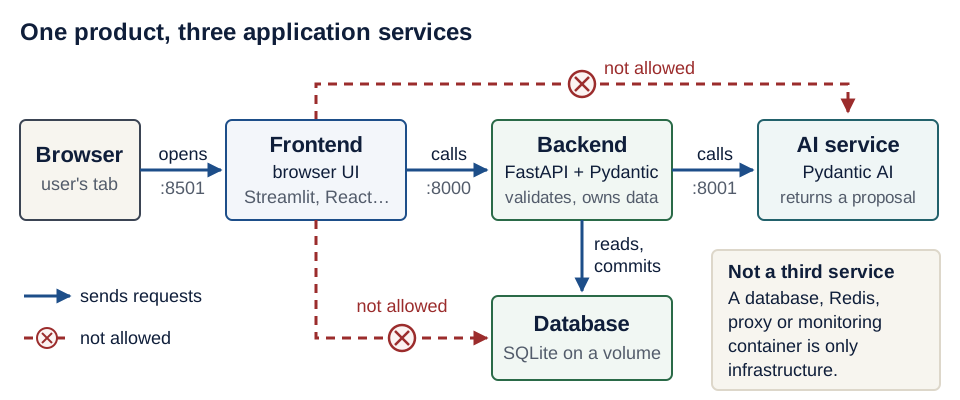
Text version of the diagram
- Browser (the user’s tab) opens the frontend’s UI at port 8501.
- Frontend (Streamlit, React, or another web framework) calls the backend’s HTTP API at port 8000. With React, the UI code runs inside the browser, but it still calls only the backend.
- Backend (FastAPI and Pydantic) validates every request, reads and commits the database, and calls the AI service over HTTP at port 8001 with validated input.
- AI service (Pydantic AI) returns a candidate result. It never opens the database; the backend validates the candidate before anything is saved.
- Database (for example, a SQLite file on a Docker volume) belongs to the backend alone.
- Not allowed: the frontend reading or writing the database directly (it would bypass validation), and the frontend calling the AI service directly (the backend always sits in between).
- Not a third service: a database, Redis, proxy or monitoring container is infrastructure.
Scope and safety:
- Docker Compose is the required way to run all three services. Add infrastructure only when you can justify it.
- SQLite is enough; PostgreSQL is allowed. Data must survive your documented restart procedure.
- Redis, Kubernetes, cloud hosting, JWT, and multiple database engines are optional. You need neither AWS Educate nor any paid account; a free local model (for example, through Ollama) works for real runs.
- Apply input validation, secret management, appropriate permissions, and access controls wherever your domain needs them.
Assignments and deadlines
Deadlines are at 23:59 Israel time on the dates below. Submit through the submission channel provided by the instructor.
Project repository (required): keep your course product in the EASS-PART-A-2026-X organization, the same organization that owns these lecture notes. Submit its URL in the form https://github.com/EASS-PART-A-2026-X/<your-product> for EX1, EX2 and EX3; grow the same repository throughout the course. Each student uses their own GitHub account to contribute. Follow the organization access steps before creating it, agree a unique product repository name with the instructor, and confirm grader access. Keep product code in its own repository. Open-source contributions still go to the qualifying projects’ upstream repositories.
| Assignment | Deadline | What you hand in |
|---|---|---|
| EX1 — Backend | Mon 9 Nov 2026 | CRUD API with Pydantic validation, persistent data, tests, a backend Dockerfile, and setup, run, and test instructions |
| EX2 — Frontend plus backend | Mon 30 Nov 2026 | Browser UI integrated with EX1: core flows, error states, one automated UI or integration flow, and reproducible run instructions |
| EX3 — Complete product | Mon 11 Jan 2027 | Three application services, Pydantic AI functionality, Docker Compose, persistent data initialization, automated and failure tests, basic CI, a small AI evaluation dataset with results, a demo, and a short runbook |
| Open-source evidence | Mon 11 Jan 2027 | Three qualifying merged PRs, documented in your evidence table |
Both the application and the open-source requirement are mandatory.
Open-source contribution rule and evidence
Each student needs at least three distinct pull requests (PRs) of their own accepted and merged into established open-source projects; credit is per student, not per team, and each PR counts for one student only. Size does not matter: documentation, typo fixes, examples, tests, bug fixes, and features all qualify once maintainers merge them.
Qualifying repositories
- The official public upstream repository on GitHub, under an open-source license, of an established project with ongoing maintainer activity.
- More than 10,000 GitHub stars on the day you open the PR; exactly 10,000 is not enough.
- Not a fork, a classroom repository, a personal copy, or a repository created to satisfy this assignment.
All three PRs may go to one qualifying project or to several. The course publishes no list of eligible projects; you verify each candidate yourself, as Lecture 1 shows.
What counts as merged
- Counts: the change reaches the project’s main development branch (
main,master, or a documented equivalent). Merge, squash, and rebase merges all count. An integration-branch merge counts only after you show the change later landed on the main development branch. - Does not count: open PRs, approved but unmerged PRs, PRs closed or rejected without a merge, and merges that exist only in a fork.
- Ask the instructor: about a PR you opened before the term began.
The “PR opened” entries in the calendar are progress checkpoints; only merged PRs meet the requirement. Maintainers control acceptance, so start in week 1, follow up on reviews every week, and keep extra viable contributions going if a review stalls.
Evidence table
In your product README, add one row per PR with these seven fields:
- Student name and GitHub handle
- Official repository
- License URL
- Star count and the date you checked it
- PR URL
- Contribution summary
- Merge evidence showing the change on the main development branch
Contribution etiquette
- Before you start, read the project’s CONTRIBUTING guide and AI-use policy; some projects restrict AI-assisted work or outside PRs.
- Check for duplicates, reproduce the issue, keep the change focused, and run the project’s tests.
- Write all maintainer-facing text yourself (issue comments, PR descriptions, review replies), and respond to reviews respectfully.
- Don’t manufacture issues, spam maintainers, or split one change into artificial PRs. Legitimate small fixes are fully acceptable.
Working method, AI use, assessment and reproducibility
AI assistants. AI coding tools are allowed from week 1. You must understand and verify everything you submit. Your product README includes a short AI-use note: the tools you used, the help you received, and the checks you performed. Prompt logs are not needed.
AI use at a glance. This table restates the rules on this page; it adds none.
| What it means for you | |
|---|---|
| Encouraged | Using an assistant from week 1 to investigate, implement and verify changes. |
| Required | Understanding and verifying everything you submit. A short AI-use note in your product README (tools, help received, checks performed). Explaining your own work individually. Writing all maintainer-facing text yourself. Reading each upstream project’s CONTRIBUTING guide and AI-use policy before you start (some restrict AI-assisted work). |
| Not OK | Submitting work you cannot explain. Letting an assistant write your PR descriptions, issue comments or review replies. |
| Recommended setup | Keeping secrets and private user data out of Git, and automated tests that make no paid API calls (deterministic substitutes such as TestModel), as listed under “What a grader does” below. |
Practice the work-order → candidate → verification loop with the assistant available to you, such as Codex, Claude Code, or OpenCode. The guides add formative exercises and optional framework comparisons; assignment requirements, deadlines, and grading stay as stated here. No particular commercial coding assistant or orchestration framework is required.
Assessment. Assessment covers working behavior, understandable design, tests, reproducibility, documentation, contribution evidence, and your individual understanding. You individually explain your own product work and each of your contributions, including how you verified them, even if you build in a pair.
What a grader does. A grader clones your repository, configures the documented settings, runs the stack, exercises the frontend, runs the tests, and inspects the important failure cases. To make that path work, the recommended setup is:
docker compose up --buildstarts the stack after the documented setup.- Dependency manifests and lockfiles (
pyproject.toml,uv.lock) are committed. .env.examplelists every setting without real credentials. Secrets and private user data never reach Git.- The database initializes itself, and data lives in persistent storage.
- Each service reports health or readiness, for example at
GET /health. - The README gives the exact test command for each service.
- Automated tests make no paid API calls; they use deterministic substitutes such as Pydantic AI’s
TestModel. - Separate instructions explain how to run with a real model.
Frequently asked questions
Do I need a paid account, a cloud subscription or a GPU?
No. Every required step works with free tools: Docker Desktop is free for education use, automated tests use offline fakes such as TestModel, and a free local model (for example, through Ollama) works for real runs. If an AI tool asks for payment, switch to another route in Student setup or to the manual route.
My Git, SQL or shell skills are weak. Where do I start?
Take the readiness check in Engineering foundations. Each check that fails links to a short repair section, and each lecture’s “Before you start” says which section it needs.
I am behind. What now?
Follow When you are behind in the learning map: find the earliest checkpoint that fails, repair it, and only then add the next layer. Tell the instructor early if installation rights, hardware or access block you.
Can I use AI tools?
Yes, from week 1, under the rules in AI use at a glance: you must understand and verify everything you submit, keep a short AI-use note, and write all maintainer-facing text yourself.
Where do I ask for help?
In the channel the instructor provides. Write your question as PARD (problem, actions, result, desired), with secrets redacted, and include what you already tried.
Official resources
- HIT academic calendar (Hebrew)
- FastAPI · Pydantic · Pydantic AI
- Docker Compose · uv · pytest
- Streamlit · Playwright for Python
- Contributing to a project on GitHub
Tool versions in the lecture pages were verified in October 2026; your uv.lock pins the versions you actually use.
Earlier course material
Archived PDFs from earlier runs, for reference only; where they differ, this guide and the lecture pages apply: Class IX course notes · Slides (2022) · Natalie’s notes