Lecture 4 · Browser frontend
← Course home · ← Previous: Lecture 3 · Next: Lecture 5 →
At a glance
- When: Monday 9 November 2026, 16:00 Israel time, on Zoom
- You leave with: your first working end-to-end user flow in the browser
- Goals: trace a click to the backend and back, explain reruns and stable keys, and show validation feedback in words (details)
- Prerequisites: your Lecture 3 backend answers
curl -s http://localhost:8000/recipeswith its seed rows; repair: Lecture 3 completion check- Product milestone: EX1 is due tonight, 23:59; if EX1 is unfinished, submit it first
- Time: prerequisite check and warm-up about 15 min; lab about 2 h in and after class (estimates)
- Done when: a classmate completes list, add, edit and delete on your page in under a minute, and your
frontend/is committed withuv run ruff check .clean
On this page
Mission
So far only curl and /docs can use your product. Today it gets a face: a Streamlit page where a person lists, adds, edits and deletes records, each click traveling browser → frontend → backend → SQLite. The win: on a screen share, a classmate tells you what to click and completes all four flows in under a minute, with no terminal.
Note: EX1 (backend) is due tonight at 23:59 Israel time. Its requirements are in the README’s assignments table.
Before you start
You need two terminals, one for the backend and one for the frontend. On Windows, both run inside WSL2.
Prerequisite check: about one minute each, before class. If a check fails, follow its repair link first.
Check Pass when Repair In backend/, runuv run fastapi dev; in the second terminal, runcurl -s http://localhost:8000/recipesJSON with your seed rows Lecture 3 completion check docker psNo container named backendis listed. If one is, it holds port 8000: stop it withdocker rm -f backend(the named volume keeps its data)Containers in one page Open http://localhost:8000/docsand expandPOST /recipes(or your resource)You can name every field and say which ones are required HTTP, JSON, and contracts git statusin your product repositorynothing to commit, working tree clean: your EX1 work is committedGit you need to operate Answer the two questions in “Python you will read today” below Both answers match Python you need to read
Words you'll meet today
Every term here is also in the course glossary, next to the terms from the other lectures.
- Frontend server: the Streamlit process (port 8501). It runs your Python and sends the page to the browser.
- Websocket: a long-lived, two-way connection. Streamlit’s browser page uses one to send clicks to the frontend server and receive the updated page.
- Rerun: Streamlit runs your whole script again, top to bottom, after every interaction.
- Session state:
st.session_state, a dictionary the frontend server keeps for one browser tab. - Widget key: the name Streamlit uses to remember a widget’s value between reruns.
- Form:
st.form, a group of inputs that is sent only when its submit button is pressed. - Origin: scheme + host + port, such as
http://localhost:5173. Browsers compare origins before letting JavaScript read another server’s reply. - CORS: Cross-Origin Resource Sharing, the rule by which a backend tells browsers which other origins may read its replies.
- Timeout: the longest a client waits for one step (connecting, or the next piece of a reply) before giving up.
- Escaping: marking special characters so they are shown as text instead of being interpreted, for example
\*shows a star instead of starting bold text.
Python you will read today
| You will see | It means | Same thing, longer |
|---|---|---|
if notice := st.session_state.pop("notice", None): | Assign and test in one step (the “walrus” operator) | notice = st.session_state.pop("notice", None) then if notice: |
with st.expander(label), st.form("edit-3"): | Enter two context managers; the form sits inside the expander | with st.expander(label): then, indented, with st.form("edit-3"): |
browse, add = st.tabs([...]) then with add: | Each tab is a container; with puts the following elements into it | — |
try: … except E: … else: | else runs only when the try block raised nothing | Put the success code at the end of try, but then its own errors would be caught too |
st.session_state.setdefault("clicks", 0) | Set the key only if it is missing; keep any existing value | if "clicks" not in st.session_state: st.session_state["clicks"] = 0 |
str.maketrans({...}), text.translate(table) | Build a character-replacement table once, then apply it to a string | A loop that replaces each special character |
Check yourself: (1) In if notice := st.session_state.pop("notice", None):, what is notice when no message was stored? (2) In the try/except/else of the add form, which line runs when api.create_recipe raises httpx.HTTPStatusError?
Check your answers
None, so theifbody (st.success) is skipped.popalso removes the message, so it shows only once.show_error(exc)in theexceptblock. Theelseblock (notify(...)) runs only when no exception was raised.
Learning checkpoint
By the end, you should be able to:
- Trace a click through browser, Streamlit server, HTTP client, backend, and database.
- Explain reruns, stable widget keys, session state, and why a write needs fresh displayed data.
- Show validation feedback while preserving the backend as the authority for accepted input.
Predict first: Where does the HTTP request originate in Streamlit, and how would that change with browser-side React?
Check your prediction
In Streamlit, the frontend server sends it: your Python in api.py runs inside the Streamlit process, and the browser only exchanges clicks and page updates with that process over a websocket. With React, your JavaScript runs in the user’s browser, so the browser itself sends the request. The backend must then be reachable from the user’s machine, and it must allow the frontend’s origin with CORS. The first figure in Concepts shows both.
Warm-up from earlier classes: answer from memory, then check. Ungraded.
- (Lecture 1) Your backend listens on
127.0.0.1:8000. Can a classmate on the same Wi-Fi open it?- (Lecture 2) You send
POST /recipeswith an empty title. Which status code comes back, and where in the reply is the field named?- (Lecture 3) You stop
uv run fastapi devand start it again. What survives: the recipes, or values the server only held in memory?
Check your answers
- No.
127.0.0.1is the loopback address: only programs on your own machine can reach it. Today you give the frontend the same protection. 422 Unprocessable Content. Each item in thedetaillist has alocsuch as["body", "title"]; its last element names the field.- The recipes, committed to
data/app.db. Memory is lost on restart. Today’sst.session_stateis memory in the frontend server, so nothing important may live only there.
Bridge if needed: HTTP, JSON, and contracts for requests and status codes; Files, environments, and processes for “which process runs this code?”.
Concepts
Where the frontend sits
The frontend is its own process and reaches data only through the backend’s API, never the database (README product requirements). With Streamlit, your Python runs on the Streamlit server and the browser only draws the result, so the HTTP calls to the backend come from the server, not the browser. The browser and the Streamlit server talk over a websocket, a long-lived two-way connection that carries clicks one way and page updates the other.
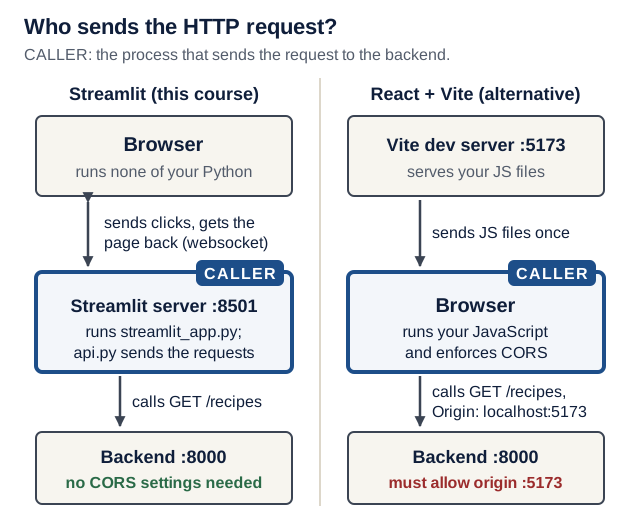
Text version of the diagram
Streamlit (this course).
- Browser. Draws the page and runs none of your Python. It sends clicks and widget values to the Streamlit server over a websocket and receives the page to draw.
- Streamlit server, port 8501 (the caller). Runs
streamlit_app.pyandapi.py.api.pysendsGET /recipesand the other HTTP requests to the backend. - Backend, port 8000. FastAPI validates every request and is the only process that opens SQLite.
No CORS is needed: no browser JavaScript calls the backend.
React with Vite (an alternative).
- Vite dev server, port 5173. Serves your JavaScript files to the browser once. It does not call the backend.
- Browser (the caller). Runs your JavaScript, which sends
GET /recipesto the backend with the headerOrigin: http://localhost:5173. - Backend, port 8000. Answers with
Access-Control-Allow-Originif that origin is allowed.
The browser enforces CORS: it lets your JavaScript read the reply only if the backend allowed that origin.
Check yourself: in the React design, which machine must be able to reach http://localhost:8000: the developer’s, the Vite server’s, or the user’s?
Check your answer
The user’s, because the request leaves the user’s browser. That is why a React build needs a backend URL that works from the user’s machine, and why Compose’s internal name http://backend:8000 (Lecture 8) works for Streamlit but not for browser JavaScript.
The rerun model
Every interaction (a click, a submitted form) reruns your script from top to bottom, like a spreadsheet recalculating after an edit. Ordinary variables start fresh each run; widgets remember values through their keys; st.session_state is a per-browser-tab dictionary that survives reruns, until the tab reloads or the server restarts.
Try it after the scaffold commands in Live demo step 1. Save this in frontend/, run it from frontend/ with uv run streamlit run rerun_demo.py, and delete the file afterwards:
# frontend/rerun_demo.py (a throwaway file)
import streamlit as st

clicks = 0  # a normal variable: reset on every rerun
st.session_state.setdefault("clicks", 0)  # survives reruns

if st.button("Click me"):
    clicks += 1
    st.session_state["clicks"] += 1

st.write(f"Local variable: {clicks} · session_state: {st.session_state['clicks']}")
Predict: you click the button three times. What does the last line show?
Check your prediction
Local variable: 1 · session_state: 3. Each click reruns the whole file: clicks = 0 runs again, then the if adds 1, so the local variable is never more than 1. The value in st.session_state is kept between runs, so it counts every click.
Predict: now reload the browser tab. What do both counters show, and why?
Check your prediction
Local variable: 0 · session_state: 0. A reload opens a new session, and session state belongs to a session. Restarting the Streamlit server wipes it too (Streamlit: session state). Verified on Streamlit 1.66.0.
The same mechanism, one step at a time:
- Click. The browser sends “button pressed” to the Streamlit server over the websocket.
- Rerun from the top. The server runs
rerun_demo.pyagain, from the first line. - Local variable resets.
clicks = 0runs again;if st.button(...)isTruefor this one run, soclicksbecomes 1. - Session state persists.
st.session_state["clicks"]still holds the old count, so it goes from 2 to 3. - Draw. The server sends the new page; the browser shows
Local variable: 1 · session_state: 3. - Reload resets both. A reloaded tab is a new session: both counters start at 0.
One consequence shapes the page. The recipe list is fetched at the top of the script, before the form handler further down saves anything. After a write, the page therefore calls st.rerun() to fetch fresh data, and it parks the success message in st.session_state so the message survives that rerun.
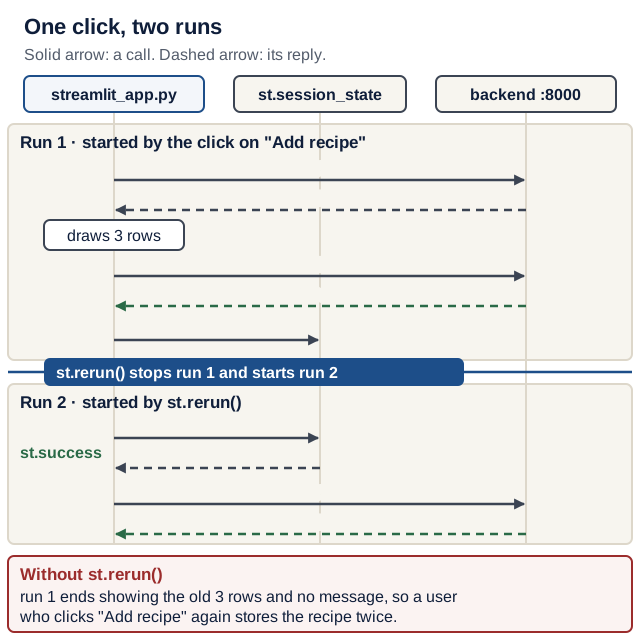
st.rerun(). Run 1 drew the list before the save. Predict what the user sees if run 2 never happens. On a narrow screen, scroll the diagram sideways. Open the diagram at full size.Text version of the diagram
Run 1, started by the click on “Add recipe”:
api.list_recipes()sendsGET /recipesand gets 3 rows.- The Recipes tab is drawn with those 3 rows.
- The add form’s handler sends
POST /recipes; the backend answers201 Created. notify("Added Stew.")stores the message inst.session_state["notice"], thenst.rerun()stops run 1 and starts run 2.
Run 2, started by st.rerun():
st.session_state.pop("notice")returns the message, andst.successshows “Added Stew.”.api.list_recipes()sendsGET /recipesagain and gets 4 rows.- The Recipes tab is drawn with 4 rows. No button was pressed in this run, so nothing is saved again.
Without st.rerun(): run 1 ends with the old 3-row list and no message. A user who thinks the add failed submits again, and the backend stores a duplicate (Break-it drill 2).
Forms and keys
st.form batches its inputs: typing does not rerun the script; only the submit button does. Every widget and form needs a unique, stable key. In a loop over records, derive keys from the record’s id (edit-3-title), never from the loop position or a fixed string: a widget’s remembered value follows its key, not the record, so position-based keys attach one record’s edits to another (Break-it drill 4 shows the damage). clear_on_submit=True empties the add form after every submit, failed ones included; required=True on the title (lab step 6) stops the commonest failed submit, an empty title, in the browser, so the other fields keep what the user typed.
Check yourself: inside an edit form, you type a new title and then click the Minutes field. Does the script rerun?
Check your answer
No. Inside st.form, widget changes stay in the browser until the form’s submit button is pressed; then the script reruns once with all the new values.
One module owns HTTP
api.py holds every call to the backend:
- Base URL from the environment:
BACKEND_URL, defaulthttp://localhost:8000. Compose will set it tohttp://backend:8000in Lecture 8; no code changes. - An explicit timeout:
httpx.Timeout(10.0, connect=2.0)allows 2 s to open the connection and 10 s for each other wait: sending a piece of the request, receiving the next piece of the reply, or getting a pooled connection. It is not a deadline for the whole request. Writing the value down makes it a visible, reviewable decision; httpx’s own default is 5 s, andrequestshas no default timeout at all. A stopped backend fails at once anyway (connection refused); timeouts matter when the backend is running but hangs. raise_for_status()turns 4xx and 5xx answers intohttpx.HTTPStatusError, which the page catches.
The UI never builds URLs or sends requests itself. That pays off in Lecture 5: the error mapping moves out of the page into api.py, and streamlit_app.py only needs small changes (catch api.BackendError instead of httpx errors, add a spinner and an empty state).
Version note: the backend’s tests use httpx2 (Lecture 2), a continuation of HTTPX maintained by Pydantic. The frontend uses httpx, because respx, Lecture 5’s mocking library, intercepts httpx and not httpx2. The calls look the same, but the import names differ: never mix the two in one file. (Checked 17 October 2026: httpx 0.28.1 and httpx2 2.13.1 on PyPI; respx 0.23.1 did not intercept an httpx2 request in a test run. See the HTTPX timeouts page.)
Check yourself: the backend is stopped. How long does api.list_recipes() take to fail, and with which exception? And if a program accepts the connection on port 8000 but never answers?
Check your answer
Stopped backend: at once, with httpx.ConnectError ([Errno 61] Connection refused on macOS, errno 111 on Linux). Silent program: after about 10 s, with httpx.ReadTimeout, because the connection opened and the read timeout ran out. Measured with httpx 0.28.1: 0.01 s and 10.09 s. The optional drill in Break it on purpose lets you watch the second case.
Validation in three places
The same rule (“a recipe needs a title”) can be checked in three processes. Only the last one is the authority.
- In the browser: widget bounds (
number_inputfrom 1 to 1440),max_chars=200, andrequired=True, which Streamlit checks in the browser before the form is sent. Instant feedback, but anyone can skip it: Streamlit’s documentation says this check “can be bypassed”. - In the frontend server, before any request: your own Python check, such as
if submitted and not new_recipe["title"].strip():. It runs on the Streamlit server after the form arrives, and it saves a pointless round trip to the backend. - In the backend: Pydantic validation from Lecture 2. This is the authority, because
curlor any other client skips the first two.
When the backend rejects a body, FastAPI answers 422 with a detail list; each item has loc (where), msg (what) and type. Show it in words, for example Please fix: title: String should have at least 1 character, never as raw JSON or a traceback.
Check yourself: someone sends POST /recipes with an empty title straight to the backend with curl. Which of the three checks still stops it?
Check your answer
Only the backend’s Pydantic validation: curl never runs the browser or the frontend server. That is why the backend stays the authority even when the UI validates.
Other frameworks, and CORS
React with Vite, or another web framework, is equally acceptable for your product. What changes is where the code runs. JavaScript runs in the user’s browser and calls the backend directly, so:
- the backend URL must be reachable from the user’s machine (for example
http://localhost:8000), and Vite exposes it to your code as animport.meta.env.VITE_*variable at build time; - the browser enforces CORS: the backend must name the frontend’s exact origin (scheme + host + port, such as
http://localhost:5173).
# backend/app/main.py: only if browser JavaScript calls the API
from fastapi.middleware.cors import CORSMiddleware

# after app = FastAPI(...):
app.add_middleware(
    CORSMiddleware,
    allow_origins=["http://localhost:5173"],  # your dev server's exact origin
    allow_methods=["*"],
    allow_headers=["*"],
)
Streamlit’s calls are server-side Python, so the Streamlit version needs no CORS settings. Whatever the framework, a CLI alone is not a frontend.
| Question | Streamlit | React with Vite |
|---|---|---|
| Where does your UI code run? | In the Streamlit server (Python) | In the user’s browser (JavaScript) |
| Who sends the HTTP request to the backend? | The Streamlit server, through api.py | The browser |
| Does the backend need CORS settings? | No | Yes, for the frontend’s exact origin |
| Control over the interface versus effort | Less control; little code, one language with the backend | Full control over layout and behavior; a second language, a build step and more code |
Defend it: write one sentence for your README: why this frontend for your product? Name one reason from your product’s needs and one cost you accept.
What a strong answer mentions
A concrete need and a concrete cost. For example: “Streamlit, because the product is forms and lists used by one person at a time, and all our code stays in Python; we accept less control over layout.” Weak answers only say a framework is “easier” or “popular”. Formative only: the README’s requirement is a browser frontend of any of the allowed kinds.
CORS is a browser access rule, not authentication or authorization: curl is not subject to that browser rule. A product with private user records must enforce ownership and access in the backend, even when its UI validates input.
Show user text as text
Validation accepts text; the display decides how it is interpreted. Streamlit renders Markdown in expander labels and in st.success messages: its documentation lists bold, italics, links and images for labels. A recipe titled [win a prize](https://example.com) **now** would therefore show a clickable link with hidden target and bold text, and a title containing a Markdown image makes every visitor’s browser fetch that image. For any product where one person’s text is shown to someone else, that is a stored injection.
The page’s plain() helper (part 1 of the Live demo code) puts a backslash before every ASCII punctuation mark. In Markdown, \* means “a literal star”, so the title is shown exactly as typed. Call it on every user-entered (or, from Lecture 7, model-produced) text that goes into a label or a message.
Check yourself: a user saves the title **Spicy** soup. What does the expander label show without plain(), and with it?
Check your answer
Without plain(): Spicy in bold, then “soup”; the stars disappear. With it: **Spicy** soup, stars included. Verified on Streamlit 1.66.0. One thing stays clickable even with plain(): a bare web address such as https://example.com is still turned into a link, but its visible text is its real target, so nothing is hidden.
Live demo
The instructor builds the Recipe Box frontend next to the Lecture 3 backend.
1. Scaffold the project (from the repository root). Make the smallest change.
uv init --app --no-package --python 3.14 frontend
cd frontend
uv add streamlit httpx
uv add --dev ruff
rm main.py
mkdir .streamlit
2. Streamlit settings. Make the smallest change.
# frontend/.streamlit/config.toml
[browser]
gatherUsageStats = false  # Streamlit collects usage stats unless you opt out

[server]
headless = true
address = "localhost"  # only this machine; Lecture 8's container overrides it
Without address, streamlit run listens on every network interface and prints a “Network URL”: anyone on the same Wi-Fi could list, edit and delete your records, although the backend itself only listens on 127.0.0.1. With address = "localhost", Streamlit listens on 127.0.0.1 only and prints just URL: http://localhost:8501. Lecture 8’s container starts Streamlit with --server.address 0.0.0.0, and a command-line flag takes precedence over config.toml (Streamlit configuration options), so Compose still works.
Version note: checked 17 October 2026 on Streamlit 1.66.0 (released 14 October 2026): the default listened on all interfaces (*:8501); with address = "localhost", only on 127.0.0.1:8501; --server.address 0.0.0.0 overrode the file.
Explain after: why does the frontend container in Lecture 8 need 0.0.0.0, while your laptop does not?
Show a model answer
Inside a container, 127.0.0.1 is the container’s own loopback: Docker’s published port forwards traffic to the container’s network interface, which a loopback-only server never hears. So the server inside must listen on 0.0.0.0. Safety then comes from the host side: Lecture 8 publishes the port as 127.0.0.1:8501:8501, so only your machine can reach it. On your laptop there is no such forwarding layer, so localhost is enough and safer.
3. The API client. State the contract: the paths, field names and timeouts the frontend relies on.
# frontend/api.py
"""Every HTTP call to the backend lives here."""

import os

import httpx

BACKEND_URL = os.getenv("BACKEND_URL", "http://localhost:8000")
TIMEOUT = httpx.Timeout(10.0, connect=2.0)


def list_recipes() -> list[dict]:
    r = httpx.get(f"{BACKEND_URL}/recipes", params={"limit": 100}, timeout=TIMEOUT)
    r.raise_for_status()
    return r.json()


def create_recipe(recipe: dict) -> dict:
    r = httpx.post(f"{BACKEND_URL}/recipes", json=recipe, timeout=TIMEOUT)
    r.raise_for_status()  # 422 -> httpx.HTTPStatusError
    return r.json()


def update_recipe(recipe_id: int, changes: dict) -> dict:
    r = httpx.patch(f"{BACKEND_URL}/recipes/{recipe_id}", json=changes, timeout=TIMEOUT)
    r.raise_for_status()
    return r.json()


def delete_recipe(recipe_id: int) -> None:
    r = httpx.delete(f"{BACKEND_URL}/recipes/{recipe_id}", timeout=TIMEOUT)
    r.raise_for_status()
Predict: before any UI exists, run uv run python -c "import api; print(len(api.list_recipes()))" from frontend/ with the backend running. What prints? What happens if you stop the backend and run it again?
Check your prediction
3 on a freshly seeded backend. With the backend stopped, a traceback that ends at once in httpx.ConnectError: [Errno 61] Connection refused (errno 111 on Linux). Nothing catches it yet: that is Lecture 5’s first job.
4. The page, part 1: the helpers. Make the smallest change.
# frontend/streamlit_app.py (part 1)
import string

import httpx
import streamlit as st

import api

st.set_page_config(page_title="Recipe Box")
st.title("Recipe Box")

# Every ASCII punctuation mark, prefixed with a backslash.
MARKDOWN_ESCAPES = str.maketrans({c: "\\" + c for c in string.punctuation})


def plain(text: str) -> str:
    """Escape Markdown so user or model text is shown, not interpreted."""
    return text.translate(MARKDOWN_ESCAPES)


def notify(message: str) -> None:
    """Remember a success message, then rerun so lists show fresh data."""
    st.session_state["notice"] = message
    st.rerun()


def show_error(exc: httpx.HTTPStatusError) -> None:
    """Turn the backend's 422 details into words a user can act on."""
    if exc.response.status_code == 422:
        problems = [
            f"{err['loc'][-1]}: {err['msg']}" for err in exc.response.json()["detail"]
        ]
        st.error("Please fix: " + "; ".join(problems))
    else:
        st.error(f"The backend returned {exc.response.status_code}.")
5. Part 2: one form helper for both add and edit. The dictionary keys are the API’s field names; the widget keys are built from key; recipe prefills the inputs when editing; integer bounds and defaults make number_input return int, not float.
# frontend/streamlit_app.py (part 2)
def recipe_fields(key: str, recipe: dict | None = None) -> dict:
    """Draw the recipe inputs (inside a form) and return them as a request body."""
    r = recipe or {}
    return {
        "title": st.text_input(
            "Title", r.get("title", ""), max_chars=200, key=f"{key}-title"
        ),
        "minutes": st.number_input(
            "Minutes", 1, 1440, r.get("minutes", 30), key=f"{key}-minutes"
        ),
        "servings": st.number_input(
            "Servings", 1, 50, r.get("servings", 2), key=f"{key}-servings"
        ),
        "ingredients": st.text_area(
            "Ingredients, one per line",
            r.get("ingredients", ""),
            max_chars=5000,
            key=f"{key}-ingredients",
        ),
        "tags": st.text_input(
            "Tags, comma-separated", r.get("tags", ""), max_chars=500, key=f"{key}-tags"
        ),
    }
6. Part 3: the page itself. Make the smallest change.
# frontend/streamlit_app.py (part 3)
if notice := st.session_state.pop("notice", None):
    st.success(notice)

recipes = api.list_recipes()  # Lecture 5: what if the backend is down?

browse, add = st.tabs(["Recipes", "Add a recipe"])

with browse:
    for recipe in recipes:
        rid = recipe["id"]
        title = plain(recipe["title"])  # user text: show it, never interpret it
        label = f"{title} ({recipe['minutes']} min, serves {recipe['servings']})"
        with st.expander(label), st.form(f"edit-{rid}"):
            changes = recipe_fields(f"edit-{rid}", recipe)
            save_col, delete_col = st.columns(2)
            save = save_col.form_submit_button(
                "Save changes", key=f"save-{rid}", width="stretch"
            )
            delete = delete_col.form_submit_button(
                "Delete", key=f"delete-{rid}", width="stretch"
            )
            try:
                if save:
                    api.update_recipe(rid, changes)
                    notify(f"Saved {plain(changes['title'])}.")
                if delete:
                    api.delete_recipe(rid)
                    notify(f"Deleted {title}.")
            except httpx.HTTPStatusError as exc:
                show_error(exc)

with add, st.form("add", clear_on_submit=True):
    new_recipe = recipe_fields("add")
    if st.form_submit_button("Add recipe", key="add-submit", width="stretch"):
        try:
            created = api.create_recipe(new_recipe)
        except httpx.HTTPStatusError as exc:
            show_error(exc)
        else:
            notify(f"Added {plain(created['title'])}.")
7. Run both services, each in its own terminal. Observe the real result.
cd backend
uv run fastapi dev
cd frontend
uv run streamlit run streamlit_app.py
Open http://localhost:8501. The three seed recipes appear as expanders. Edit one, save, reload the page: the change persists.
Predict: in the “Add a recipe” tab, leave the title empty and press “Add recipe”. What does the page show, and what does the backend terminal log?
Check your prediction
The page shows Please fix: title: String should have at least 1 character, and the backend logs a line ending in "POST /recipes HTTP/1.1" 422 Unprocessable Content. The request reached the backend, which rejected it. clear_on_submit=True also emptied every field you had typed; lab step 6 fixes that.
Then add a valid recipe (201 Created in the backend log) and delete it (204 No Content).
Predict: open the browser’s developer tools, Network tab, and reload. Will you see a request to /recipes? Answer before you look.
Check your prediction
No. The browser loads only Streamlit’s own page, scripts, styles and fonts, plus one websocket to the Streamlit server (ws://localhost:8501/_stcore/stream; the Network tab’s “WS” filter shows it). The GET /recipes lines appear in the backend’s terminal, because api.py runs inside the Streamlit server. Checked on Streamlit 1.66.0.
Investigate: with both services still running, answer from the code, then check against the backend log.
- You click “Add recipe” with a valid title. In what order do the lines of part 3 run, and how many
GET /recipeslines does the backend log?- The list is fetched before the form saves. Why does the new recipe still appear at once?
- Between the two runs, where does the text “Added Stew.” live?
Show model answers
- From the top: the notice check (nothing stored),
api.list_recipes()(GETnumber 1), the tabs and every expander, then the add form, whose button isTrue, soPOSTruns andnotify()callsst.rerun(). The second run fetches again: twoGET /recipeslines around onePOST. notify()callsst.rerun(), which starts a fresh run whoseGETalready includes the new row.- In
st.session_state["notice"], in the Streamlit server’s memory for your tab. The second run pops it and shows it once.
Trace it: you change Hummus from 15 to 20 minutes and press “Save changes”. Fill in the cells marked “?” before opening the answer.
| Step | File : function | Input | State after | Next call |
|---|---|---|---|---|
| 1 | browser → Streamlit server | the form’s widget values, sent over the websocket | a rerun is scheduled | streamlit_app.py from line 1 |
| 2 | api.py : list_recipes | GET /recipes?limit=100 | recipes still says Hummus takes 15 min | the loop draws the expanders |
| 3 | streamlit_app.py : loop, rid == 2 | save is True | changes["minutes"] == 20 | ? |
| 4 | api.py : update_recipe | ? | the backend has committed the change | notify("Saved Hummus.") |
| 5 | streamlit_app.py : notify | the message | ? | st.rerun() |
| 6 | streamlit_app.py, second run | none | the message is shown; the list shows 20 min | wait for the next click |
Check your answer
- Step 3, next call:
api.update_recipe(2, changes). - Step 4, input:
PATCH /recipes/2with the JSON body built byrecipe_fields(all five fields), answered200 OK. - Step 5, state after:
st.session_state["notice"] == "Saved Hummus.";st.rerun()then stops the first run immediately.
Hands-on lab
Build the same four flows for your own domain. Plan your time:
- Core today: steps 1–6
- Before Lecture 5: steps 7–9
- Extension (optional): the Stretch goals, once the completion check passes
EX2 progress: the four flows you build today are the “core flows” of EX2 (due Mon 30 Nov 2026, 23:59); Lecture 5 adds the error states and the automated flow. See the README’s assignments table.
Run every command from frontend/ unless a step says otherwise.
- Create
frontend/with the commands in Live demo steps 1–2 (from the repository root), add.streamlit/config.toml, and commitpyproject.toml,uv.lockand.python-version. - Write
api.pywith list, create, update and delete for your resource. Checkpoint: theuv run python -c "import api; ..."call prints your seed count. - Show the list. Pick a label that identifies each record at a glance, and pass every user-entered part through
plain(). Checkpoint:uv run streamlit run streamlit_app.pyprintsURL: http://localhost:8501and no “Network URL”. - Add the create form with
show_error. Checkpoint: submitting with a required field empty shows a sentence, not JSON or a traceback. - Add edit and delete inside each record’s form, with keys built from the id. Checkpoint: an edit survives a page reload, and a deleted record is gone from
GETon the backend too. - Buddy test on Zoom: share your screen (or give remote control). A classmate directs all four flows in under a minute while you only click what they say. Note where they hesitated.
-
Before Lecture 5: add the two front-line checks for a required field of yours. First the frontend check, so an empty request is never sent:
# frontend/streamlit_app.py: the "add" form with a frontend check
with add, st.form("add", clear_on_submit=True):
    new_recipe = recipe_fields("add")
    submitted = st.form_submit_button("Add recipe", key="add-submit", width="stretch")
    # frontend check before any request
    if submitted and not new_recipe["title"].strip():
        st.warning("Give the recipe a title before saving.")
    elif submitted:
        try:
            created = api.create_recipe(new_recipe)
        except httpx.HTTPStatusError as exc:
            show_error(exc)
        else:
            notify(f"Added {plain(created['title'])}.")
Checkpoint: a title of only spaces shows the warning, and the backend log shows no new
POST. Then, inrecipe_fields, addrequired=Trueto the title’sst.text_input(...)call (aftermax_chars=200). Checkpoint: with an empty or all-spaces title, the field turns red with “This field is required.”, the backend log shows no newPOST, and the other fields keep what you typed. Keep both checks: the browser check is a convenience anyone can bypass, the frontend check protects the backend from pointless requests, and the backend remains the authority. - Before Lecture 5: add a “Run the frontend” section to your README: both terminals, the URL, and
BACKEND_URL. - Before Lecture 5: commit the frontend, so Lecture 5 can compare against it: from the repository root,
git add frontend, thengit commit -m "Frontend: list, add, edit, delete". Checkpoint:git statusprintsnothing to commit, working tree clean, andgit log --oneline -1shows your commit.
Break it on purpose
For each drill: predict, run it, then explain the result in one sentence before you open the answer. Automated UI tests arrive in Lecture 5 (AppTest); until then, keep each drill as a manual check in your README.
-
Contract drift. In
recipe_fields, rename the"minutes"key to"time", then add a recipe. Predict the message.Check your prediction
Please fix: minutes: Field required; time: Extra inputs are not permitted. Why: your Lecture 2extra="forbid"rejected the unknown field instead of silently ignoring it, so you heard about the typo at once. Fix: use the API’s field names from/docs. The backend side is already pinned by your Lecture 2 test for unknown fields. -
Forget the rerun. Delete
st.rerun()fromnotify, then add a recipe. Predict what the page and the backend log show.Check your prediction
No message appears and the list looks unchanged, yet the backend logged
201 Created. Why: the list was fetched before the save ran (see the write-then-rerun figure), and the message waits inst.session_statefor a run that never comes. Both appear only on the next interaction, and a user who thinks the add failed types it again and creates a duplicate. Fix: restorest.rerun(). -
Duplicate keys. Change
st.form(f"edit-{rid}")tost.form("edit"). Predict what happens when the page loads.Check your prediction
The page stops with
StreamlitDuplicateElementKey: “There are multiple elements with the samekey='edit'. To fix this, please make sure that thekeyargument is unique for each element you create.” Why: every record’s form now has the same key. Fix: build every key from the record id. -
Keys from the loop position. Change the loop to
for i, recipe in enumerate(recipes):and useiinstead ofridin every key (st.form(f"edit-{i}"),recipe_fields(f"edit-{i}", recipe),key=f"save-{i}",key=f"delete-{i}"); keepridin theapicalls. Delete the first recipe, then open the expander that is now first. Predict: what does its form show, and what would “Save changes” write? Write a Debug log entry (the card) with your hypothesis before you press Save.Check your prediction
With the seed data: the label says
Hummus (15 min, serves 4), but the form shows Shakshuka and 25 minutes, the record you just deleted. Pressing Save sendsPATCH /recipes/2with Shakshuka’s values, so Hummus silently becomes a copy of the deleted recipe. Why: a widget’s remembered value follows its key, not the record. After the delete, the keyedit-0-titlestill holds the old first record’s values, and position 0 now belongs to a different record. Verified in a real browser on Streamlit 1.66.0. Fix: build keys from the id; restore the loop. -
Markdown in a title. In part 3, change
title = plain(recipe["title"])totitle = recipe["title"]and removeplain(...)from the “Added” notice. Add a recipe titled[win a prize](https://example.com) **now**. Predict: what do the notice and the new expander’s label show?Check your prediction
Added win a prize now.with “win a prize” as a clickable link tohttps://example.comand “now” in bold; the label is a link too. Why: validation accepted the text, and Streamlit rendered it as Markdown. Restoreplain(), reload, and the label reads[win a prize](https://example.com) **now** (30 min, serves 2)exactly as typed. Verified on Streamlit 1.66.0; with a Markdown image in the title, the unescaped label also made the browser request the image URL.
Optional: watch a hung backend. Stop the backend, then from any folder run
python3 -c "import socket,time; s=socket.socket(); s.bind(('127.0.0.1',8000)); s.listen(); time.sleep(600)": a program that accepts connections and never answers. Reload the page and predict how long it takes to fail, and with which error. (Answer: about 10 s, then a traceback ending inhttpx.ReadTimeout: timed out; the read timeout ran out. A stopped backend, by contrast, fails at once.) Press Ctrl+C to end it.
Bonus preview: stop the backend and reload the page. You get a traceback ending in httpx.ConnectError. Leave it for now; handling it properly is Lecture 5’s first job.
Open-source track
This week you keep PR #1 alive. The etiquette rules are in the README’s contribution etiquette. In the commands below, replace NUMBER with your PR’s number and OWNER/REPO with the upstream repository.
gh pr checks NUMBER --repo OWNER/REPO
gh pr view NUMBER --repo OWNER/REPO --comments
gh search prs --author=@me --state=open
- CI is red? Read the failing job, reproduce it locally, fix it on the same branch and push; the PR updates itself. Never open a second PR for one change.
- A review arrived? Reply in your own words: thank the reviewer, answer every point, say what changed in which commit, ask when unclear. If you disagree, explain once with evidence, then accept the maintainers’ decision.
- Silence? Wait at least a week (or what CONTRIBUTING says), then post one polite follow-up. Meanwhile, start scouting the issue for PR #2, which should be opened by Lecture 6. On the day you open it, check again that the repository still has more than 10,000 stars (qualifying repositories).
Working with AI assistants
- Generate from the contract, not from memory. Paste
api.pyand your backend’s schema (curl -s localhost:8000/openapi.json) and state the rules: all HTTP inapi.py,st.formwith keys from ids,plain()on user text in labels and messages,width="stretch", 422 details in words. - Explain before fixing. When the list does not refresh, ask the assistant to explain the cause in terms of the rerun model, and check the explanation against Streamlit’s main concepts before accepting a fix.
A bounded work order for this week (the field names are the course’s one work-order template):
Outcome:      each recipe's expander label also shows its tags, e.g.
              "Hummus (15 min, serves 4) · vegan, quick"
Files:        frontend/streamlit_app.py
Non-goals:    no change to api.py, the backend, or any widget key
Verify with:  uv run ruff check . && uv run ruff format --check .
              then reload http://localhost:8501: every seed label shows its tags
Review focus: the label line: tags pass through plain(), keys still use rid
Acceptance:   before the change, the Hummus label has no tags (write this check
              in your README; Lecture 5 turns such checks into AppTest tests)
Stop:         if the change seems to need a backend edit or a new dependency
Read the diff (git diff frontend/streamlit_app.py) before you run anything, then run the verify commands yourself. Add one line to your README’s AI-use note (what it must contain): the tool, what it changed, and how you checked it.
Verify any assistant-written frontend code by clicking every flow yourself, then run this in frontend/; it must print nothing:
grep -nE "sqlmodel|sqlite|st\.connection|use_container_width|experimental_" *.py
st.connection is Streamlit’s built-in way to open a database, so it would bypass the backend as surely as an import sqlite3.
Optional: keep these rules in a
frontend/AGENTS.mdfile (or your assistant’s equivalent instruction file) so every session starts with them; see the agent-driven development guide. Thegrepabove stays the check: an instruction file is a request, not a guarantee.
Spot the outdated suggestion:
st.experimental_rerun(): removed. Streamlit 1.66 raisesst.experimental_rerun has been removed. Use st.rerun instead.use_container_width=True: deprecated; usewidth="stretch".requests.get(url)with no timeout: one slow backend freezes the page.- A frontend that opens the SQLite file, a SQLModel session or
st.connection("sql"): it bypasses the backend, which the product rules forbid. - “Add
CORSMiddlewareso Streamlit can reach the API”: not needed for server-side calls.
Completion check
With both terminals running, open http://localhost:8501. Run the commands from frontend/.
| Must work | Evidence you keep | If it fails, repair here |
|---|---|---|
| The list shows your seed rows; adding a record shows a success message and the record at once | a screenshot in your PR or notes | Common pitfalls · The rerun model |
An edit persists after a page reload; a delete removes the record from the backend too (curl -s http://localhost:8000/recipes) | the backend log lines: POST 201, PATCH 200, DELETE 204 | Forms and keys |
| An invalid or empty required field produces a readable sentence, never raw JSON or a traceback | the sentence, copied into your README’s manual checks | Validation in three places |
grep -nE "sqlmodel|sqlite|st\.connection" *.py prints nothing | empty output | One module owns HTTP |
uv run ruff check . && uv run ruff format --check . | All checks passed! and … files already formatted | run uv run ruff format ., then fix what ruff check reports |
git status is clean and git log --oneline -1 shows your frontend commit | the commit hash | Hands-on lab step 9 |
| EX1 is submitted through the submission channel provided by the instructor | your submission confirmation | Assignments and deadlines |
Not yet? Repair and re-run before starting the next lecture’s lab; later layers assume this one works.
Quick quiz
Q1. You click "Add recipe". Which code runs, and why does the page call st.rerun() after saving?
The whole script runs from the top, so api.list_recipes() executes before the form handler saves. st.rerun() starts a fresh run that fetches the updated list; the message survives because it waits in st.session_state.
Q2. (Lecture 2) The form sends {"title": "Soup", "time": 30}. What does the backend answer?
422. RecipeCreate uses extra="forbid", so time is rejected as an extra input, and the required minutes is missing. Both errors arrive in the detail list.
Q3. The browser's Network tab shows no request to /recipes. Is the frontend broken?
No. In Streamlit, api.py runs on the Streamlit server, which calls the backend; the browser only talks to Streamlit over a websocket. Look for the requests in the backend’s terminal log instead.
Q4. Does the backend need CORSMiddleware for the Streamlit frontend? For a React frontend?
Streamlit: no, because CORS is enforced by browsers and the calls come from server-side Python. React: yes, because its JavaScript calls the API from the browser, so the backend must allow the frontend’s exact origin.
Q5. (Lecture 3) You restart the Streamlit server. What happens to the recipes, and to st.session_state?
The recipes are safe in the backend’s SQLite file. st.session_state is lost: it lives in the Streamlit server’s memory, per browser session. Nothing important may live only in the frontend.
Q6. Your recipe titles are validated by Pydantic (1 to 200 characters). Which statement is true?
- (a) Validation guarantees the title is safe to show anywhere.
- (b) A valid title can still be interpreted as Markdown.
- (c) Only titles produced by an AI model need escaping.
Check your answer
Answer: (b). Validation decides which text is accepted; the display decides how it is interpreted, so the display must escape it. [win a prize](https://example.com) is a valid 1–200 character title and still renders as a link unless plain() escapes it. (a) mixes up those two jobs. (c) is wrong because any user can type Markdown; model output (Lecture 7) is one more source.
Explain it: in one sentence, what is notify() for? (Not what each line does.)
Show a model answer
Weak (narrates lines): “It stores a message in session state and calls st.rerun().” Strong (purpose and the failure it prevents): “It makes a successful write visible: the message survives the rerun that fetches the fresh list, so the user sees both the confirmation and the new data and does not submit twice.”
Defend it: a teammate wants to delete the frontend check
if submitted and not new_recipe["title"].strip():, because the backend validates titles anyway. Keep it or drop it? Give one reason from the contract or from evidence, and one cost of your choice.
What a strong answer mentions
Either choice can be defended; the reasoning matters. Keeping it: it answers at once in words, sends nothing pointless to the backend, and still works when the browser’s required=True is bypassed; the cost is a second copy of a rule that can drift from the backend’s (for example, if the backend later allows something the frontend still blocks). Dropping it: one source of truth, fewer lines; the cost is a round trip and a 422 for a mistake the frontend could have caught. Either way, the backend stays the authority.
Stretch goals
Optional, once the four flows work and the completion check passes.
-
Keep the user’s input when a save fails (after lab step 7). With
clear_on_submit=True, a submit that the backend rejects still empties the form. Drop it, build the add form’s widget keys from a counter inst.session_state(f"add-{version}"), and increase the counter after a successful save so Streamlit draws fresh, empty widgets. Check it in a real browser: AppTest does not reproduceclear_on_submit. If you adopt versioned keys, Lecture 5’s tests must find widgets by label instead of key, for examplenext(w for w in at.text_input if w.label == "Title").Simpler is enough:
required=Trueon the title already keeps the other fields for the commonest failure, an empty title. Do the versioned keys only if your users often hit other validation errors. - Two UIs, one API (if you are considering React for EX2). Build a minimal React and Vite page that lists the same records, with the CORS setting above. Create in one UI and watch it appear in the other.
- Search that scales (once your list may exceed one page). Add a
qquery parameter to the backend’s list endpoint, with a test, and a search box that sends it. Filtering only in the frontend breaks once pagination kicks in.
Common pitfalls
- A traceback ending in
httpx.ConnectError(Connection refused). The backend is not running, orBACKEND_URLpoints elsewhere. Start it, and check the variable withecho $BACKEND_URL. Lecture 5 replaces the traceback with a message. - The list does not update after a submit. No
st.rerun()after the write. Callnotify(). There are multiple elements with the same key. Keys built from a fixed string. Use the record id (not the loop index either; see Break-it drill 4).AttributeError: module 'streamlit' has no attribute 'experimental_rerun'. Outdated code. Usest.rerun().- 422 shows up as a JSON blob. The error was displayed raw. Format
detailas inshow_error. - A title shows up bold, as a link, or with missing characters. User text was rendered as Markdown. Pass it through
plain(). - A CORS error in the browser console (React or Vite only). The origin is not allowed. Add your exact dev origin to
CORSMiddleware; never"*"with credentials. - Your changes never appear. An old Streamlit still holds 8501, so the new one quietly moved to the next free port (its terminal prints
http://localhost:8502). Stop the old process, or open the URL the terminal prints. - A classmate cannot open your page at your IP address. Expected:
address = "localhost"keeps the frontend on your machine. Use screen sharing for the buddy test. - The Title field turns red with “This field is required.” and nothing happens. Expected: the browser blocked an empty title (
required=True). Type a title.
Instructor notes
Suggested flow (minutes are estimates; if time runs short, keep steps 2, 3, 5 and 7 and assign the rest as reading):
- EX1 check-in (5 min): collect blockers (restart test, Dockerfile) for after class.
- Predict-first vote (10 min): “Which process sends the HTTP request to the backend?” Run it as a peer-instruction vote: individual poll, discuss in pairs, re-vote, then a student explains (pacing guide). Then show the who-sends-the-request figure.
- Scaffold
frontend/(Live demo steps 1–2) and runrerun_demo.pyas predict-then-run (10 min); it unlocks everything else. Ask the reload prediction before reloading. - Build
api.pylive and call it from the terminal before any UI exists (10 min). - Build the page in three passes: list, add with the 422 message, then edit and delete (25 min). Do the Trace it table together.
- Run drills 2, 4 and 5 (10 min); let students call out the fix before you type it. Drills 1 and 3 can be reading.
- Lab: students build the four flows for their own domain; end with the Zoom buddy test.
- React and CORS in five sentences, with the comparison table; show the middleware only if students plan a JavaScript frontend.
- Open source: read one real review comment aloud, outline a reply together; the student writes the actual reply.
- Exit ticket (2 min): “In your product, which process sends the HTTP request to the backend, and which one checks the title last?” Quiz Q1–Q6 for self-study; Q3 needs the Network-tab demo.
Emphasize: the frontend talks only to the API, the whole script reruns, keys come from ids, user text is shown as text. Students get stuck on field names drifting from the backend, keys inside loops, a backend that is not running (or on another port), and success messages that vanish without st.session_state.
Read more
Before the lab (≤15 min): Streamlit: main concepts. Read it with two questions: what triggers a rerun, and what survives one?
Go deeper (optional):
- Streamlit: session state
- Streamlit: using forms
- Streamlit:
st.text_input, includingrequiredand which Markdown a label accepts - Streamlit: configuration options
- HTTPX: timeouts
- FastAPI: CORS