Lecture 8 · Docker Compose
← Course home · ← Previous: Lecture 7 · Next: Lecture 9 →
At a glance
- When: Monday 7 December 2026, 16:00 Israel time, on Zoom. HIT’s Hanukkah holiday is Sunday 6 December; this class runs as normal
- You leave with: the whole stack starting with one command; third upstream PR opened
- Goals: locate code, configuration, addresses, credentials and data in the stack; explain service DNS, published ports and health ordering, and their limits; start from a clean checkout (details)
- Prerequisites: Lecture 7 works (
uv run pytestpasses inbackend/) and Lecture 3’s backend image builds; repair: Containers in one page- Product milestone: EX3 (due Mon 11 Jan 2027, 23:59) requires Docker Compose for all three services; today’s
compose.yamlis that part- Time: prerequisite check about 10 min before class; lab about 2 h after class (estimate)
- Done when: a fresh clone with no
.envreaches three healthy services withdocker compose up --build --wait
On this page
Mission
Lecture 7 needed three terminals and a good memory for ports. Today one file replaces all of it. A grader clones your repository, runs docker compose up --build, opens http://localhost:8501 and pastes a recipe: no API keys, no setup beyond Docker. Then you delete the containers, bring them back, and your data is still there.
Before you start
Prerequisite check: about 10 minutes, ungraded. Each check takes about a minute.
Check Pass when Repair Run docker compose versionit prints Docker Compose version v2.24or newer (see the note below)Lecture 1 · student setup In backend/, rundocker build -t recipe-box-backend .it ends with naming to docker.io/library/recipe-box-backendand no errorLecture 3 completion check In backend/, runuv run pytestit passes (Recipe Box: 22 passed)Lecture 7 completion check Read -p 127.0.0.1:8000:8000aloud“port 8000 on my laptop’s loopback forwards to port 8000 in the container” Containers in one page Say where AI_MODELcomes from when the AI service starts“from an environment variable, read with os.getenv;testwhen it is unset”Configuration and environment variables
Version note:
docker compose versionprintsDocker Compose version v2.24or newer. Current Docker Desktop ships v5.x, which is the samedocker composeplugin (Docker skipped v3 and v4).docker-composewith a hyphen is the retired v1;'compose' is not a docker commandmeans the plugin is missing. Checked 17 October 2026 against the Compose releases page (latest v5.6.0).
You need:
- The backend
Dockerfile,.dockerignoreand named volume from Lecture 3. - The three-service flow and its tests from Lecture 7.
- Docker Desktop running; on Windows, inside WSL2 with Ubuntu integration on.
- Stop Lecture 7’s three dev servers. They hold ports 8000, 8001 and 8501.
Words you'll meet today
Every term here is also in the course glossary, next to the terms from the other lectures.
- Service: one entry under
services:incompose.yaml; Compose runs one container for it (or more, if scaled). - Project: everything Compose creates for one
compose.yaml: containers, a network and volumes, all prefixed with the project name (recipe-box). - Service DNS name: inside the project’s network, each service name (
backend,ai-service) resolves to that service’s container. - Published port: a host port forwarded into a container (
ports:). An unpublished port is reachable only from other containers. - Bind address: the address a server listens on.
0.0.0.0accepts connections from anywhere that can reach the container;127.0.0.1only from inside it. - Healthcheck: a command Docker runs inside the container every few seconds; its result is the container’s health (
starting,healthy,unhealthy). - Named volume: storage Docker keeps outside every container, mounted at a path; it survives
docker compose down. - Interpolation: Compose replacing
${NAME:-default}incompose.yamlwhile reading the file, before any container exists.
Learning checkpoint
By the end, you should be able to:
- Locate code, configuration, network addresses, credentials, and persistent data in the Compose stack.
- Explain service DNS, published ports, health/startup ordering, and the limits of those controls.
- Start from a clean checkout and distinguish a data-preserving restart from a deliberate reset.
Predict first: A service was healthy at startup and later fails. What does depends_on guarantee, and what must the application still handle?
Check your prediction
depends_on with condition: service_healthy only orders startup: the backend’s container is created and started after the AI service first reports healthy. After that, Compose does nothing: if the AI service crashes, the backend keeps running and stays healthy, and nothing restarts the AI service unless you set a restart: policy. The application must handle the failure at request time, which is exactly Lecture 7’s 503 path: the paste fails politely and CRUD keeps working.
Warm-up from earlier classes: answer from memory, then check. Ungraded.
- (Lecture 3) What survives
docker rm -fof the backend container: the image, the volume, or the data inside the container’s own filesystem?- (Lecture 7) With the AI service stopped, what does the backend answer to
POST /recipes/from-text, and how quickly?- (Lecture 1) Inside a container, what does
localhostrefer to?
Check your answers
- The image and the named volume survive; anything written inside the container’s own filesystem is gone with the container. That is why the database file lives in the volume.
503 {"detail": "AI service unavailable"}, at once: the connection is refused, so no timeout is involved.- The container itself: its own network namespace, not your laptop and not another container.
Bridge if needed: Containers in one page (images, containers, volumes, ports, bind addresses), Configuration and environment variables, and Lecture 1’s images and containers.
Concepts
One file instead of three terminals
Compose reads compose.yaml and creates a network, the volumes and one container per service. Each Lecture 7 habit has a place in the file:
| Lecture 7, by hand | compose.yaml |
|---|---|
cd ai-service && uv run fastapi dev --port 8001 | a service with build: ./ai-service |
AI_SERVICE_URL=... in your shell | environment: |
localhost:8001 | http://ai-service:8001 (the service name) |
backend/data/app.db | the named volume backend-data |
| waiting for “Application startup complete” | healthcheck: plus depends_on |
name: recipe-box fixes the project name, so containers are called recipe-box-backend-1 and so on. There is no version: key; it is obsolete.
One Dockerfile per service
Every service reuses Lecture 3’s uv pattern: a minor-version base tag (Lecture 10 pins it by digest) and a pinned uv, a cached dependency layer, uv sync --locked (it refuses a stale lockfile), a non-root user (uid 10001) and an exec-form CMD. Only the data directory, the port and the start command differ. .dockerignore keeps .venv, .env and tests out.
Two lines in each Dockerfile are easy to misread. EXPOSE 8001 only documents a port; it publishes nothing (only ports: in Compose does). --host 0.0.0.0 in the CMD makes the server accept connections from other containers; with 127.0.0.1, only processes inside the same container could connect (Dockerfile reference: EXPOSE, checked 17 October 2026).
Networking: where is localhost?
Every container has its own localhost: inside the backend, localhost:8001 is the backend itself, where nothing listens. Compose puts all services on one network where each service name is a DNS name, so the backend calls http://ai-service:8001.
your laptop                      compose network (one per project)
-----------                      ---------------------------------
browser -> localhost:8501 ->     frontend    :8501
                                    |  BACKEND_URL=http://backend:8000
curl    -> localhost:8000 ->     backend     :8000  -> volume backend-data (/app/data)
                                    |  AI_SERVICE_URL=http://ai-service:8001
(nothing at localhost:8001)      ai-service  :8001  (no ports: internal only)
ports: ["HOST:CONTAINER"] publishes a port on your laptop. Publish only what a person uses: the frontend, and the backend for curl and /docs. The AI service gets no ports:, so it is not published at localhost:8001. Other containers on the same network can still reach it; this is exposure reduction, not caller authentication. See Docker’s port-publishing rules and Lecture 10’s service-token example.
The file below binds the published ports to 127.0.0.1 for local demonstrations. Containers still use their service names internally. Deliberately exposing a product to other machines needs a separate deployment and access-control decision.
BACKEND_URL is http://backend:8000 because Streamlit’s Python runs inside the frontend container. A React app runs in the browser, so it would need the published http://localhost:8000 plus CORS, or the proxy in the box below.
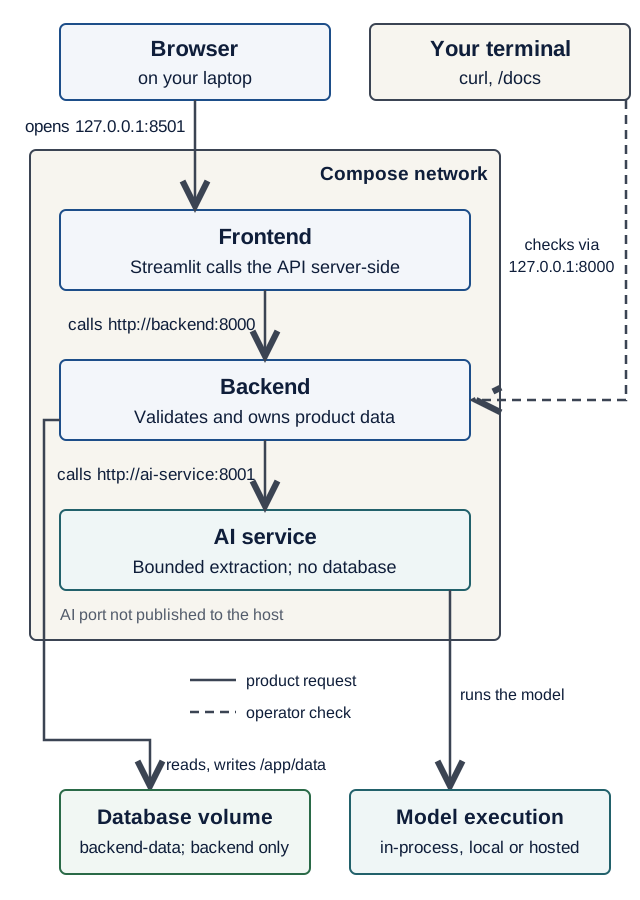
/docs check on the backend's loopback port. The model box is logical; TestModel runs inside the AI process. Predict what breaks if backend code calls localhost:8001, then use the walkthrough's diagnosis question. On a narrow screen, scroll the diagram sideways. Open the full-size service map.Text version of the diagram
- Browser (on your laptop) opens
http://127.0.0.1:8501, the frontend’s published port. - Frontend container: Streamlit’s Python calls
http://backend:8000by service name, inside the Compose network. - Backend container calls
http://ai-service:8001by service name. It alone reads and writes the database volume at/app/data. - AI service container: no published port, so nothing on your laptop reaches it. It runs the model:
TestModelinside its own process, or a local or hosted model server over the network. - Your terminal (dashed, outside the network):
curland/docsreach the backend on127.0.0.1:8000, its loopback-only published port. This is an operator’s check, not part of the product’s path.
Optional: a browser-side frontend (React, Vue) in Compose. A Node build stage compiles the static files; a small web server in the frontend container (for example nginx) serves them and forwards every
/api/...request tohttp://backend:8000. The browser then talks only to the frontend’s origin, so no CORS is needed, and the backend keeps its single loopback port for your own checks. Streamlit stays the worked example in this course.
Apply the same address rule to a model endpoint. The AI service is the caller of Ollama or another model server; a working URL from your laptop can still fail inside that container. Trace the adapter boundary, then use the local-serving address guide. The optional vLLM route is a deployment choice, not a replacement for Pydantic AI or a required fourth service. The clean-checkout demo below still uses TestModel.
Volumes: where the SQLite file lives
The named volume backend-data is mounted at /app/data, and DATABASE_URL is sqlite:////app/data/app.db: sqlite:/// plus the absolute path, four slashes. docker compose down removes containers and the network but keeps volumes; down -v deletes them too, and the seed runs again.
Configuration: interpolation, environment and env_file
Two different mechanisms:
- Interpolation: Compose replaces
${AI_MODEL:-test}while reading the file, from your shell first, then a.envfile next tocompose.yaml, then the default after:-. - Container variables:
environment:sets variables in one container;env_file:loads a file’s lines into it, andrequired: falseskips a missing file.
A clean checkout has no .env, so AI_MODEL is test (TestModel: no key, no cost). With a real model and key in .env, interpolation picks the model and env_file hands the key only to the AI service. Use defaults for non-secrets only.
Health and readiness
A healthcheck runs a command inside the container every interval; after retries failures in a row it is unhealthy (failures during start_period don’t count). depends_on with condition: service_healthy orders startup: AI service, then backend, then frontend. A bare depends_on waits only for started, not ready. up --wait blocks until all are healthy, which is what CI and graders use. The checks use Python’s urllib, because python:3.14-slim has no curl.
The backend’s /health deliberately does not call the AI service: an AI outage should not label otherwise usable CRUD as unhealthy. Lecture 7’s 503 covers that feature failure. A stricter readiness check may test what the service cannot work without, such as its database. Compose startup ordering is not continuous failure recovery; an unhealthy check alone does not stop or restart this backend. The application must still handle later dependency failures.
Restarts are a separate setting. Without a restart: policy, a container whose process exits stays down. restart: unless-stopped restarts a process that exits, until you stop it yourself; Docker does not restart a container just because its healthcheck says unhealthy (services reference: restart, checked 17 October 2026).
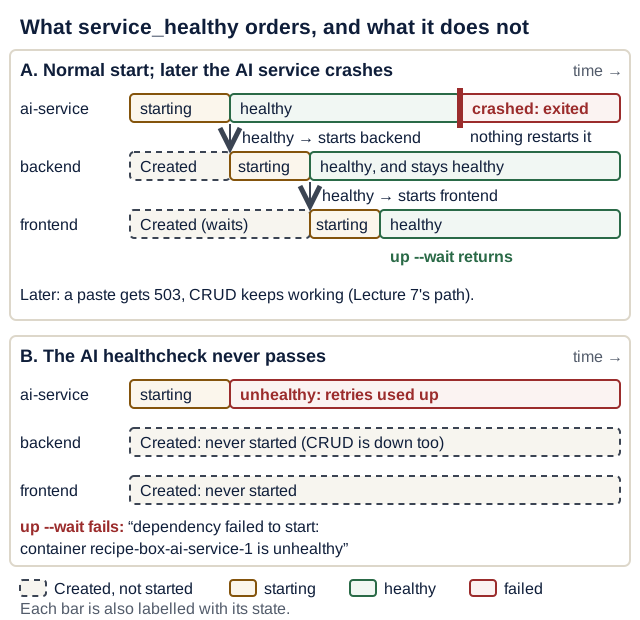
service_healthy decides when the next container starts; after that, the application handles failures. On a narrow screen, scroll the diagram sideways. Open the diagram at full size.Text version of the diagram
A. Normal start, then the AI service crashes.
ai-servicestarts; duringstart_periodfailed checks do not count; it becomeshealthy.- Only then is
backendstarted (depends_on: ai-service: condition: service_healthy); it becomeshealthy. - Only then is
frontendstarted; it becomeshealthy, andup --waitreturns. - Later the
ai-serviceprocess crashes and exits. Nothing restarts it (norestart:policy). The backend stayshealthy: a paste gets503, and CRUD keeps working.
B. The AI healthcheck can never pass.
ai-servicestarts, fails its checkretriestimes in a row afterstart_period, and is markedunhealthy.backendandfrontendstayCreated: their processes never start.up --waitfails withdependency failed to start: container recipe-box-ai-service-1 is unhealthy. CRUD is unavailable too, because the backend is not running.
Defend it: the course keeps
backend→ai-serviceascondition: service_healthy, although Lecture 7 says an AI outage must leave CRUD usable. Startup gating fails fast on a deploy misconfiguration you want to notice atup --wait; after startup, an AI outage is handled at request time by the 503 path, so CRUD keeps working. Name one cost of this choice, and one situation in which you would choose differently.
What a strong answer mentions
Cost: if the AI service cannot become healthy at startup (a bad image, a broken healthcheck, a wrong setting), CRUD is unavailable too, because the backend is never started (break-it drill 2). When to choose differently: when CRUD must start even with the AI service down, for example a demo machine with a flaky model setup: mark the dependency optional (required: false, see the stretch goals) and rely entirely on the 503 path. The course checker asserts the default, so keep service_healthy in your graded compose.yaml.
Simulator: which containers start? Choose whether each health check passes and which condition the backend waits for; see which containers start, what up --wait reports, and whether CRUD works.
Worked example (the course’s compose.yaml; “never passes” means the check is broken while the process runs, as in break-it drill 2):
- Every check passes (course default). ai-service, then backend, then frontend become healthy;
up --waitsucceeds; CRUD and paste work. - The ai-service check never passes, with
service_healthy. backend and frontend stayCreated;up --waitfails withdependency failed to start: container recipe-box-ai-service-1 is unhealthy; CRUD is unavailable. - The same broken check, with
service_startedandrequired: false. backend and frontend start and become healthy;up --waitstill reportscontainer recipe-box-ai-service-1 is unhealthy; CRUD works, and so does paste, because only the check is broken. - The backend check never passes. The backend runs, so
curl localhost:8000/recipesanswers, but the frontend is never started;up --waitfails withdependency failed to start: container recipe-box-backend-1 is unhealthy. - The ai-service is healthy, then its process crashes. Startup succeeds; nothing restarts the ai-service; CRUD keeps working and a paste returns
503.
The interactive version of this simulator needs JavaScript; the worked example above is the same model.
Secrets
- Real keys live in
.env, which is git-ignored and in every.dockerignore, so it reaches neither Git nor an image. Commit.env.examplewith names and placeholders only. No key ever goes incompose.yamlor a Dockerfile. docker compose configprints the resolved file including values from.env. Validate withconfig --quiet; never paste the full output anywhere.- A pushed key is compromised. Revoke and rotate it at the provider first, then remove it; rewriting history alone is not enough (GitHub: removing sensitive data).
- Compose
secrets:mounts a file at/run/secrets/<name>. It is a stretch goal, because a missing file stopsup.
Live demo
1. Two more Dockerfiles. Copy backend/Dockerfile into ai-service/ and frontend/. Neither needs the data directory, so drop the mkdir/chown part, then change the port. ai-service/Dockerfile (the # syntax line must stay first):
# syntax=docker/dockerfile:1
FROM python:3.14-slim
COPY --from=ghcr.io/astral-sh/uv:0.13.1 /uv /uvx /bin/
ENV UV_COMPILE_BYTECODE=1 \
    UV_LINK_MODE=copy \
    UV_NO_DEV=1 \
    UV_PYTHON_DOWNLOADS=0 \
    PYTHONUNBUFFERED=1
WORKDIR /app

# 1) Dependencies only: cached until uv.lock changes.
RUN --mount=type=cache,target=/root/.cache/uv \
    --mount=type=bind,source=uv.lock,target=uv.lock \
    --mount=type=bind,source=pyproject.toml,target=pyproject.toml \
    uv sync --locked --no-install-project

# 2) Application code.
COPY . /app
RUN --mount=type=cache,target=/root/.cache/uv \
    uv sync --locked

# 3) Never run as root.
RUN useradd --create-home --uid 10001 appuser
USER appuser
ENV PATH="/app/.venv/bin:$PATH"
EXPOSE 8001
CMD ["fastapi", "run", "app/main.py", "--host", "0.0.0.0", "--port", "8001"]
The last lines of frontend/Dockerfile start Streamlit instead:
EXPOSE 8501
CMD ["streamlit", "run", "streamlit_app.py", \
     "--server.address", "0.0.0.0", "--server.port", "8501"]
Each .dockerignore lists .venv, __pycache__, .pytest_cache, .ruff_cache, .env and tests (plus e2e for the frontend).
2. The compose file, at the repository root:
# compose.yaml (Compose Specification: no top-level "version:" key)
name: recipe-box

services:
  ai-service:
    build: ./ai-service
    # No host port: reachable on the Compose network, not published at localhost:8001.
    env_file:
      - path: .env # your real settings and keys (git-ignored)
        required: false # a clean checkout has no .env and still starts
    environment:
      AI_MODEL: ${AI_MODEL:-test} # no key, no cost unless you choose a model
      PYDANTIC_AI_NO_BANNER: "1"
    healthcheck:
      # Slim images have no curl, so ask Python's standard library instead.
      test:
        - CMD
        - python
        - -c
        - >-
          import urllib.request;
          urllib.request.urlopen("http://localhost:8001/health", timeout=2)
      interval: 5s
      timeout: 3s
      retries: 10
      start_period: 10s

  backend:
    build: ./backend
    ports:
      - "127.0.0.1:${BACKEND_PORT:-8000}:8000" # host IP:host port:container port
    environment:
      DATABASE_URL: sqlite:////app/data/app.db # 4 slashes = absolute path
      AI_SERVICE_URL: http://ai-service:8001 # the service name is a DNS name
    volumes:
      - backend-data:/app/data # survives "down"; "down -v" deletes it
    depends_on:
      ai-service:
        condition: service_healthy
    healthcheck:
      test:
        - CMD
        - python
        - -c
        - >-
          import urllib.request;
          urllib.request.urlopen("http://localhost:8000/health", timeout=2)
      interval: 5s
      timeout: 3s
      retries: 10
      start_period: 10s

  frontend:
    build: ./frontend
    ports:
      - "127.0.0.1:${FRONTEND_PORT:-8501}:8501"
    environment:
      BACKEND_URL: http://backend:8000 # Streamlit calls the API server-side
    depends_on:
      backend:
        condition: service_healthy
    healthcheck:
      test:
        - CMD
        - python
        - -c
        - >-
          import urllib.request;
          urllib.request.urlopen("http://localhost:8501/_stcore/health", timeout=2)
      interval: 5s
      timeout: 3s
      retries: 10
      start_period: 10s

volumes:
  backend-data:
>- is YAML for “fold these lines into one”, so Compose receives one line of Python.
3. Settings that stay out of Git:
# .env.example: copy to .env (git-ignored) and edit. Never commit .env.
# "test" = Pydantic AI's TestModel: no network, no key, no cost.
AI_MODEL=test

# Optional real-model run (Lecture 6): set AI_MODEL=<provider>:<model>
# and that provider's key, e.g. OPENAI_API_KEY=... or ANTHROPIC_API_KEY=...
# Free and local: AI_MODEL=ollama:<model> and
# OLLAMA_BASE_URL=http://host.docker.internal:11434/v1

# Optional: other host ports if 8000 or 8501 are taken.
# BACKEND_PORT=8000
# FRONTEND_PORT=8501
The root .gitignore lists .env; git check-ignore .env prints .env to confirm.
On Linux with Docker Engine (not Desktop), host.docker.internal resolves only if the ai-service also has extra_hosts: ["host.docker.internal:host-gateway"], and Ollama must listen on the Docker bridge address: follow Reach a host model server from Compose. Never bind it to 0.0.0.0 on a shared network: Ollama’s API has no login. A model’s first answer after loading can take longer than the backend’s 30 s read timeout, so send one request directly to Ollama before a demo (the latency experiment shows how slow a cold start is).
One frontend line changes too: Lecture 5’s backend-down message in frontend/api.py still says uv run fastapi dev in backend/. Make it "Start it (docker compose up) and reload the page.", the command a grader now uses.
4. Up. Observe the real result. From the repository root, validate, then build and start. up --build keeps streaming logs, so leave it running:
docker compose config --quiet
docker compose up --build
In a second terminal, also from the repository root, look around. Predict: which of the two curl commands succeeds, and what does the other one print?
docker compose ps --format "table {{.Service}}\t{{.Status}}"
curl -s localhost:8000/health
curl -sS localhost:8001/health
Check your prediction
config --quiet prints nothing when the file is valid, and ps shows (healthy) for all three. The first curl returns {"status":"ok"}; the second fails with curl: (7) Failed to connect to localhost port 8001, because the AI service is not published (-S makes curl show the error that -s alone hides). Paste a recipe at http://localhost:8501: it now crosses three containers.
5. “Where is localhost?” Observe the real result. Predict: what does each command print? Write both answers down before you run them.
docker compose exec backend python -c \
  "import urllib.request as u; print(u.urlopen('http://ai-service:8001/health').read())"
docker compose exec backend python -c \
  "import urllib.request as u; print(u.urlopen('http://localhost:8001/health').read())"
Check your prediction
The first prints b'{"status":"ok"}': ai-service is a DNS name on the Compose network. The second ends in urllib.error.URLError: <urlopen error [Errno 111] Connection refused>: inside the backend container, localhost is the backend itself, and nothing there listens on 8001.
6. Keep or reset the data. Break it and watch the check fail. Add a recipe in the browser. Predict: after docker compose down and docker compose up -d --wait, is it still there? And after docker compose down -v and docker compose up -d --wait?
Check your prediction
After down, the recipe is still there: down removes containers and the network, but the named volume backend-data survives and is mounted again. After down -v, only the three seed recipes remain: the volume was deleted, so the seed ran on an empty database.
Investigate: answer from
compose.yaml, then check with a command.
- Which line makes the backend start only after the AI service is healthy? Which command shows the order?
- Which service can read
OPENAI_API_KEYfrom.env, and which cannot?- Why does the frontend’s URL use
backend:8000and notlocalhost:8000?
Show model answers
depends_on: ai-service: condition: service_healthyunderbackend. Theupoutput showsWaitingand thenHealthyforai-servicebefore the backend starts;docker compose psshows how long each has been up.- Only
ai-service: it alone hasenv_file: .env. Check withdocker compose exec backend printenv OPENAI_API_KEY, which prints nothing and exits with status 1. Never print the key itself in a terminal you share or record. - Streamlit’s Python runs inside the frontend container, where
localhostis the frontend itself.backendis the service’s DNS name on the Compose network.
Commands you will use every day
| Command | What it does |
|---|---|
docker compose up --build | Build images, start everything, stream logs; Ctrl+C stops |
docker compose up --build --wait | Start in the background and wait until all services are healthy |
docker compose up --build --wait --wait-timeout 180 | The same, but give up after 180 seconds instead of waiting forever on a service that never becomes healthy; what scripts and CI use |
docker compose ps | Each service with its health and ports |
docker compose logs -f backend | Follow one service’s logs |
docker compose exec backend sh | Open a shell inside a running container |
docker compose stop ai-service | Stop one service; start brings it back |
docker compose down | Remove containers and the network; keep volumes |
docker compose down -v | Also delete volumes, including your data |
docker compose config --quiet | Validate the file without printing it |
What each command destroys. Read across before you type anything that ends in -v or -f:
| Command | Containers | Network | Named volume (your data) | Image | .env |
|---|---|---|---|---|---|
docker compose stop | stopped, kept | kept | kept | kept | kept |
docker compose down | removed | removed | kept | kept | kept |
docker compose down -v | removed | removed | deleted | kept | kept |
docker compose up --build | replaced if the image changed | created if missing | kept | rebuilt | read, never changed |
docker rm -f recipe-box-backend-1 | that one removed | kept | kept | kept | kept |
No Compose command deletes .env; it is a file in your repository, and Git ignores it.
Hands-on lab
Containerize your product. Use your own service names, and keep the shape. Plan your time:
- Core today: steps 1–6
- Before Lecture 9: steps 7–10
- Extension (optional): drill 4, “healthy but unreachable”, in Break it on purpose, then the Stretch goals
EX3 progress: EX3 (due Mon 11 Jan 2027, 23:59) requires Docker Compose as the way to run all three services. A clean clone that starts with
docker compose up --build --waitand no.envis the evidence.
Run every docker compose command from the repository root, where compose.yaml lives.
Core today:
- Dockerfiles: copy the backend’s into each service directory; drop the data directory; change the port and
CMD(keep--host 0.0.0.0); add.dockerignore. Checkpoint:docker compose buildsucceeds. compose.yaml: three services,name:set, noversion:,ports:only for the frontend and backend, both bound to127.0.0.1.- Networking: the backend calls your third service by its service name; the frontend uses
http://backend:8000(or a proxy, for a browser-side framework), and its backend-down message now saysdocker compose up. - Health: a
urllibhealthcheck per service, anddepends_onwithservice_healthy. Checkpoint:docker compose up --build --waitreturns, andpsshows three(healthy). - Data: a named volume and a four-slash
DATABASE_URL. - Settings:
.env.examplecommitted,.envignored,env_filewithrequired: false,${AI_MODEL:-test}. Checkpoint: it starts with no.env.
Before Lecture 9:
- Run the full flow in the browser, AI feature included.
- Restart test: data survives
downandup;down -vresets to the seed. Checkpoint: you can say which row of the “What each command destroys” table you just used. - Peer review (optional, recommended; about 10 min). Swap
compose.yamlwith a classmate. Apply the Pattern 1 checklist from Working with AI assistants to their file, and report one concrete observation together with the command that shows it (for example: “curl -sS localhost:8001/healthanswers, so the AI port is published”). Done when: you have sent one observation and received one. - README “Run it”: commands, ports, a
down -vwarning, and the real-model switch.
Optional: if you keep an AGENTS.md file (student setup, Part B), add the line Verify with: docker compose up --build --wait --wait-timeout 180 so an assistant runs the same check you do.
Break it on purpose
The loop: predict, break, read the exact error, fix, and note what would have caught it.
Drill 1: localhost again. Set the backend’s AI_SERVICE_URL: http://localhost:8001 and run docker compose up -d --wait.
Predict: do all three services become healthy? What does a paste return?
Check your prediction
Everything is healthy, yet pasting returns {"detail":"AI service unavailable"}. The backend’s /health does not call the AI service, so nothing notices at startup. The second command from demo step 5 shows why the paste fails: inside the backend container, localhost:8001 is refused. Fix it with the service name.
Drill 2: the healthcheck that can’t pass. Replace the AI service’s test with ["CMD", "curl", "-f", "http://localhost:8001/health"] and run docker compose up -d --wait.
Predict: does up --wait succeed? Can you still list recipes with curl -s localhost:8000/recipes?
Check your prediction
About a minute later it fails with dependency failed to start: container recipe-box-ai-service-1 is unhealthy. docker compose ps -a shows the AI service (unhealthy) and the backend Created: its process never started, so the curl fails with curl: (7) Failed to connect to localhost port 8000 and CRUD is unavailable too. This is the cost named in the Defend it box: startup gating is all or nothing.
Find out why the check fails:
docker inspect --format "{{json .State.Health}}" recipe-box-ai-service-1
The log says exec: "curl": executable file not found in $PATH. Restore the Python check.
Drill 3: one slash short. Change DATABASE_URL to sqlite:///app/data/app.db (three slashes) and run docker compose up -d --wait. Debug log: before you read any log, write lines 1–3 of the card from Debug with a hypothesis (symptom, reproduce, hypothesis), then use docker compose logs backend as your experiment.
Show the expected output
It fails with dependency failed to start: container recipe-box-backend-1 exited (3), and docker compose logs backend shows PermissionError: [Errno 13] Permission denied: 'app/data'. Why: three slashes make the path relative to /app; even if writable, the database would sit outside the volume and vanish on down. Restore four slashes.
Drill 4 (optional): healthy but unreachable. Make the AI service listen only on its own loopback by adding command: ["fastapi", "run", "app/main.py", "--host", "127.0.0.1", "--port", "8001"] under ai-service, then run docker compose up -d --wait.
Predict: does ps show the AI service healthy? What does a paste return? Why?
Check your prediction
ps shows all services (healthy), yet a paste returns {"detail":"AI service unavailable"}, and the first command from demo step 5 now ends in [Errno 111] Connection refused. Why: the healthcheck runs inside the AI service’s container, where localhost:8001 reaches the server; the backend arrives from another container, which a server bound to 127.0.0.1 never accepts. A healthy container is not proof that other services can reach it. Remove the command: line.
Open-source track
This week: open PR #3, and keep #1 and #2 moving (rules).
-
On the day you open it, re-check the repository, as in Lecture 6:
gh repo view OWNER/REPO \ --json stargazerCount,licenseInfo,pushedAt,isFork,defaultBranchRef - Re-read CONTRIBUTING and the AI-use policy. PR #3 is a distinct change, not a slice of an earlier one; small is fine.
- Run the project’s tests, or the subset CONTRIBUTING asks for.
- Open the PR on GitHub (or
gh pr createfrom your fork’s branch), with a description you wrote: problem, change, verification. - Add the evidence table row, and run Lecture 7’s follow-up commands on PRs #1 and #2.
Working with AI assistants
Pattern 1: review against a checklist. “Review my compose.yaml: no version: key; ports: only on frontend and backend; healthchecks without curl; depends_on with service_healthy; a named data volume; no secrets; env_file with required: false.” Verify: config --quiet, up --build --wait, ps, and a failing curl localhost:8001/health.
Pattern 2: explain a failure. Paste docker compose logs backend and the failing command; ask for the likely cause and one check that confirms it. Never paste .env or full docker compose config output: both can contain keys.
Spot the outdated suggestion:
version: "3.9"at the top. Compose warns that theversionattribute “is obsolete, it will be ignored”.docker-composewith a dash. Compose v2 and later (now v5) isdocker compose.depends_on: [ai-service]with no condition. That waits for “started”, not “healthy”.- A
curlhealthcheck on a slim image,pip install -r requirements.txtin a uv project, or unpinnedpython:3-slim(now Python 3.15) anduv:latesttags.
Completion check
Prove a stranger can start your stack. Stop yours with docker compose down, commit and push today’s work, then use a fresh clone of your repository:
Replace YOUR-REPO with your course product repository name; its owner is the course organization.
git clone https://github.com/EASS-PART-A-2026-X/YOUR-REPO.git ~/clean-check
cd ~/clean-check
docker compose -p clean-check up --build --wait
curl -s localhost:8000/health
docker compose -p clean-check down -v
-p clean-check gives the clone its own project name, so it gets a fresh volume instead of yours. Expected: up ends with three Healthy lines; curl prints {"status":"ok"}.
| Must work | Evidence you keep | If it fails, repair here |
|---|---|---|
A clean clone with no .env starts three healthy services with up --build --wait | the terminal output of the commands above | Common pitfalls · Containers in one page |
| A recipe pasted in the browser is saved, with all three services in containers | a screenshot or a one-line note | Break it on purpose, drill 1 |
curl -sS localhost:8001/health fails: the AI port is not published | the error line | Networking |
Data survives down and up; down -v resets to the seed | the two recipe lists | Volumes |
git check-ignore .env prints .env, and .env.example is committed | the command output | Secrets |
| Your README’s “Run it” section matches what you just typed | the README on GitHub | Hands-on lab, step 10 |
| PR #3 is opened, and the evidence table has its row | the PR link in your evidence table | Open-source track |
Not yet? Repair and re-run before starting the next lecture’s lab; later layers assume this one works.
Quick quiz
Q1. Inside the backend container, what does localhost port 8001 reach?
Nothing: localhost is the backend’s own container, where nothing listens on 8001, so the connection is refused (errno 111). Use the service name, http://ai-service:8001, which Compose’s network resolves.
Q2. (Lecture 3) Which command keeps your recipes: docker compose down, or docker compose down -v?
down. It removes containers and the network, but named volumes survive, so the next up mounts the same backend-data. down -v deletes volumes too, and the seed runs again. As in Lecture 3, only the volume outlives containers.
Q3. (Lecture 7) The ai-service container is stopped. What happens when a user pastes a recipe, and what does the backend's /health say?
The backend returns 503 {"detail": "AI service unavailable"}, and the UI says “AI service is unavailable, try again in a minute.” /health still says {"status":"ok"} and CRUD keeps working, by design. A dependency-sensitive probe would mark the backend unhealthy too, even though ordinary CRUD is still usable; it would not itself stop this Compose container.
Q4. There is no .env, and you run AI_MODEL=ollama:llama3.2 docker compose up. Which model does the AI service use? And with no shell variable?
ollama:llama3.2: interpolation takes the shell’s value first (it would even beat .env). With neither, the default after :- applies: test. With no .env, the AI service also needs OLLAMA_BASE_URL; otherwise the first extraction fails and the backend answers 503.
Q5. Why do the healthchecks run python -c "import urllib.request; ..." instead of curl?
python:3.14-slim has no curl, so a curl check always fails with “executable file not found”, and the service never becomes healthy. Python is already in the image and can make the request itself.
Explain it: in one sentence, what is the backend’s healthcheck for? (Not what the command does.)
Show a model answer
Weak (what it does): “It runs Python inside the container every 5 seconds and opens /health.”
Strong (purpose and the failure it prevents): “It tells Compose when the backend can actually answer requests, so the frontend is not started against a backend that is still booting, and up --wait fails loudly instead of reporting a stack that does not work.”
Defend it: a teammate proposes
depends_on: ai-service: condition: service_startedfor the backend, “because Lecture 7 says CRUD must survive an AI outage”. Agree or disagree. Give one reason from the evidence in this lecture and one cost of your choice.
What a strong answer mentions
- Keep
service_healthy: a broken AI service is noticed atup --wait, during deployment, not by the first user who pastes a recipe (drill 2 shows the failure in about a minute). After startup the 503 path already keeps CRUD working, as the AI-crash case in the health figure shows. Cost: at startup, an unhealthy AI service also keeps CRUD down. - Switch to
service_started(withrequired: false): CRUD starts whatever happens to the AI service. Cost: a misconfigured AI service is discovered only when someone pastes, andup --waitreports success for a stack whose AI feature does not work. Note that the course checker assertsservice_healthyfor the graded file.
Stretch goals
Optional. The required path stays as above.
-
Start CRUD even when the AI service is down (after the completion check). Make the dependency optional. The course checker asserts the default
service_healthy, so try this in a copy, not in your gradedcompose.yaml:# compose.yaml, under services.backend (a variant; the graded file keeps service_healthy) depends_on: ai-service: condition: service_started required: false # Compose 2.20 or later: warn instead of failingRepeat break-it drill 2 and compare: the backend now starts and becomes healthy, while
up --waitstill reportscontainer recipe-box-ai-service-1 is unhealthy; pasting even works, because only the check is broken, not the AI process. To see the 503 path, make the AI process exit instead withcommand: ["python", "-c", "raise SystemExit(1)"]underai-service: the backend is healthy,GET /recipesanswers, and a paste returns503. Simpler is enough: the course default plus the 503 path already keeps CRUD usable once the stack is up. -
Live reload in containers. Add this to the backend service and run
docker compose watch: code edits are copied in and the container restarts; a newuv.locktriggers a rebuild.# compose.yaml, under services.backend develop: # used only by "docker compose watch" watch: - action: sync+restart # copy changed code in, restart the container path: ./backend/app target: /app/app - action: rebuild # dependencies changed: build a new image path: ./backend/uv.lock -
Compose secrets. Mount a key as a file. Your code must read the file itself, because provider libraries read environment variables. Git-ignore
secrets/; a missing file makesupfail withbind source path does not exist.# compose.yaml, under services.ai-service secrets: [openai_api_key] # appears as /run/secrets/openai_api_key # compose.yaml, at the top level secrets: openai_api_key: file: ./secrets/openai_api_key.txt # git-ignored, like .env -
PostgreSQL instead of SQLite: add a
dbservice with apg_isreadyhealthcheck and its own named volume. It is infrastructure, not your third service.
Common pitfalls
Cannot connect to the Docker daemon→ Docker Desktop isn’t running → start it; on Windows, check WSL integration.docker-compose: command not found→ the old v1 tool → typedocker compose.env file .../.env not found→env_filelacksrequired: false→ add it.The lockfile at uv.lock needs to be updated, but --locked was provided.→pyproject.tomlchanged without relocking →uv lockin that service, commituv.lock.port is already allocated, orports are not available: exposing port TCP 127.0.0.1:8000 ... bind: address already in use, or the old dev server answers → a Lecture 7 server holds the port (the wording depends on the platform) → stop it, or setBACKEND_PORT/FRONTEND_PORTin.env.- All services
(healthy), but every paste returns 503 → a URL useslocalhost, or a server binds127.0.0.1inside its container → use the service name and--host 0.0.0.0(drills 1 and 4). up --waitfails withdependency failed to start: container recipe-box-ai-service-1 is unhealthy, and the backend isCreated→ the AI service’s healthcheck never passed, so the backend was never started → readdocker inspect --format "{{json .State.Health}}" recipe-box-ai-service-1(drill 2).- A code change doesn’t show up → the old image was reused →
docker compose up --build. - 503 in Compose, fine without Docker →
localhostin a URL → use the service name. - Data vanished → someone ran
down -v→ usedown, and warn in the README. - Logs full of
GET /health→ the healthcheck, every 5 seconds →docker compose logs backend | grep -v /health.
Instructor notes
Suggested flow, with a minute budget (estimate):
- (5 min) Show Lecture 7’s three terminals: “What would a grader have to type?” Then the mapping table.
- (10 min) Copy the backend’s Dockerfile for the AI service; ask what must change. Pause on
EXPOSEand--host 0.0.0.0. - (20 min) Build
compose.yamlin steps: AI service and backend,config --quiet,up --build, then the frontend. - (10 min) “Where is localhost?” predictions, then
curl localhost:8001from the laptop. Peer-instruction vote: “Inside the backend container, what doeslocalhost:8001reach?” Vote, discuss in pairs, vote again. - (10 min) Predict-then-run:
down, thendown -v, with the “What each command destroys” table on screen. - (10 min)
.env.example, interpolation, and why plainconfigoutput is never pasted. - (10 min) Drill 2 live: the minute of waiting makes the point; then the health figure and the
service_healthyDefend-it box. - (5 min) PR #3 round: each student names the repository and the change.
Core path if time runs short: steps 3, 4, 5 and 7; assign the configuration details and drill 4 with the lab.
Exit ticket: “The AI service crashes an hour after up --wait succeeded. What restarts it, what does the backend’s /health say, and what does a user who pastes see?”
Emphasize: the service name is the address, down -v deletes data, a clean checkout starts with zero keys, and startup ordering is not failure handling. Students get stuck on dev servers holding ports, localhost in URLs, a forgotten --build, and three-slash database URLs.
Read more
Before the lab (≤15 min): Docker: control startup order. Read it with two questions: (1) what exactly does condition: service_healthy wait for, and what does it do after that? (2) which healthcheck settings decide how long up --wait waits before it gives up?
Go deeper (optional):
- Docker: Compose file reference, services and networking in Compose
- Docker: environment variables in Compose and their precedence
- uv: using uv in Docker
- Docker: Compose Watch and secrets in Compose
- Execution boundaries: Agent sandboxes distinguishes Compose, restricted containers, OS sandboxes, gVisor and microVMs; Local inference treats a model server as an optional dependency of the existing AI service.
- Model serving: Visual inference engineering covers model choice, attention, quantization, caching, speculation, batching, parallelism, modalities and production, with worked visual exercises.
- Engineering practice: Manifests, skills and evals: engineering contracts connects this lecture’s files to configuration consumers, reusable procedures and evidence.
- Visual review: Visual system walkthrough: one request, end to end connects this checkpoint to service ownership, validation, the commit boundary and failure evidence.