Meetings 11–13 · Clinics, rehearsal and final demos
← Course home · ← Previous: Lecture 10
At a glance
- When: Mondays 28 December 2026, 4 January 2027 and 11 January 2027, 16:00 Israel time, on Zoom
- You leave with: a rehearsed demo and verified PR evidence
- Goals: find the first failing boundary and fix it with a check that catches it; rehearse the demo from a clean clone of a tagged commit with green CI; explain your own work without an assistant
- Prerequisites: Lecture 10’s release candidate:
gh run list --commit …showssuccessfor the commitv1.0.0-rc.1points at; repair: Lecture 10 completion check- Product milestone: EX3 and open-source evidence, due Mon 11 Jan 2027, 23:59 Israel time (deadlines)
- Done when:
v1.0.0is tagged on a commit with green CI, and your demo starts from a clean clone of that tag
No new material: you work on your own product and PRs; the instructor may reorder agenda items. Rules and deadlines live in the course README. Commands use Recipe Box names; substitute yours, and run them from your repository root unless a step says otherwise.
On this page
Meeting 11 · Integration and upstream-review clinic
Purpose (Monday 28 December 2026): a stack that starts from a clean clone, and a written next step for every open upstream PR.
Learning checkpoint
- Locate the first failing boundary using a small request, the relevant logs, and the expected contract.
- Repair a reproduced integration problem and show the check that detects it.
- Explain the next respectful action for each upstream review, with the student retaining authorship of maintainer-facing text.
Use the learning map’s recovery path when several symptoms share one prerequisite failure.
Optional clinic station: use the industry studio for a reproduced defect, a reviewable repair and a five-minute individual explanation. Choose the station that addresses a current product gap; no extra submission is required.
What you bring
- Your Lecture 10 release candidate, running.
- Your open PRs:
gh search prs --author=@me --state=open --json url,updatedAt,commentsCount. - One unanswered review comment or one quiet PR.
Suggested agenda
- Checklist stand-up: each student answers one self-check bullet about their own project.
- Integration triage in pairs, using the path below.
- Formative check-off in pairs (10 minutes, ungraded).
- Ownership swap: explain your PR to a partner as if they were the maintainer; they explain it back. If they struggle, improve the PR description.
- Review-reply workshop (playbook below): you draft replies; peers comment on tone.
- Stalled-PR rescue: the group suggests next steps for one quiet PR.
- Write a status, next action and date for each PR. Unfinished Lecture 10 items (the runbook, the security review) also fit here.
Integration triage path
Walk the stack from the outside in and stop at the first step that does not match. Each step tests one boundary, so the first mismatch tells you where to look.
| Step | Boundary | Command | Expected | If not → next |
|---|---|---|---|---|
| 1 | containers | docker compose ps | all three services (healthy) | docker compose logs <service> for the first unhealthy one |
| 2 | your laptop → backend | curl -i http://localhost:8000/health | 200 and {"status":"ok"} | backend logs; DATABASE_URL; the backend’s ports: |
| 3 | frontend → backend | docker compose exec frontend printenv BACKEND_URL | http://backend:8000 | fix BACKEND_URL in compose.yaml; never localhost inside a container |
| 4 | backend → ai-service | probe 4 below | b'{"status":"ok"}' | docker compose logs ai-service; check AI_SERVICE_URL with printenv |
| 5 | the whole AI flow | probe 5 below | 201 and a recipe with an id | read the status in the table after the probes |
printenv prints one variable and nothing else, unlike docker compose config, which prints every resolved setting, secrets included.
# Probe 4: from inside the backend container, call the unpublished ai-service
docker compose exec backend python -c \
  "import urllib.request as u; print(u.urlopen('http://ai-service:8001/health').read())"

# Probe 5: the full AI flow through the published backend port
curl -i -X POST http://localhost:8000/recipes/from-text \
  -H "Content-Type: application/json" \
  -d '{"text": "Hummus: chickpeas, tahini. 15 min."}'
| Probe 5 shows | What it means | Look next |
|---|---|---|
201, but the UI shows an error | the backend works; the frontend’s call or its error handling does not | step 3; docker compose logs frontend |
422 | the request body failed validation, for example empty or whitespace-only text | read detail[].loc; fix the caller, not the backend |
500 | a bug in the backend: an exception nobody handled | docker compose logs backend; read the last line of the traceback |
502 | the AI service answered, but its output broke the contract after the agent’s retries | ai-service logs; Lecture 9 |
503 | the AI service is unreachable, slow, crashed or over its budget | step 4; docker compose logs ai-service |
Worked example: "AI service is unavailable" while everything is healthy
This is Lecture 8’s Drill 1, traced with the path above.
- Symptom: pasting a recipe shows “AI service is unavailable, try again in a minute.” The Recipes tab still works.
- Step 1:
docker compose psshows all three(healthy). Step 2:{"status":"ok"}. So the containers and the backend are fine. - Probe 5:
HTTP/1.1 503with{"detail":"AI service unavailable"}. The backend could not get an answer from the AI service. - Probe 4:
b'{"status":"ok"}'. The AI service is up and reachable by its service name. So the problem is the address the backend uses. - Hypothesis, written first: “the backend calls the wrong URL.” Check:
docker compose exec backend printenv AI_SERVICE_URLprintshttp://localhost:8001. - Explain: inside the backend container,
localhostis the backend itself, where nothing listens on 8001. Probe 4 withlocalhostinstead ofai-serviceends inConnection refused, which confirms it. - Fix and check: set
AI_SERVICE_URL: http://ai-service:8001incompose.yaml, rundocker compose up -d --wait, repeat probe 5:201. - The check that detects it: a pytest cannot see Compose settings, but Lecture 10’s CI
composejob can: its smokecurl --failonPOST /recipes/from-textfails on the 503. Break it once on a branch and watch that check turn red before you trust it.
Write the failing check first. Before you repair anything, add the test (or smoke command) that fails because of this bug, then fix until it passes. A bug without a check comes back. Keep a debug log entry, and write your hypothesis before you ask a person or an assistant.
Formative check-off
Ungraded practice for Meeting 13, in Meetings 11 and 12. A partner picks any commit from your git log --oneline and asks you two question bank questions about it. You answer without an assistant and without notes. Write down one thing you could not explain, and look it up before Meeting 13. Inspired by the lab check-offs in MIT’s 6.5840 and the short oral quizzes in Stanford’s CS329Z; EASS is not affiliated with either.
Upstream-review clinic playbook
Answering review comments. Read the whole review and restate each request in your own words; ask if unclear. Make one change per request, run the project’s tests, push to the same branch. Reply in each thread with what changed and how you verified it, or disagree politely with evidence. Write replies yourself, within the project’s AI policy.
Nudging a stalled PR. First fix what is yours: failing CI, conflicts, an unsigned contributor license agreement (CLA), a missing template item. Wait as long as the project asks, or at least a week after the last activity. Then post one short comment: what is ready, what you checked, one easy question. No mass tagging, no repeated pings, no deadline pressure such as “I need this merged for a course”.
When to pivot. Start another viable contribution in parallel when a maintainer declines the change, the issue is fixed elsewhere, or a nudge goes unanswered close to the deadline. Keep the original PR open unless asked to close it. Pivoting adds attempts; it never lowers the bar: only merged PRs count, and the etiquette rules still apply. Opening a new PR? Re-check the star count on the day you open it.
Meeting 12 · Demo rehearsal, troubleshooting and evidence review
Purpose (Monday 4 January 2027): demo from a fresh clone, survive one failure on purpose, and prove every merged PR.
Learning checkpoint
- Follow the runbook from a clean checkout, rather than relying on an existing terminal or editor session.
- Demonstrate a user flow, one controlled outage, and recovery while preserving the expected data.
- Check the model/configuration used for the demonstration and explain the limits of the evaluation evidence.
Use engineering foundations to distinguish a restart, reset, rollback, and restore. These are rehearsal questions, not additional submission requirements.
What you bring
- Your project URL under
https://github.com/EASS-PART-A-2026-X/<your-product>, and a partner to clone it. For a private repository, ask the instructor or authorized repository administrator to arrange read access for the rehearsal, or share your screen while your partner dictates the steps. Keep course contributor access intact; do not grant broad organization access for a rehearsal. - Your release candidate tag (
v1.0.0-rc.1or later) on a commit with green CI. - A short demo script, plus your filled-in evidence table and AI-use note. The script starts with your product’s purpose in one sentence, then performs your Lecture 1 operational principle live (“after X does A, then B; afterwards C holds”), then one failure, then one test.
Suggested agenda
- Clean-clone dry run: your partner follows only your README.
- Demo rehearsal, following the checklist below.
- Break it on purpose: a peer picks a Lecture 9 drill; you show the graceful path live.
- Peer feedback with the form below, in words, not scores.
- Explain one design decision and its trade-off, then a formative check-off with two question-bank questions.
- Evidence review with the instructor, then a troubleshooting queue.
Demo rehearsal checklist
Before you start: stop your dev stack (docker compose stop in your working copy) so ports 8000 and 8501 are free. If they are busy anyway, export BACKEND_PORT and FRONTEND_PORT (for example 18000 and 18501) before up; the commands below follow them.
-
Clean checkout, two ways. First run
scripts/clean-checkout.shfrom your working copy (Lecture 10): it copies.env.example, so it tests the documented settings. Then clone the tag you will demo, with no.envand no.venv, which tests zero secrets. The grader may take either path, so you test both.git clone --branch v1.0.0-rc.1 <your-repo-url> fresh-check cd fresh-check export COMPOSE_PROJECT_NAME=fresh-check docker compose config --quiet docker compose up --build --wait--branchwith a tag gives you exactly that commit. Git then notes a “detached HEAD”, and may warn that the tag “is not a commit” (an annotated tag is a small object that points at a commit). Both are expected: a tag is not a branch. (Checked with Git 2.50, 17 October 2026.)COMPOSE_PROJECT_NAMEoverridesname:incompose.yaml, so the clone gets its own containers and an empty volume instead of joining your dev stack. -
Happy path at
http://localhost:${FRONTEND_PORT:-8501}: list, add, edit, delete, then the AI flow, following your demo script. Check the API too:curl "http://localhost:${BACKEND_PORT:-8000}/health" curl -i -X POST "http://localhost:${BACKEND_PORT:-8000}/recipes/from-text" \ -H "Content-Type: application/json" \ -d '{"text": "Hummus: chickpeas, tahini. 15 min."}'With
AI_MODEL=test, expect201with placeholder values such as"title":"a": that is TestModel, not a bug. - One failure drill:
docker compose stop ai-service, then repeat the request: expect503 {"detail":"AI service unavailable"}and a friendly UI message. Restore withdocker compose up --wait. - Tests:
uv run pytestin each service, exactly as your README says. - Evals:
uv run python -m evals.run_evalsinai-service/, then show the dated results table. - Evidence: open your README’s evidence table.
- Clean up, in
fresh-checkwith the same shell:docker compose down -v, thenunset COMPOSE_PROJECT_NAMEandcd .., so laterdocker composecommands in this terminal target your dev stack again. - Close the loop. If the rehearsal needed fixes: in your working copy, commit and push them, wait until
gh run list --workflow ci.yml --commit "$(git rev-parse HEAD)" --json status,conclusionshowscompletedandsuccess, then tag the next candidate (v1.0.0-rc.2) on that SHA and rehearse again. If nothing needed fixing, that green SHA is yourv1.0.0.
Peer feedback form
Ungraded and in words; copy it into a message or a shared document. Inspired by the review forms in Stanford’s CS329Z and the sprint demos in CS224G; not affiliated.
1. One thing that worked, and the evidence (what you saw or ran):
2. One reproducible problem. Steps: … Expected: … Actual: …
3. One question the author could not answer:
Grader-style self-check
Use Submission evidence for compact EX1–EX3 criteria and worked examples of what an observation does and does not prove.
A grader follows the path in the README. Walk it yourself first:
.env.examplelists every setting without real values;git check-ignore -v .envnames your ignore rule.docker compose up --buildstarts all three services;docker compose psshows them healthy.- Core flows work in the browser, with loading, empty and error states.
- The README’s test commands pass with no key and no model calls.
gh run list --workflow ci.yml --commit "$(git rev-parse HEAD)" --json status,conclusionshowscompletedandsuccessfor the commit you will submit.- Failures read clearly: ai-service down, backend down, invalid input.
- Data survives
downthenup, and the README warns thatdown -vwipes it. - Real-model instructions are separate and optional.
- The README’s evaluation results table is dated and names the model and configuration it ran with.
- The README has the runbook sections and an AI-use note (tools, help received, checks performed).
git statusis still clean afterwards.
Evidence review
For each PR in your evidence table:
gh repo view OWNER/REPO --json stargazerCount,licenseInfo,isFork,defaultBranchRef
gh pr view PR_URL --json state,mergedAt,baseRefName,mergeCommit
gh api repos/OWNER/REPO/compare/MERGE_SHA...DEFAULT_BRANCH --jq .status
A PR passes when state is MERGED and baseRefName is the project’s main development branch: main, master (as in FastAPI), or a documented equivalent; the defaultBranchRef name is usually that branch. After a merge into another branch, the third command must print ahead or identical; behind or diverged means not on the main branch yet. Stars change: your evidence is the dated snapshot taken when you opened the PR (qualifying repositories).
Predict: your PR merged into a dev branch as commit M. Draw main for each answer the third command can print, and decide whether M is on main.
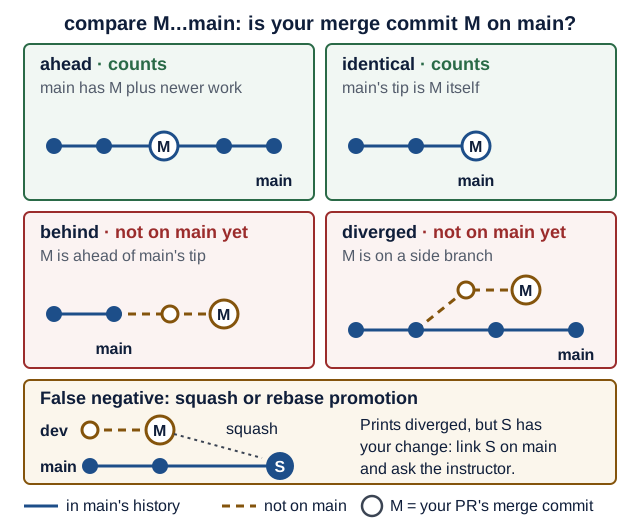
Text version of the diagram
The command compares M (base) with the main branch (head) and says where the branch tip is relative to M.
ahead: the main branch contains M and newer commits. M is on it: counts.identical: the main branch’s tip is M. Counts.behind: M is newer than the branch tip, on a branch that has not reached main yet. Not on main yet.diverged: M sits on a side branch, and the main branch has moved on without it. Not on main yet.- False negative: the
devbranch, M included, was later squash-merged (or rebase-merged) into main as a new commit S. S contains your change, but M itself is not an ancestor of main, so the command printsdiverged.
If a squash or rebase promotion makes this print diverged although your change landed, link the commit on the main development branch that contains your change and ask the instructor. The README’s rule is what counts: an integration-branch merge counts only after you show the change landed on the main development branch.
Meeting 13 · Final demos and individual technical discussion
Purpose (Monday 11 January 2027): show it working and explain it in your own words.
Learning checkpoint
- Trace a user action through your implementation and identify the state, tools, and checks involved.
- Explain one failure, one design tradeoff, and one limitation without repeating an assistant’s summary.
- Show the existing assignment and contribution evidence, and distinguish merged, released, and deployed states.
The individual-understanding prompts are practice for this discussion; grading remains as stated in the course guide.
What you bring
v1.0.0, tagged on a SHA with green CI (gh run list --workflow ci.yml --commit "$(git rev-parse 'v1.0.0^{commit}')" --json status,conclusionshowscompletedandsuccess), already started from a clean clone of that tag (git clone --branch v1.0.0 <your-repo-url> demo).- Your README, open at the runbook and the evidence table.
Suggested agenda
- Final demonstrations in the announced order, following the rehearsal checklist.
- Individual technical discussion: questions from several topics below, including your PRs. Partners answer separately.
- Close: EX3 and open-source evidence are due at 23:59 Israel time today (deadlines), via the submission channel provided by the instructor.
Individual technical discussion · question bank
For the instructor; students may practice with it. “Listen for” lists what a good answer mentions; “show me where” in the student’s code is the best follow-up. No scores or weights: assessment criteria are in the README.
Practise like this: attempt each question out loud first, without notes or an assistant, then open it and compare. A question you could not start goes on your “look it up” list.
HTTP and FastAPI
Q1. Which status codes do create, delete, a missing item and bad input return?
Listen for: 201 with the resource; 204, no body; 404 for any missing id, DELETE included; 422 from validation.
Q2. What happens when a client sends GET /recipes?limit=101?
Listen for: Query(ge=1, le=100) rejects it before the handler runs: 422, loc names limit.
Q3. What runs when your backend starts and stops?
Listen for: The lifespan creates tables and seeds, yields, then disposes the engine; TestClient runs it only inside with.
Pydantic
Q4. Why separate Create, Update and Public models?
Listen for: Clients cannot set id; PATCH applies only sent fields; responses always include id.
Q5. A client sends PATCH /recipes/1 with {"titel": "Soup"}. What happens?
Listen for: extra="forbid" gives 422 extra_forbidden; otherwise the typo is ignored and a 200 changes nothing.
Persistence
Q6. Prove your data survives a restart. What would delete it?
Listen for: A named volume survives down; down -v deletes it and the idempotent seed reruns; a restart test proves it.
Q7. How do your tests avoid touching your real database?
Listen for: A fresh database per test via app.dependency_overrides; engine disposed; any test order passes.
Frontend states
Q8. Show the loading, empty and error states. Where is each in the code?
Listen for: A spinner while loading, an info message when empty, and one module that turns errors into messages with a next step, never a traceback.
Q9. How does your UI test run without a backend? What does the browser test add?
Listen for: AppTest (or equivalent) runs in-process with HTTP mocked; Playwright drives a real browser with role-based locators.
Pydantic AI
Q10. What does output_type give you, and what if the answer does not fit?
Listen for: Validated, typed result.output; failures go back to the model as retries; then UnexpectedModelBehavior becomes a 502.
Q11. What are your agent's tools and dependencies for?
Listen for: Tools supply facts the model should not guess; @agent.tool gets ctx.deps, tool_plain does not; tests swap deps.
Q12. How do you guarantee tests and CI never call a paid model?
Listen for: models.ALLOW_MODEL_REQUESTS = False; agent.override with TestModel or FunctionModel; AI_MODEL defaults to test.
Service contracts
Q13. Why is the AI a separate service? Would a Redis container count instead?
Listen for: Own process, contract and tests, called over HTTP; an in-backend agent class or Redis does not count (requirements).
Q14. Walk through your timeout values. Why that order?
Listen for: Explicit timeouts; the AI limit below the backend’s read timeout (Recipe Box: 25 s inside 30 s); the frontend outlasting the backend’s retries.
Q15. Why does the backend answer 503 for one AI failure and 502 for another?
Listen for: 503: the AI service is unreachable, slow, crashed (500) or over its budget (429); 502: it answered, but its output stayed invalid after the agent’s retries or broke the contract, so the fix is in the AI service, not in waiting.
Docker Compose
Q16. Why does the backend use the ai-service name while localhost:8001 on your laptop fails?
Listen for: localhost is the container itself; Compose DNS resolves service names; the AI service has no host-published port. Other network peers can still reach it, so that setting is not caller authentication.
Q17. What do healthcheck and condition: service_healthy do in your stack?
Listen for: A /health probe inside the container; dependents wait for it, because started is not ready; up --wait blocks until healthy.
Failures and evaluations
Q18. Which failures do you retry, how often, and which never?
Listen for: The backend selectively retries transport failures and ai-service 503/504, at most 3 attempts with backoff; never its budget-exhaustion 429, 502, 500 or other 4xx. Repeating stateless extraction avoids duplicate database writes but can repeat inference work and cost. The frontend never retries POST /recipes/from-text; provider/transport retries also need inspection.
Q19. What is in your evaluation dataset, and what did it tell you?
Listen for: Messy real inputs, including prompt injection; deterministic evaluators; dated results with the model; a drop is a regression.
Q20. How do you stop one request from running up a model bill?
Listen for: UsageLimits, bounded HTTP attempts, and a wall-clock timeout; a budget-exhaustion 429 is not retried and becomes a backend 503. Token/cost stopping checks can observe an overrun after work occurs; counted agent steps do not cover every provider retry. Check provider controls, pricing availability, and actual usage rather than promising a hard bill ceiling.
CI and security
Q21. What does your CI run, and why uv sync --locked?
Listen for: Lint and tests with AI_MODEL=test, a Compose smoke test; --locked fails on a stale uv.lock; SHA-pinned actions.
Q22. An API key was committed and pushed. What do you do, in order?
Listen for: Rotate it at the provider first; check usage; then stop tracking it and use a git-ignored .env; rewriting history alone is not enough, and it is optional in this course.
Open-source contributions
Q23. Walk me through one merged PR and how you verified it.
Listen for: Reproduction; why that scope; which project tests ran; what the reviewer asked. Follow up: “explain one line of the diff”.
Q24. How did you check eligibility, and that the change reached the main branch?
Listen for: A dated star snapshot above 10,000; license; not a fork; MERGED into the default branch, or its merge commit shown there.
Q25. A review you disagreed with, or a PR that stalled: what did you do?
Listen for: Answered with evidence, in their own words; for a stall: fixed CI, nudged once, started another contribution in parallel.
AI tools, models, and engineering judgment
Q26. Which assistant and model helped you, what could they access, and what did you verify?
Listen for: The editor/chat/harness is distinguished from its model/provider and the product’s AI_MODEL; relevant context and permissions are identified; actual commands, results, and the reviewed diff support the claims. A statement that the model “said it passed” is not execution evidence.
Q27. Why is your chosen model suitable for this task, and what evidence could change your choice?
Listen for: Task-specific cases and capabilities, semantic quality, observed usage/latency where available, account access and cost limits; model/configuration/date recorded where exposed. A free or automatic model route is acceptable. Explain unknowns and avoid universal rankings from a few examples.
Q28. Your fake-model tests and schema checks pass. What remains uncertain?
Listen for: Real-model quality, facts and domain meaning, unseen cases, real integration failures, and authorization can require different checks. A model’s tool proposal is not authority to execute it. Point to the application’s enforcement and a concrete evaluation or failure test.
Release, delivery and security boundaries
Q29. Which exact commit did your CI test, and how do you know the demo runs it?
Listen for: A SHA, not a branch name: git rev-parse 'v1.0.0^{commit}'; gh run list --commit <sha> shows completed and success for it; the demo started from git clone --branch v1.0.0. A fix after the tag is a new SHA that needs its own green run and a new tag.
Q30. Your container already runs as uid 10001. What do cap_drop: [ALL] and no-new-privileges add?
Listen for: CapEff is already 0 for uid 10001; cap_drop: [ALL] sets the bounding set (CapBnd) to 0, so no setuid program or file capability can ever grant one; no-new-privileges stops setuid escalation. Defence in depth: it limits the damage if a bug lets someone run code in the container.
Q31. The ai-service publishes no port. Who can still call it, and what would 401 versus 403 mean?
Listen for: Any container on the same Compose network, not only the backend. 401: the caller did not prove who it is (missing or wrong shared token). 403: the caller is known but not allowed this action. The optional shared token is service authentication only; it adds no authorization and no user identity.
Q32. The backend saved a recipe, but the response was lost on the way back. What does the user see, and is clicking again safe?
Listen for: The row is committed, but the frontend got no complete reply, so the outcome is unknown to it: the UI says the change may have been saved and asks the user to reload and check, rather than “failed”. Clicking again is not safe by default: POST is not idempotent, so a blind retry can create a duplicate; that is why the frontend never retries writes automatically. Reloading the list shows the truth; an idempotency key would be the stronger fix. See the commit boundary.
Read more
- Contributing to a project (GitHub Docs)
- gh pr view, gh search prs and gh run list (GitHub CLI manual)
- Compare two commits (GitHub REST API)
- Further study: the course sites and research behind the check-offs and peer-feedback forms (optional)