Lecture 1 · Environment, Git, Docker and AI-assisted coding
← Course home · Next: Lecture 2 →
At a glance
- When: Monday 19 October 2026, 18:00 Israel time (after HIT’s opening-event break), on Zoom (calendar notes)
- You leave with: a working environment, a one-page product sketch, and 2–3 open-source candidates you checked yourself
- Goals: say where a command runs and where a change lives, explain image versus container and host versus container port, and review one assistant change (details)
- Prerequisites: Student setup, Part A is done; repair: readiness check
- Product milestone: the start of EX1 (due Mon 9 Nov 2026, 23:59): a repo,
/health, and a product sketch- Time: prerequisite check about 10 min the night before; lab about 2 h in and after class; Git undo drill about 10 min before Lecture 2 (estimates)
- Done when:
curl http://localhost:8000/healthprints{"status":"ok"}from code you committed and pushed, and your README has an## AI usenote
On this page
Mission
Today you build the workbench for the whole semester: a tiny FastAPI app on your laptop, a container running Python 3.14, a one-page product idea, and 2–3 checked open-source projects. The win you can show: curl http://localhost:8000/health prints {"status":"ok"} from code you committed and pushed.
Before you start
You need Python basics, a terminal, your own free GitHub account with a verified email, and admin rights on your laptop. Windows: use WSL2 (Ubuntu); every command on these pages runs inside Ubuntu, not PowerShell. Installation steps are in Student setup, Part A, which also helps you choose one assistant route or the manual fallback; your editor and model do not change the course requirements.
Prerequisite check: about one minute each, the night before. If a check fails, follow its repair link, then ask for help with the PARD template in the channel the instructor provides.
Check Pass when Repair Run pwd, thencd .., thenpwdagainYou can say which folder you were in before and after Readiness check Open a second terminal tab. In the first, run sleep 60, then press Ctrl+CThe prompt comes back at once: you stopped a running process Files, environments, and processes which uvandecho $PATHwhich uvprints a path in one of the folders$PATHlistsReadiness check uv --version,git --version,gh --version,docker --version,curl --versionEach prints a version: uv 0.12 or newer (0.13 recommended); curl 7.82 or newer, or note that you will use Lecture 2’s fallback Student setup, Part A docker compose versionSee the version note below Common pitfalls gh auth status, thendocker run --rm hello-worldLogged in to github.com, thenHello from Docker!Student setup, Part A · Common pitfalls
Version note: docker compose version prints Docker Compose version v2.24 or newer. Current Docker Desktop ships v5.x, which is the same docker compose plugin (Docker skipped v3 and v4). docker-compose with a hyphen is the retired v1; 'compose' is not a docker command means the plugin is missing. (Checked 17 October 2026: Docker Desktop 4.95.0 bundles Compose v5.6.0; why v5.)
Words you'll meet today
Every term here is also in the course glossary, next to the terms from the other lectures.
- Interface, loopback: a network interface is one way into a machine (Wi-Fi, a cable, a virtual network). Loopback is the private one that reaches only the same machine:
127.0.0.1, also calledlocalhost. - Bind: a server binds to an address and port to listen there. Bound to
127.0.0.1, it hears only its own machine; bound to0.0.0.0, it hears every interface. - Daemon: a background program that waits for work. The Docker daemon (engine) runs containers; the
dockercommand only sends it requests. - Lockfile:
uv.lock, the exact version of every installed package, so every machine installs the same set. - Virtual environment:
.venv/, a project-private folder of installed packages, so projects do not share or break each other’s libraries. - Fork: your own copy of someone else’s GitHub repository. Upstream PRs usually go from a branch in your fork to the original project.
- Squash merge: merging a PR as one new commit that contains all of its changes.
- Slim image: a smaller variant of an image (for example
python:3.14-slim) with fewer system tools; it has nocurl. - Tag versus digest: a tag (
3.14-slim) is a movable name that can point to a newer build tomorrow; a digest (sha256:…) names one exact build forever. Lecture 10 uses digests. - Import string:
app.main:appmeans “import the moduleapp/main.pyand use the object namedappin it”.
Learning checkpoint
By the end, you should be able to:
- Identify the working directory, uv project, running server, and Git branch before changing code.
- Explain image versus container, host versus container port, and commit versus push versus merge.
- Give an assistant one bounded task, inspect its diff, and demonstrate the actual result.
Predict first: If an editor says a file was saved but the server still shows old behavior, which directory and process would you inspect first?
Check your prediction
Look at the terminal where the server runs. Run pwd there and compare it with the folder your editor saved into. fastapi dev prints Will watch for changes in these directories: [...] at startup and WatchFiles detected changes in 'app/main.py'. Reloading... when it sees your save. If that line never appears, the server was started from another folder or another clone, or it runs in a container, which sees its own copy of the files rather than your edit. Stop it with Ctrl+C and start it again from backend/.
Bridge if needed: Student setup for installs; Files, environments, and processes for terminals and processes; Git you need to operate for Git.
Concepts
Your toolchain
| Tool | What it does for you | Check |
|---|---|---|
| WSL2 (Windows) | A real Ubuntu inside Windows | wsl --status in PowerShell |
| uv | Installs Python, manages environments and dependencies | uv --version |
| Git and gh | Version history; the GitHub CLI for repos and PRs | gh --version |
| Docker and the Compose plugin | Runs software in isolated containers | docker compose version |
| curl | Sends HTTP requests from the terminal | curl --version |
| Editor | VS Code, Cursor, or any editor with Python support | Open the product folder and its terminal; code --version is optional |
uv: one tool for Python and dependencies
pyproject.tomlis the recipe card: “this project needs FastAPI”.uv.lockis the receipt: the exact version of every installed package. Commit it, so graders get what you tested..python-versionpins Python (3.14), and uv downloads it for you..venv/is the kitchen: disposable, git-ignored, rebuilt from the lockfile.
The habit: run everything through uv run …. It syncs the environment first, so you never activate a virtual environment or pip install into system Python. uv run looks for the nearest pyproject.toml in the current folder or above it, so where you type the command decides which project, and which .venv, it uses.
Git and GitHub: commits, branches, pull requests
A commit is a snapshot plus a message saying why. A branch is a movable label on a line of commits; main must always work. Push uploads commits to GitHub. A pull request (PR) asks to merge one branch into another and shows the diff for review. You use PRs on your own repo and upstream, meaning in the original open-source projects you contribute to. The habit for both: read git diff --staged before every commit, especially when an AI assistant wrote the change.
Where does my change live? A change moves through four places. Each command moves it one step, and each place has its own way to look at it:
| Area | How a change gets there | How to inspect it | Safe undo |
|---|---|---|---|
| Working tree (your files) | You edit and save | git status, git diff | git restore <file> discards the edit (it cannot be recovered) |
| Staging area (the next commit) | git add <file> | git diff --staged | git restore --staged <file> unstages; the edit stays in your file |
| Local commits (history on your laptop) | git commit | git log --oneline, git show | git revert <commit> adds a new commit that undoes it |
GitHub (origin) | git push, then a PR merge | gh pr list --state merged, the web page | git revert, then push; never rewrite pushed main |
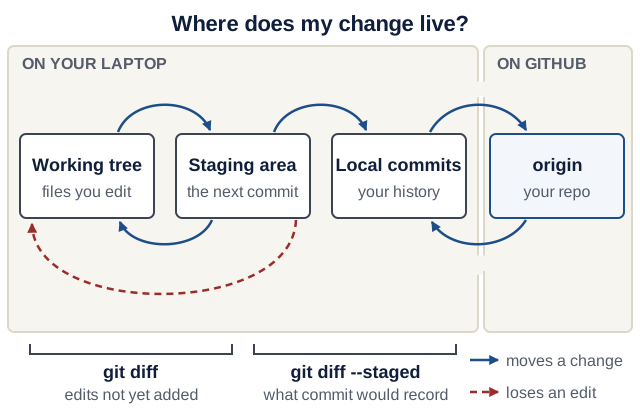
Text version of the diagram
Four boxes from left to right: working tree, staging area, local commits, GitHub (origin).
- Forward:
git addmoves an edit from the working tree to the staging area;git commitrecords the staged snapshot in local history;git pushcopies local commits to GitHub. - Back:
git pullbrings commits from GitHub (for example a merged PR) into your local branch and files.git restore --staged <file>takes a file out of the staging area and keeps your edit.git restore <file>overwrites the working-tree file with the staged or committed version, so the edit is lost; it is drawn in the danger colour. - What the two diffs compare:
git diffcompares the working tree with the staging area (changes you have not added yet).git diff --stagedcompares the staging area with your last commit (exactly whatgit commitwould record). - Inspect:
git statusreports the three local boxes;git log --onelinelists local commits;gh pr list --state mergedlists what reached GitHub’smain.
Check yourself: you edited README.md and ran git add README.md, then edited it again. What does git diff show now, and what does git diff --staged show?
Check your answer
git diff shows only the second edit (working tree versus staging area). git diff --staged shows only the first edit, which is what git commit would record right now. Run git add README.md again to stage both. The full set of safe undo moves is in Git you need to operate.
Simulator: where does my change live? Run Git commands on one file and watch which of the four places holds your latest edit, and which command shows it.
Worked example (one file, starting clean):
- Edit
README.md. Only the working tree changed:git diffshows edit 1, andgit diff --stagedprints nothing. git add README.md. Edit 1 is staged:git diffprints nothing, andgit diff --stagedshows edit 1.- Edit again.
git diffshows edit 2;git diff --stagedstill shows only edit 1. git commit. Edit 1 is recorded on your laptop.git statussays the branch is ahead oforiginby 1 commit, and edit 2 is still not staged.git push. GitHub now has edit 1. Edit 2 exists only in your working tree.git restore README.md. Edit 2 is gone for good: Git never stored it.git restore --staged README.mdwould only have unstaged a staged edit.
The interactive version of this simulator needs JavaScript; the worked example above is the same model.
Docker: images and containers
- An image is a frozen filesystem plus a default command, such as “Debian + Python 3.14”. Think of it as a class.
- A container is a running instance of an image, like an object. It is a process with its own filesystem and network. Deleting it leaves the image untouched.
- Port mapping
-p 8080:8000forwards host port 8080 to container port 8000. It works like a phone extension: callers dial the building (8080), and reception forwards them to extension 8000. - The container has its own
localhost. Inside the container,127.0.0.1means the container itself, not your laptop. So the server inside must listen on all of the container’s interfaces (0.0.0.0); a server bound to127.0.0.1there answers only callers inside the same container, and the forwarded request gets no answer.python -m http.serverbinds0.0.0.0by default.fastapi devbinds127.0.0.1, which is right on your laptop;fastapi runbinds0.0.0.0, which is why Lecture 3’s Dockerfile uses it.
For a local-only demo, -p 127.0.0.1:8080:8000 also selects the host interface. The runnable examples use loopback so the demo is not intentionally published to other machines on your network. The two-field form normally binds all host interfaces.

curl localhost:8080 from your laptop to the server, then predict what happens if the server binds 127.0.0.1. On a narrow screen, scroll the diagram sideways. Open the diagram at full size.Text version of the diagram
Top panel, from left to right:
- Your laptop (the host).
curl localhost:8080or a browser connects to127.0.0.1:8080. Because of-p 127.0.0.1:8080:8000, Docker listens there, on loopback only, so other machines on your network cannot connect. - Docker’s Linux VM. On macOS and Windows, Docker Desktop runs containers inside a small Linux virtual machine; on Linux the host runs them directly. Docker forwards the connection to port 8000 of the container.
- The container has its own network and its own
localhost. A server bound to0.0.0.0:8000receives the forwarded request and answers200 OK. A server bound to127.0.0.1:8000accepts only connections from inside the container, so the forwarded request fails; on Docker Desktop curl reportscurl: (52) Empty reply from server.
Bottom panel, the lifecycle of one container from one image: docker run creates a container from the image and starts it (running). When its main process ends, or after docker stop, it is exited and still listed by docker ps -a. docker rm deletes it, and --rm deletes it automatically when it exits (removed). The image stays in docker images and can start many more containers.
AI-assisted coding: brief, diff, verify, note
AI tools are allowed from week 1 (rules). The bottleneck has moved from writing code to verifying it: treat AI output like a PR from a stranger.
-
Brief: a five-line work order. Write it before you ask. The whole course uses these field names; Lecture 2 adds two more.
Outcome: GET /health returns {"status": "ok"} Files: backend/app/main.py only Non-goals: no database, no new dependencies Verify with: uv run fastapi dev in backend/, then curl http://localhost:8000/health prints {"status":"ok"} Review focus: the path is /health (not /healthz); return type annotated - Small diff. One change at a time. Reject a diff that touches files outside “Files”.
- Verify. Run it, read
git diff --staged, and check unfamiliar calls in the official docs. From Lecture 2 on, also break the code and confirm that a test goes red. - Note. Keep a short AI-use note in your product README, under
## AI use: tools used, help received, checks you ran. Lab step 7 writes the first one.
Product scoping: one narrow domain, three services
You grow one product all semester (requirements). Narrow beats ambitious: “save and adapt recipes” is buildable; “a food platform” is not. The demo product is Recipe Box, and you pick your own domain. A good sketch answers:
- Why does it exist? The purpose: the need, and the bad situation it prevents. Recipe Box: “recipes saved as screenshots and chat messages get lost and cannot be searched or scaled.”
- Who uses it, and for what? Three user stories: “As a user, I can action so that benefit.”
- How does it work, in one scenario? The operational principle: “after X does A, then B; afterwards C holds”. Recipe Box: “after I paste a messy recipe and press Extract, the form fills in; after I save it, it appears in my list and is still there tomorrow.” Lecture 5’s end-to-end test and your final demo replay this sentence.
- What data does it keep? One main record, 4–6 fields, each with a type and a limit.
- What does the AI service do? One job with a structured output, such as messy text in and a record out.
- How does data flow? Read the sketch below top to bottom: the browser talks only to the frontend, the frontend only to the backend, and only the backend touches SQLite and calls the AI service.
browser
  -> frontend    (Streamlit or React)      :8501
  -> backend     (FastAPI)                 :8000  -> SQLite (only the backend)
  -> ai-service  (FastAPI + Pydantic AI)   :8001  (called only by the backend)
Purpose and operational principle are inspired by concept design in MIT’s 6.1040 Software Design (Fall 2026); see Further study. EASS is not affiliated with MIT.
Asking for help: the PARD template
Send all four parts to whoever you ask, human or AI. It is also the skeleton of a good upstream bug report.
Problem:   one sentence
Action(s): the exact commands you ran
Result:    the full output, pasted as text (not a screenshot)
Desired:   what you expected
Before asking, write one sentence saying what you think is wrong, and why: see the debug log. A wrong guess is fine; it tells the helper where your picture differs from reality.
Open source: choose before you code
You need three PRs merged into qualifying projects (rules; three per student). Reviews take weeks, and some projects restrict outside or AI-assisted PRs: as of October 2026, Streamlit’s CONTRIBUTING says it has paused pull requests from outside its maintainer team. So you check projects before writing code for them.
SDLC: from a request to running software
The sections above set up tonight’s workbench. This one is the map for the rest of the semester: read it once now, and come back to it as Lectures 2–10 fill in each stage.
The software development life cycle (SDLC) is the work of discovering a need, defining acceptable behavior, designing a solution, implementing it, verifying it, releasing it and learning from its operation. Coding is one activity in that cycle. A saved file, a green test run, a merged pull request and a healthy production release are different milestones.
Example: a user wants to find vegetarian recipes. Before writing code, clarify whether “vegetarian” is an explicit tag or an inference from ingredients, what an empty result looks like, and whether existing recipes need a migration. For an explicit tag filter, ordinary SQL and API validation are enough; an LLM adds no necessary capability.
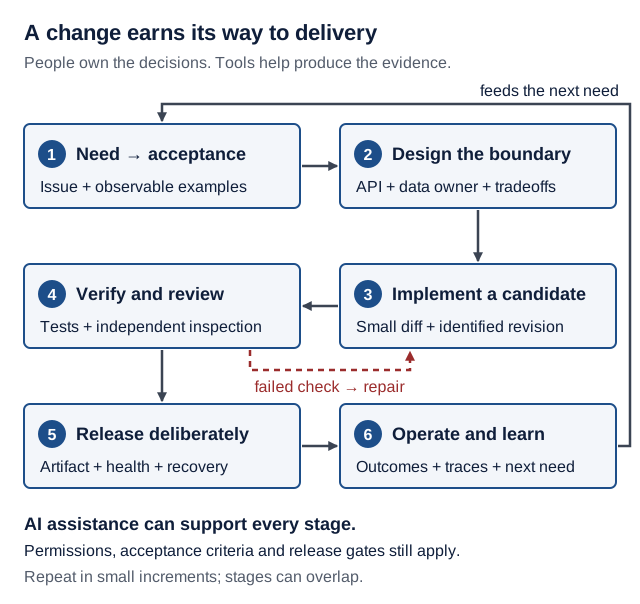
Text version of the diagram
A change earns its way to delivery. People own the decisions. Tools help produce the evidence.
Six stages, each labelled with the evidence it produces. Arrows connect them in this order:
- Need → acceptance: issue and observable examples.
- Design the boundary: API, data owner and tradeoffs.
- Implement a candidate: small diff and identified revision.
- Verify and review: tests and independent inspection. A dashed arrow labelled “failed check → repair” goes back from this stage to stage 3.
- Release deliberately: artifact, health and recovery.
- Operate and learn: outcomes, traces and next need. An arrow labelled “feeds the next need” returns from this stage to stage 1 and closes the loop.
Below the stages: AI assistance can support every stage; permissions, acceptance criteria and release gates still apply. Repeat in small increments; stages can overlap.
Around 2023 and now: what changes with coding agents?
This comparison describes two workflows, not a claim that every company changed at the same time. Around 2023, teams already used version control, automated tests, CI/CD, cloud infrastructure and coding assistants. In 2026, capable coding agents can also inspect repositories, edit multiple files and execute tools in a configured environment. Adoption and reliability vary; a team can mix manual work, autocomplete, chat and agents within one change.
| Stage | A common workflow around 2023 | An agent-assisted workflow today | Evidence you still owe |
|---|---|---|---|
| Discover and specify | Talk to users; write an issue and acceptance criteria | Ask an assistant to summarize feedback and draft cases; confirm the actual need with stakeholders | A concrete problem, boundaries and observable acceptance criteria |
| Design | Read the code, sketch interfaces, discuss tradeoffs | Have an agent trace callers and propose alternatives; inspect its references | An interface, data ownership and a reason for the design |
| Implement | Write code with docs, search, autocomplete and peer help | Delegate a bounded change with allowed files, tools and a stopping condition | A small diff you can explain; no unrelated edits or exposed secrets |
| Verify and review | Run tests and CI; review a pull request | Let an agent run checks and propose repairs; inspect the tests and independently check important behavior | Relevant tests, failure cases and results for the exact candidate revision |
| Release | Merge, build an artifact, deploy and check health | Automate the same gates; give deployment credentials only to the authorized release process | The deployed revision, configuration, migration plan and rollback or recovery procedure |
| Operate and learn | Read logs, respond to incidents, prioritize fixes | Use AI to summarize traces or suggest hypotheses; verify them against telemetry | User-visible outcomes, latency, errors and a verified fix |
The change is in how work is performed and coordinated, not the disappearance of requirements, architecture or accountability. An agent’s confident summary is a claim to check. More generated code can also mean more review and maintenance. Faster typing does not establish faster delivery or better quality.
The GitHub developer survey from 2023 already discussed AI tools alongside review, build and test delays; it describes a particular survey population, not all developers. Anthropic’s long-running agent harness example illustrates incremental work, explicit progress records and verification across sessions. It is one engineering approach, not proof that every agent can deliver independently.
Walk one change through the cycle
For GET /recipes?tag=vegetarian, write the work order before asking an agent to edit:
Problem: people cannot narrow the recipe list by a saved tag.
Accept: matching recipes only; unknown tag returns []; omitted tag preserves the old list.
Boundary: backend owns filtering and stored data; frontend sends a query parameter.
Scope: API, database query, tests, and a small frontend control; no new service or model.
Verify: matching/nonmatching/empty cases, existing unfiltered behavior, browser check.
Stop: return a reviewable diff and commands/results; do not deploy from the coding session.
- Specify: turn those sentences into examples before implementation. Decide how whitespace and letter case behave rather than letting the generated code decide silently.
- Design and build: trace browser → backend → SQLite. Update the OpenAPI contract when the query parameter changes. Keep persistence in the backend.
- Verify: seed two recipes with different tags. Check both filtered and unfiltered requests. A test that only asserts HTTP 200 cannot establish correct filtering.
- Deliver: review the diff, run CI for that revision and merge through the team’s process. Check the deployed service; merge alone does not prove publication.
- Learn: if users get empty lists because tag spelling varies, investigate the data and requirements. Improve normalization or the UI based on evidence.
Check yourself: an agent changes the filter and reports “all tests pass”, but the tests never create a nonmatching recipe. Which acceptance criterion remains unproven? Add a fixture that could expose the mistake, then explain why it distinguishes correct filtering from returning everything.
Check your answer
Matching recipes only. If every recipe in the test data has the vegetarian tag, the correct response to GET /recipes?tag=vegetarian and the whole list are the same, so the tests cannot tell a correct filter from one that ignores the tag. Add a fixture (the data a test creates before it runs) with one recipe tagged vegetarian and one without that tag, and assert that the filtered response contains the first and not the second. A filter that returns everything now fails; a correct filter passes. This is step 3’s “seed two recipes with different tags”.
Where we practice it: Lectures 2–3 implement the API and persistence; 4–5 add the browser and tests; 6–9 introduce the separate AI service, boundaries and evaluations; 10 covers CI, security and release. The agent-driven engineering guide develops delegation and review, and the software factory lab follows a work order through retained delivery evidence. These remain the same product and course requirements.
Live demo
1. Check the tools (macOS, Linux, WSL; any folder). Observe the real result.
uv --version
git --version
gh --version
docker --version
docker compose version
curl --version
2. Create the repo and the backend (from the folder that holds your projects, for example ~/eass). Make the smallest change. Run git init first: uv init outside a Git repo creates a nested backend/.git.
mkdir recipe-box
cd recipe-box
git init
uv init --app --no-package --python 3.14 backend
cd backend
uv add "fastapi[standard]"
mkdir app
touch app/__init__.py
rm main.py
Version note: since uv 0.12, uv init --app creates a packaged src/ layout; --no-package keeps the flat app/ layout used all semester. uv 0.13 downloads Python 3.15 by default, so we pin --python 3.14. (Checked 17 October 2026 with uv 0.13.1: uv 0.12.0, uv 0.13.0.)
# backend/app/main.py
from fastapi import FastAPI

app = FastAPI(title="Recipe Box API")


@app.get("/health")
def health() -> dict[str, str]:
    return {"status": "ok"}
Append to backend/pyproject.toml, so fastapi dev and later fastapi run (Docker) use an explicit entrypoint instead of guessing. Without it, the CLI auto-discovers app/main.py and suggests this exact table.
[tool.fastapi]
entrypoint = "app.main:app"
Start the server from backend/, and leave it running. Then open a second terminal.
uv run fastapi dev
Predict: you are about to run curl http://localhost:8000/health in the second terminal. Which terminal prints a new line, and what does that line say?
Check your prediction
Both. The second terminal prints the response, {"status":"ok"}. The server terminal prints an access-log line such as INFO: 127.0.0.1:63209 - "GET /health HTTP/1.1" 200 OK: who called, which method and path, and the status code. The port after 127.0.0.1: is curl’s own random port, so yours differs.
curl http://localhost:8000/health
Also open http://localhost:8000/docs.
Investigate:
- In the server terminal, find the line that says which import string
fastapi devused. Where did it come from?- The server says
Uvicorn running on http://127.0.0.1:8000. Could a phone on the same Wi-Fi open your/docs?
Show model answers
Using import string: app.main:app, read from[tool.fastapi]inpyproject.toml. Without the table the line ends with(auto-discovered, ...).- No. The server is bound to
127.0.0.1, the loopback interface, so only programs on your laptop can connect. That is the safe default for development.
3. Commit, push, and practice a PR. Restore, verify, commit. Go back to the repo root first; every command in this step runs there:
cd ..     # back to recipe-box/, the repo root
pwd       # must end in /recipe-box
Keep local files out of Git with .gitignore
Create .gitignore at the repo root (recipe-box/.gitignore):
.env
.venv/
__pycache__/
.pytest_cache/
.ruff_cache/
data/
*.db
Review and commit
Source and reproducible setup
.gitignoreThe team's shared ignore rulesbackend/app/*.pyThe code you writebackend/pyproject.toml+backend/uv.lockDependencies and resolved versionsbackend/.python-version+backend/README.mdRuntime choice and instructions
Keep local
Secrets, generated files and runtime data
.envLocal settings and real API keys.venv/Rebuild from the lockfile__pycache__/and test/lint cachesGenerated, disposable outputdata/and*.dbRuntime data, not source code
Already tracked? Adding an ignore rule does not remove a file from Git's index or past commits.
Check the boundary: from the repository root, run git check-ignore -v backend/.venv/ to see the matching rule. After staging, git ls-files .env must print nothing; it checks whether that path is tracked, which is a different question. These rules do not prevent a deliberate git add -f. If a real credential was committed or pushed, stop using it and revoke/rotate it; adding .env here does not erase history. See the Git ignore reference.
Predict: after git add ., which seven files will git diff --staged --stat list, and which folder must not appear?
Check your prediction
The seven paths below. The line counts on the right differ on your machine; the paths must match. If you see .venv/ (or backend/.venv/...), stop: check that .gitignore is at the repo root and the rule matches. Also check whether the path was already staged/tracked or added with -f; ignore rules do not undo those states. Before your first commit, unstage a wrong path with git rm -r --cached <path> (that is what git status suggests then); after it, use git restore --staged <path>.
 .gitignore              |    7 +
 backend/.python-version |    1 +
 backend/README.md       |    0
 backend/app/__init__.py |    0
 backend/app/main.py     |    8 +
 backend/pyproject.toml  |   12 +
 backend/uv.lock         | 1256 ++++++++++++++++++++
 7 files changed, 1284 insertions(+)
git status                 # before: .gitignore and backend/ are "Untracked files"
git add .
git status                 # after: seven paths under "Changes to be committed"
git diff --staged --stat
git commit -m "Add backend skeleton with /health"
Publish to EASS-PART-A-2026-X, the course organization. The instructor uses recipe-box for the demo; students replace it with their agreed, unique product name. Confirm organization access first. Choose one route:
-
You have permission to create the project repository:
gh repo create EASS-PART-A-2026-X/recipe-box --private --source=. --remote=origin --push -
The instructor already created an empty project repository for you: connect to that repository instead of running
gh repo create. Replace the demo name below. If it already contains commits, ask the instructor how to preserve both histories before pushing.git remote add origin https://github.com/EASS-PART-A-2026-X/recipe-box.git git push -u origin main
Then check the owner and continue:
gh repo view --json nameWithOwner,url
git switch -c add-product-sketch
Write the product sketch in README.md at the repo root (template in the lab), then, still from recipe-box/:
git add README.md
git commit -m "Add product sketch"
git push -u origin add-product-sketch
gh pr create --fill
gh pr merge --squash --delete-branch
git switch main
git pull
gh pr merge merges on GitHub; git pull brings that merge back to your laptop. The repository owner must be EASS-PART-A-2026-X. Keep the visibility and contributor/grader access agreed with the instructor; organization ownership does not automatically grant every student access. A PR on your course product repository never counts toward the three upstream PRs.
4. Docker in four commands (any folder). Observe the real result.
Predict: the last command is docker stop hello. Afterwards, will docker ps -a still list hello? Will docker images still list python:3.14-slim?
Check your prediction
hello is gone from docker ps -a: --rm deletes the container as soon as it stops. python:3.14-slim is still in docker images: the image is the template, and it stays for the next run.
docker run --rm hello-world
docker run --rm python:3.14-slim python -c "import sys; print(sys.version)"
docker run -d --rm --name hello -p 127.0.0.1:8080:8000 python:3.14-slim python -m http.server 8000
docker stop hello
Line 2 prints a 3.14.x version even without Python 3.14 on your laptop. While hello runs, http://localhost:8080 shows a directory listing served from inside the container, and docker ps lists it with 127.0.0.1:8080->8000/tcp. Pin python:3.14-slim, not python:3-slim, which now means Python 3.15. Tags can receive updates; Lecture 10 explains exact image digests.
5. Check an open-source candidate (any folder). Observe the real result. FastAPI is used only to show the commands; it is not a recommendation.
gh repo view fastapi/fastapi \
  --json nameWithOwner,stargazerCount,licenseInfo,isFork,isArchived,pushedAt
gh api repos/fastapi/fastapi/community/profile --jq '.files.contributing.html_url'
gh pr list -R fastapi/fastapi --state merged --limit 10
On 17 October 2026 the first reported 103,177 stars, MIT, isFork: false, and a push the same day. The second command shows that FastAPI’s CONTRIBUTING lives in the organization’s .github repo: never assume it sits at the root.
Hands-on lab
Do every step for your own domain. Plan your time:
- Core today: steps 1–7
- Before Lecture 2: drill 4, “Undo without panic”, in Break it on purpose
- Extension (optional): the Stretch goals
- Install (skip what Student setup, Part A already did).
- Windows: in an admin PowerShell run
wsl --install -d Ubuntu, reboot, and create your Ubuntu user. In Docker Desktop, enable WSL integration for Ubuntu (Settings → Resources). Keep code under~in Ubuntu, never/mnt/c. Open projects withcode .from Ubuntu (VS Code’s WSL extension). - macOS: Docker Desktop, an editor, and
brew install uv gh(or the official installers). - Linux: Docker Engine and the Compose plugin, from Docker’s docs.
-
Everyone (skip the first line if you used Homebrew; on Ubuntu, install gh with the apt steps). These are the same lines as setup’s Connect Git and GitHub block; use the email address you chose there:
curl -LsSf https://astral.sh/uv/install.sh | sh
uv python install 3.14
git config --global user.name "Your Name"
git config --global user.email "ID+USERNAME@users.noreply.github.com"
git config --global init.defaultBranch main
gh auth login
gh auth setup-git
gh auth loginasks four questions. Answer: GitHub.com → HTTPS → Yes (authenticate Git with your GitHub credentials) → Login with a web browser.
Checkpoint: demo step 1 prints six versions, with uv 0.12 or newer (0.13 recommended; else run
uv self updateorbrew upgrade uv) andgh auth statussaysLogged in to github.com. - Windows: in an admin PowerShell run
-
Create your repo and
/healthwith demo step 2, named after your product (for examplestudy-planner). Checkpoint: the curl prints{"status":"ok"}, and/docsopens. -
Publish, branch, then write your product sketch. Run demo step 3 up to
git switch -c add-product-sketch, using your agreed product name and retaining theEASS-PART-A-2026-X/owner prefix. Use the existing-repository route if the instructor created it. Check the organization owner withgh repo view --json nameWithOwner,url, then write the sketch inREADME.mdat the repo root on that branch:# <Product name> One sentence: who it is for and what problem it solves. **Purpose:** the need, and the bad situation it prevents. **Operational principle:** after <someone> does <A>, then <B>; afterwards <C> holds. ## User stories 1. As a <user>, I can <action> so that <benefit>. ## Data sketch <Record>: field (type, limits), ... ## The AI service Input: ... Structured output: ... ## Data flow browser -> frontend -> backend -> ai-service (only the backend touches the database) ## AI use Tools: ... · Help received: ... · Checks I ran: ... ## Open-source shortlist | Repository | Stars (date checked) | License | Why it fits me | |---|---|---|---|Recipe Box: save a recipe; browse, edit or delete; paste messy text and get a structured recipe saved. Record:
title(text, 1–200 chars),minutes(integer, 1–1440),servings(integer, 1–50, default 2),ingredients(text, at most 5000 chars, one per line),tags(text, at most 500 chars, comma-separated). Checkpoint: a classmate reads it in two minutes and can say what the AI service does and repeat your operational principle. -
Merge the sketch through a PR with the rest of demo step 3. Checkpoint:
gh pr list --state mergedshows your PR, andgit log --onelineonmainshows it aftergit pull. - Docker missions (any folder).
- Start
helloagain (demo step 4, third command) and rundocker pswhile it runs: one line, statusUp …, ports127.0.0.1:8080->8000/tcp. - Run a container without
--rm:docker run --name keep python:3.14-slim python -c "print(1)". It prints1and exits. - Run
docker ps -a:keepshowsExited (0) …andhelloshowsUp …. - Run
docker stop helloanddocker rm keep, thendocker ps -a(neither is listed) anddocker images(python:3.14-slimis still there).
Checkpoint: you can point at the running container, the exited one, and the image they share, and say why
hellovanished afterdocker stopwhilekeepneededdocker rm. - Start
-
Open-source shortlist. Pick 2–3 projects you use or care about and work through the open-source track. Checkpoint: each table row has a dated star count, a license, and the CONTRIBUTING link you read.
- Give an assistant one bounded task (about 15 min, from
recipe-box/on an up-to-datemainwith a cleangit status). No assistant yet? Do the task by hand and writeTools: nonein the note. Before your first agent session, read Week 1 minimum; Student setup, Part B has an explain-first prompt to try before this edit and the red flags to watch for.git switch -c add-run-section- Write a three-line forecast in your own notes, not the README: minutes by hand versus with the assistant; your chance (0–100%) that the first try passes “Verify with”; the exact verify command.
-
Give the assistant this work order:
Outcome: README.md gains a "## How to run" section: the exact commands to start the backend and to check /health Files: README.md only Non-goals: no code changes, no new dependencies, no other README section changed Verify with: follow the new section in a fresh terminal; curl http://localhost:8000/health prints {"status":"ok"} Review focus: the folder each command runs in (cd backend); uv run, not pip or a bare uvicorn - Run
git statusandgit diff. Keep the change only if it touchesREADME.mdalone and you ran its commands yourself:git add README.md, thengit commit -m "Add How to run". Otherwise discard it withgit restore README.md(andgit restore .for any other file it touched), and write the section by hand. If the assistant committed on its own,git log --onelineshows it; undo it withgit revert HEAD. - Under
## AI use, write two lines: what the tool did, and the check you ran. Compare the result with your forecast in one sentence. - Push, open a PR and merge it as in demo step 3.
Checkpoint: before merging,
git diff main --statlists onlyREADME.md; after merging, your README on GitHub has## How to runand an## AI usenote naming the tool, the help and the check you ran. A red flag to reject: the assistant says it “ran” or “tested” something you did not see run, or suggestspip install.
EX1 progress: today you have the repo,
/health, and the first run instructions (## How to run). Lecture 2 adds CRUD, validation and tests; Lecture 3 adds persistent data and a backend Dockerfile. EX1 is due Mon 9 Nov 2026, 23:59 (assignments).
Break it on purpose
Make it fail, read the exact error, fix it, and note the fix in your README. For each drill, predict first, then run, then explain.
Drill 1 · Wrong folder. From the repo root (recipe-box/), run uv run fastapi dev. Predict the first line of output before you press Enter.
Check your prediction
error: Failed to spawn: fastapi, followed by No such file or directory. uv run looks for the nearest pyproject.toml in this folder or above it. The repo root has none, so backend/.venv, where fastapi is installed, is never used. Fix: cd backend.
Drill 2 · Port collision. With one server running in backend/, start a second uv run fastapi dev in another terminal. Predict the error, and which program owns port 8000.
Check your prediction
ERROR: [Errno 48] Address already in use on macOS ([Errno 98] on Linux and WSL). Find the owner with lsof -nP -iTCP:8000 -sTCP:LISTEN. It lists two Python processes with different PIDs: the fastapi dev reloader and the worker it started, sharing one listening socket. The simplest fix: find the other terminal and press Ctrl+C, which stops both. Killing only the worker’s PID is a trap: the reloader still holds port 8000, so the port stays busy and requests hang. To keep both servers, start the second one with uv run fastapi dev --port 8002.
Drill 3 · The container is not your laptop. Run docker run --rm python:3.14-slim python -c "import fastapi". Predict whether it works, given that FastAPI is installed in your project.
Check your prediction
ModuleNotFoundError: No module named 'fastapi'. FastAPI lives in your project’s .venv, not in the image; a container sees only the image’s files. Lecture 3 builds an image that installs your dependencies.
Debug log: pick one drill and write the seven-line debug log entry for it in your notes, with the hypothesis written before you ran the fix.
Drill 4 · Undo without panic (about 10 min; finish before Lecture 2). Practise on a throwaway branch, so main is never at risk. Every command runs from recipe-box/ with the server stopped.
- A wrong commit.
git switch -c practice-undo. In your editor, change"ok"to"okay"inbackend/app/main.py, thengit commit -am "Change health text". Rungit log --oneline --graphandgit show HEAD: the top commit and its one-line diff. - Undo it without rewriting history. Predict what
git log --onelineshows aftergit revert HEAD --no-edit, then run both. - Discard an uncommitted edit. Add a scratch line to the end of
README.md.git statusshowsmodified: README.md. Rungit restore README.md, thengit statusagain. - Make and resolve a conflict.
git switch -c tagline-a, change your README’s one-sentence description (line 2) andgit commit -am "Tagline A". Thengit switch practice-undo,git switch -c tagline-b, change the same line differently andgit commit -am "Tagline B". Back onpractice-undo, rungit merge tagline-a, then predict whatgit merge tagline-bprints, and run it. - Resolve. Open
README.md, keep the line you want, and delete the three marker lines. Thengit add README.md,git commit -m "Merge tagline-b", andgrep -n '<<<<<<<' README.md, which must print nothing. - Clean up.
git switch mainandgit branch -D practice-undo tagline-a tagline-b. Nothing reached GitHub, somainis unchanged.
Check your predictions
- Step 2: a new top commit,
Revert "Change health text", above the one it undoes. The bad commit stays in history and the file says"ok"again. This is the safe undo for anything already pushed, because nobody else’s copy of history changes. - Step 3:
git statusreportsnothing to commit, working tree clean. The scratch line is gone for good;git restorecannot be undone. - Step 4: the first merge is a fast-forward. The second prints
CONFLICT (content): Merge conflict in README.mdandAutomatic merge failed; fix conflicts and then commit the result.The file now holds both versions between<<<<<<< HEAD,=======and>>>>>>> tagline-b.git merge --abortwould return to the state before the merge.
Done when: you have seen the Revert "Change health text" line in git log --oneline, resolved a conflict so that grep -n '<<<<<<<' README.md prints nothing, and can say in one sentence what HEAD and a branch point to. The rule to remember: never rewrite pushed main; use git revert. This drill is inspired by MIT’s 6.102 “Git 2: disaster recovery” and Missing Semester 2026, version control; the scenario is our own.
Open-source track
This week: choose 2–3 candidates and verify each one yourself. The course publishes no eligible list (qualifying rules). For each candidate:
- Official upstream:
isFork: false, and the project’s website links here. Use thenameWithOwnergh prints (renamed repos redirect). - More than 10,000 stars: record
stargazerCountand the date in your shortlist. Re-check and record it again on the day you open each PR; that count goes in your evidence table. - Open-source license: save the license file’s URL.
- Maintainers merge outside work: recent merges, some by authors labeled
CONTRIBUTORorFIRST_TIME_CONTRIBUTOR(MEMBERmeans the team). Two ways to check:- In the browser: open the repository’s Pull requests tab, filter by
is:pr is:merged, open the last 10, and look for authors without aMember(orOwnerorCollaborator) badge. -
One way with the shell: this pipeline counts merged PRs by author type among the last 100 closed PRs, without bots.
gh api "repos/OWNER/REPO/pulls?state=closed&per_page=100" \
  --jq '.[] | select(.merged_at) | [.author_association, .user.login] | @tsv' \
  | grep -v "\[bot\]" | sort | uniq -c
- In the browser: open the repository’s Pull requests tab, filter by
- CONTRIBUTING read in full, including any AI policy. Some ban autonomous agents, require human-written PR text, or want an issue first. Numbers are signals; CONTRIBUTING is the rule.
-
Tests run locally, for your best candidate, before Lecture 3. Follow CONTRIBUTING. For a uv-based Python project it often looks like the generic pattern below; FastAPI’s own script also sets
PYTHONPATH=./docs_src, so its last line isPYTHONPATH=./docs_src uv run pytest tests/some_small_folder(verified 16 October 2026).gh repo clone OWNER/REPO -- --depth 1 cd REPO uv sync uv run pytest tests/some_small_folder
Read one result: FastAPI on 17 October 2026
The pipeline printed two lines: 16 MEMBER tiangolo and 4 MEMBER YuriiMotov. Of the last 100 closed PRs, 66 were merged; 46 of those were bot PRs (filtered out), and the remaining 20 all came from two team members. In this window there is no merged PR from an outside author, so FastAPI is a weak candidate for your first PR right now, whatever its star count. A wider window or next month may look different: re-check on the day you choose.
What each stage does: gh api fetches the last 100 closed PRs as JSON; --jq keeps the merged ones and prints the author type and login; grep -v "\[bot\]" drops bots; sort | uniq -c counts identical lines.
Next week you look for a real issue or documentation gap in your best candidate.
Working with AI assistants
Read the development loop: turn a request into acceptance criteria, a small candidate change, and evidence. Use the five-line work order from Concepts now; the longer one, with Acceptance and Stop, starts in Lecture 2, once you have tests: one work-order template. Distinguish repository guidance from enforced permissions, and read Week 1 minimum before you let an agent run commands.
- Explain an error. Paste a PARD, then add: “Explain the cause in two sentences and give the smallest fix. Don’t touch unrelated files.”
- Predict, then run. “Explain each flag of
docker run -d --rm -p 127.0.0.1:8080:8000 python:3.14-slim, without showing output.” Predict whatdocker psandcurl localhost:8080will show, then run all three. - Scope review. “Here is my product sketch. Which user story is too big for ten weeks? Suggest a narrower one.”
Check your prediction (prompt 2)
It prints a container ID and seems to vanish: docker ps is empty and curl says Failed to connect to localhost port 8080. The command has no program to run, so the image’s default command runs: python3, an interactive shell. In detached mode it gets no input, so it exits at once, and --rm deletes the container. Nothing is broken. Add a command that keeps running, such as python -m http.server 8000 after the image name, and the same curl gets a directory listing.
Verify by running it and checking flags in the official docs. Spot the outdated suggestion:
pip install fastapi uvicornwith arequirements.txt, where the course usesuv addand commitsuv.lock;uv init --app backendwithout--no-package, which creates asrc/layout;FROM python:3-slim, which is now Python 3.15;docker-composewith a dash, where the Compose plugin isdocker compose.
Completion check
From backend/, with uv run fastapi dev running in a second terminal and main checked out:
uv run python --version
git pull
git log --oneline
gh pr list --state merged
docker run --rm python:3.14-slim python -c "print('container ok')"
curl http://localhost:8000/health
Expected: Python 3.14.x; three or more commits; two merged PRs (the sketch and How to run); container ok; {"status":"ok"}.
| Must work | Evidence you keep | If it fails, repair here |
|---|---|---|
curl http://localhost:8000/health prints {"status":"ok"} from committed, pushed code | Your repo URL | Drill 1 · Common pitfalls |
Repo has backend/ (pyproject.toml, uv.lock, .python-version, app/main.py) and a root .gitignore excluding .venv/ and .env | git diff --staged --stat from demo step 3 | Where does my change live? |
| README has purpose, operational principle, 3 user stories, a data sketch with types and limits, the AI service’s job, and the data flow | README on GitHub | Product scoping |
README has an ## AI use note naming the tool, the help and the check you ran | README on GitHub | Lab step 7 |
docker run --rm python:3.14-slim python -c "print('container ok')" prints container ok | — | Docker concept · Common pitfalls |
| Shortlist of 2–3 verified candidates with dated star counts | README shortlist table | Open-source track |
| Before Lecture 2: drill 4 done (a revert and a resolved conflict) | One sentence in your notes on revert versus restore | Git you need to operate |
Not yet? Repair and re-run before starting the next lecture’s lab; later layers assume this one works.
Quick quiz
Q1. You stop a container started with --rm. What happens to the python:3.14-slim image? (a) It is deleted with the container (b) It saves the container's changes (c) It stays for the next run
(c). --rm deletes the container. The image is the template; it stays in docker images and can start many more containers. Nothing the container changed is written back into the image.
Q2. In -p 8080:8000, which port does your browser use? (a) 8000, the container port (b) Whichever port is free (c) 8080, the host port
(c). The format is HOST:CONTAINER. The browser talks to the host on 8080, and Docker forwards that to 8000 inside the container, where nothing listens on 8080.
Q3. Which file must you commit so graders get exactly the versions you tested? (a) README.md (b) uv.lock (c) .venv/
(b). pyproject.toml states ranges such as fastapi[standard]>=0.143.3; uv.lock records the exact resolved versions. .venv/ is machine-specific build output, so it is git-ignored. README.md explains the project but pins no versions.
Q4. A project has exactly 10,000 stars and a friendly CONTRIBUTING. Does a merged PR there count? (a) Yes, it meets the threshold (b) Only if the instructor approves (c) No, it needs more stars
(c). The rule is more than 10,000 stars, so exactly 10,000 is not enough (qualifying rules).
Q5. An assistant's change works when you run it. What must you still do before you commit it? (a) Read every line of the staged diff (b) Nothing else, because the change already works (c) Ask a second assistant to approve it
(a). Running it proves one path works, not that the change stayed in scope. Read git diff --staged first: you must be able to explain every line you submit.
Explain it: in one sentence, what is the difference between an image and a container? (Not the commands that create them.)
Show a model answer
- Weak (narrates commands): “You build an image with
docker buildand start a container withdocker run.” - Strong (purpose and consequence): “An image is a read-only template of files plus a default command, and a container is one running (or stopped) process made from it, so deleting a container loses only that run’s changes while the image can start any number of fresh copies.”
Defend it: the course publishes container ports as
-p 127.0.0.1:8080:8000, not-p 8080:8000. Give one reason from today’s material and one cost.
What a strong answer mentions
- Reason: the two-field form binds every host interface, so anyone on the same café or campus network can reach a development server that has no authentication. Binding loopback keeps it on your laptop.
- Cost: a phone or a classmate’s laptop on the same network cannot open your app for a quick test; you would publish deliberately (and briefly) or use a proper deployment.
Stretch goals
Optional, after the core lab steps work:
- Explore a container:
docker run --rm -it python:3.14-slim bash, thenwhoamiandcat /etc/os-release. You arerootinside, and slim images have nocurl. - See the bind address in action: run
docker run -d --rm --name lo -p 127.0.0.1:8081:8000 python:3.14-slim python -m http.server 8000 --bind 127.0.0.1, thencurl localhost:8081. Explain the failure with the port-mapping figure, thendocker stop lo. - Try the next Python without touching your project:
uv run --no-project --python 3.15 python --version. - Find the agent skills your libraries ship, after you have read Agent sandboxes: Week 1 minimum. FastAPI, Streamlit and Pydantic AI ship agent “skills” inside their packages. A skill is a folder of instructions an agent can load. In a service folder,
uvx library-skills scanlists them (in today’sbackend/only FastAPI’s appears). Read eachSKILL.mdbefore enabling it: it is text from a dependency, not permission. Thenuvx library-skills --claudelinks them for your agent (library-skills.io).
Common pitfalls
uv: command not foundafter installing → the shell hasn’t reloadedPATH→ open a new terminal or runexec "$SHELL" -l.Cannot connect to the Docker daemon→ Docker Desktop is stopped, or WSL integration is off → start it, enable Ubuntu integration, rundocker ps.permission denied … /var/run/docker.sock(Linux) → your user may not talk to the Docker daemon → follow Docker’s post-installation steps (membership of thedockergroup is root-equivalent), or usesudofor today. On a managed or shared machine, ask first.- WSL is very slow → the project lives under
/mnt/c/...→ move it under~. - “Please tell me who you are” on commit → no Git identity → run the two
git config --globallines. - Push asks for a password → Git isn’t using your GitHub login →
gh auth login, thengh auth setup-git. Never paste a password or token into a chat or a file. Permission denied (publickey)on push → you chose SSH ingh auth loginwithout a working key → rerungh auth loginand choose HTTPS.backend/.gitappeared →uv initran beforegit init→ deletebackend/.git, rungit initat the root.README.mdor.gitignoreended up inbackend/→ you ran demo step 3 insidebackend/→ fromrecipe-box/, move it withgit mv backend/.gitignore .gitignore(orgit mv backend/README.md README.md); use plainmvif you have not rungit addyet.- Staged the wrong file →
git add .picked up more than you meant →git restore --staged <file>; before your very first commit that printsfatal: could not resolve HEAD, so usegit rm --cached <file>instead.
Instructor notes
Today’s meeting starts at 18:00, after HIT’s 17:00–18:00 opening-event break (calendar notes).
Suggested flow, with a minute budget per segment (estimates):
- Introductions: name plus one thing you’d like to build (5 min).
- Mission and the three-service picture; link the README rules, don’t read them out (5 min).
- Version check; collect failures as PARD posts and fix them during the lab (10 min).
- Demo step 2 with a student narrating each command before you run it (15 min).
- Git areas: walk one edit through the figure, then demo step 3 with the two
git statuscalls (15 min). - Docker demo with the port-mapping figure. Peer-instruction vote on quiz Q2 (
HOST:CONTAINER): individual poll; if 35–70% are right, two minutes in pairs, then re-vote, and a student explains (10 min). - AI workflow: write the work order live, let an assistant make the change, review the diff out loud (10 min).
- Scoping in pairs: each partner reads the other’s sketch and names its riskiest story and its operational principle (10 min).
- Open-source checklist live on one repo; students check their own candidates (10 min).
- Exit ticket: one thing learned, one thing confusing, your first open-source candidate (5 min).
Core path if time runs short: segments 3, 4, 5 and 7, so everyone leaves with a pushed /health and has seen one reviewed assistant diff; Docker missions, scoping and the shortlist move to the lab. Drill 4 is homework before Lecture 2.
Emphasize git init before uv init, --no-package, WSL, cd .. before demo step 3, and that merged is what counts upstream. Students get stuck on Docker’s WSL integration, PATH after installing uv, the wrong folder, and domains that are too broad: push for one record type and one AI job.
Read more
Before the lab (≤15 min): Docker: publishing ports. Read with two questions: what does the host side of -p control, and what does the two-field form expose that 127.0.0.1: does not?
Go deeper (optional):
- uv: installation and working on projects
- Install WSL and Docker Desktop’s WSL 2 backend
- Docker: what is a container?
- GitHub CLI manual and Contributing to a project
- FastAPI: first steps and FastAPI CLI
- Course sites that go further on tools and Git: Further study