Lecture 10 · CI, security and release
← Course home · ← Previous: Lecture 9 · Next: Meetings 11–13 →
At a glance
- When: Monday 21 December 2026, 16:00 Israel time, on Zoom
- You leave with: a release candidate: green CI, a passing clean-checkout test, hardened containers, a runbook README and a
v1.0.0-rc.1tag- Goals: read a CI workflow and say which commit it checked; play the grader on a fresh clone; tag a release candidate only on a commit with green CI (details)
- Prerequisites: Lecture 9 works (tests green in all three services,
docker compose up --build --waithealthy) andgh auth statussucceeds; repair: Git you need to operate- Product milestone: EX3 (due Mon 11 Jan 2027, 23:59). The EX3 minimum from the README is basic CI and a short runbook, and the grader’s path starts from a fresh clone with no real keys. Everything else on this page is recommended hardening.
- Time: prerequisite check about 10 min before class; lab about 2–3 h after class; the runbook and security review may finish in Meeting 11 (estimate)
- Done when:
scripts/clean-checkout.shprintsClean checkout OKandgh run list --commit …showssuccessfor the commit you tagged
On this page
Mission
Until today, “it works” meant “on my laptop”. Now a robot checks every push, a script plays the grader on a fresh clone, and your containers lose every privilege they don’t need. You finish by tagging a release candidate that a stranger can start, test and break using only your README.
Before you start
Prerequisite check: one minute each, before class.
Check Pass when Repair docker compose up --build --wait, thendocker compose psall three services show (healthy)Lecture 8 completion check uv run pytestin each service folderevery suite passes with no API key Lecture 9 completion check git status --shortandgit log origin/main..main --onelineboth print nothing: everything is committed and pushed Git you need to operate git check-ignore -v .envprints the .gitignorerule that ignores.envConfiguration and environment variables gh auth statussays you are logged in to github.com Student setup
You also need your product on GitHub with main as the default branch, the Lecture 8 stack (non-root containers, ai-service not published, .env git-ignored), and the Lecture 9 failure tests.
Words you'll meet today
Every term here is also in the course glossary, next to the terms from the other lectures.
- Workflow: a YAML file in
.github/workflows/that tells GitHub what to run and when. - Runner: the fresh virtual machine GitHub starts for one job and throws away afterwards.
- Job: a named group of steps that runs on one runner. Jobs run in parallel unless one
needsanother. - Step / action: one command (
run:) or one published, reusable piece of workflow code (uses:). - Check run: one row in a pull request’s Checks list, one per job, green or red.
- SHA: the 40-character hash that names exactly one commit, such as
3d3c42e5…. - Release candidate (RC): a version you believe is final, published so others can try it.
- Linux capability: one slice of root’s power, such as changing file owners or opening raw network sockets.
- Advisory: a published record of a known vulnerability in a package version, with an ID such as
GHSA-…,PYSEC-…orCVE-….
Learning checkpoint
By the end, you should be able to:
- Explain what the CI jobs check on which revision, and reproduce the documented clean-checkout path.
- Identify the limits of network isolation, input validation, dependency pins, and a shared service token.
- Show the runbook, release candidate, retained data, and a recovery plan appropriate to your product.
Predict first: If an image tag moves or a database schema changes, is reverting a Git commit enough to reproduce or recover the previous system?
Check your prediction
No. Reverting brings back the source, nothing else. A moved image tag such as python:3.14-slim rebuilds the old source on new base-image contents unless you pinned a digest. A schema change has already been applied to the data in the volume, and the old code may not understand it. Getting the old data back needs a backup taken before the change: see Rollback is not restore below.
Warm-up from earlier classes: answer from memory, then check. Ungraded.
- (Lecture 9) Which AI-service failures does the backend retry, and which does it never retry?
- (Lecture 8) Your ai-service has no
ports:. Can the backend container reach it? Cancurl localhost:8001on your laptop?- (Lecture 3) What survives
docker compose downbut notdocker compose down -v?
Check your answers
- It retries transport failures and the ai-service’s 503 and 504, at most 3 attempts with backoff. It never retries the budget-exhaustion 429, a 502, a 500 or other 4xx: repeating cannot fix them.
- The backend can, at
http://ai-service:8001, because Compose service names are DNS names on the shared network. Your laptop cannot: nothing is published atlocalhost:8001. - The named volume
backend-data, which holds the database.downremoves containers and the network;-vremoves volumes too.
Bridge if needed: Release and data lifecycle.
Concepts
CI: the same checks on every push
Continuous integration runs your checks on a fresh machine for every push and pull request, so “works on my laptop” becomes “works from Git”. You will copy a workflow in the live demo; first, learn to read it. Nine keys carry almost all the meaning (GitHub’s overview explains the same terms):
| Key | What it means | What it controls in Recipe Box’s ci.yml |
|---|---|---|
on | the events that start a run (the trigger) | a push to main, or any pull request; a pushed tag starts nothing |
permissions | what the run’s automatic GITHUB_TOKEN may do | contents: read: read the code, nothing else |
jobs | named units of work, each on its own fresh runner | test, compose and audit |
runs-on | which runner a job uses | ubuntu-latest, a GitHub-hosted Linux virtual machine |
strategy.matrix | run the same job once per value | service: [backend, ai-service, frontend] makes three test jobs; ${{ matrix.service }} is filled in per job |
steps, uses, with | the job’s steps, in order; uses runs a published action, with passes its inputs | actions/checkout with persist-credentials: false |
run | one shell command step | uv run pytest |
needs | start only after the named jobs succeed | compose needs test |
if: failure(), if: always() | run a step only after an earlier failure, or no matter what | print the logs on failure; always run down -v |
Predict: you open a pull request with this workflow. How many check runs will the PR show, which one waits for others, and which one may fail without turning the whole run red?
Check your prediction
Five. test (backend), test (ai-service), test (frontend) and audit start at the same time, each on its own runner. compose waits (needs: test) until all three test jobs succeed; if one fails, compose is skipped. audit has continue-on-error: true, so a new advisory does not fail the run (why). The four that must be green are the three test checks and compose.
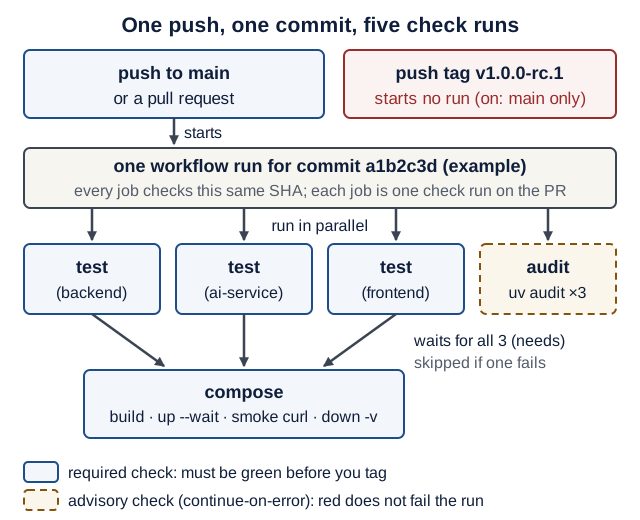
Text version of the diagram
- Trigger: a push to
mainor a pull request starts one workflow run for one commit SHA. Pushing a tag such asv1.0.0-rc.1starts nothing, becauseon.pushlists only themainbranch. - In parallel, each on a fresh runner:
test (backend),test (ai-service)andtest (frontend)each runuv sync --locked, ruff and pytest withAI_MODEL=test.auditrunsuv auditfor all three services; it is advisory (continue-on-error: true). - Then:
composestarts only if all three test jobs succeeded (needs: test). It builds the stack, waits for healthy, runs the smokecurls, prints logs if anything failed, and always runsdown -v. - Result: five check runs on the pull request, all about the same SHA. Required green: the three
testchecks andcompose.
CI never calls a paid model: AI_MODEL=test, and Lecture 6’s conftest guard models.ALLOW_MODEL_REQUESTS = False turns any real request into an error.
Reproducible means pinned
Commit enough configuration to repeat the intended environment and explain remaining moving parts:
| Layer | Selected or pinned by |
|---|---|
| Python packages | uv.lock, enforced by uv sync --locked |
| Python | .python-version and the python:3.14-slim base image select the 3.14 line; patch/base-image contents can change |
| uv itself | uv:0.13.1 in each Dockerfile, version: "0.13.1" in CI |
| CI actions | a full commit SHA, with the version as a comment |
| Actions those actions use | not pinned by your SHA; GitHub’s workflow dependency lockfiles cover them (public preview, checked 17 October 2026; optional reading) |
--locked fails when uv.lock no longer matches pyproject.toml; --frozen would quietly use the stale lock. A tag like @v7 can be moved to new code by whoever controls the action’s repository; a 40-character SHA cannot. To find the SHA for a new action, ask GitHub which commit a release tag points to:
gh api repos/actions/checkout/commits/v7.0.1 --jq .sha
It prints 3d3c42e5aac5ba805825da76410c181273ba90b1, the SHA in the workflow below (checked 17 October 2026). The commits/ endpoint always returns the commit, even for an annotated tag.
An image tag such as python:3.14-slim can move too. Strict image identity requires a digest and a recorded platform; update that digest deliberately for security fixes. Lockfiles improve dependency reproducibility but do not freeze external APIs, remote models, or mutable image tags. The course examples track a Python minor line rather than claiming bit-for-bit builds forever.
Least privilege, layer by layer
Give each part only what it needs, so a bug or a stolen token can do little:
- CI token:
permissions: contents: read. Alsopersist-credentials: false: otherwise checkout leaves the token on the runner for the rest of the job, so every later step, including code those steps run such as test dependencies and pytest plugins, could use it to push. The token used to sit in.git/config; since checkout v6 it sits in a separate file under$RUNNER_TEMP(checkout README, checked 17 October 2026). Either way, later steps can reach it, which is what Drill 2’sartipackedfinding reports. - Containers: non-root uid 10001,
cap_drop: [ALL]andno-new-privileges. - Network: no host-published port for the ai-service; network peers can still reach it. Use network policy and service authentication where the deployment requires them.
- Model: usage limits and a timeout per request; no tool that writes, deletes or runs code.
Capabilities in four sentences. Linux splits root’s power into about 40 capabilities, such as CHOWN (change file owners) or NET_RAW (craft raw network packets). Docker gives every container 14 of them by default, written as a hexadecimal bitmask in which each 1 bit is one capability. A uid-10001 process already has none in use (CapEff is 0), but its bounding set (CapBnd) is the ceiling of what a setuid program or a file capability could hand it later; cap_drop: [ALL] sets that ceiling to zero. no-new-privileges (NoNewPrivs: 1) additionally stops setuid programs from raising privileges at all.
| Layer | Default power | What we removed | What is still possible |
|---|---|---|---|
| CI token | set by the repository’s Actions settings; can include write access | contents: read; persist-credentials: false | reading your code; any step can still reach the internet |
| Container process | root, with Docker’s 14 default capabilities | uid 10001; cap_drop: [ALL]; no-new-privileges | everything uid 10001 may do: read and write /app/data, open network connections |
| Network | every Compose service can call every other one | no ports: on ai-service; published ports bound to 127.0.0.1 | any container on the Compose network can call ai-service:8001 |
| Model | anything the prompt steers it to say | no tools that write, delete or run code; UsageLimits and a timeout; backend validation | wrong, odd or injected output, and spending up to the limits |
Secrets and the leaked-key procedure
Real keys live only in .env: git-ignored, listed in every .dockerignore, and documented by name in .env.example. If a key reaches a pushed commit, assume it is stolen; bots scan public pushes within minutes. Work in this order:
- Revoke and rotate it at the provider first. Rotation makes every copy useless, including copies in forks and clones.
- Check usage and billing at the provider, right away: that is where abuse shows up.
- Stop tracking the file:
git rm --cached .env, then commit. This removes it from the next commit only; the old commit still contains it. - Optional, and ask first: rewrite history (GitHub’s guide). In this course, rotation plus untracking is sufficient. Rewriting needs a force push and does not reach forks or clones that already exist.
GitHub’s push protection blocks some recognized key formats when it is enabled. Never rely on it.
Validation and access control where needed
Every input is untrusted. extra="forbid", length limits and limit ≤ 100 reject unexpected data with 422, and SQLModel sends values as bound parameters, never pasted into SQL. The agent’s instructions ask it to treat pasted text as data. That is a request, not a guarantee; Lecture 9’s injection case measures it. The enforced controls are: no tools that write, delete or run code, and the backend validates every output before saving. Recipe Box has no user accounts (JWT is not required), but a third service reachable by more than your backend deserves a check. 401 means “who are you?”; 403 means “I know you, and no”.
Authentication establishes identity; authorization checks whether that identity may perform this operation on this record. Neither schema validation nor CORS implements ownership checks. The shared token below authenticates a service, not a human user, and does not turn the classroom demo into a private multi-user deployment. Keep demonstrations on synthetic data; plan HTTPS and an appropriate identity/access design before exposing private records publicly.
Optional: a shared service token (only if lab step 5 says something besides your backend can reach the AI service)
# ai-service/app/security.py (optional shared secret between services)
import os
import secrets
from typing import Annotated

from fastapi import Header, HTTPException, status


def require_internal_token(
    x_internal_token: Annotated[str | None, Header()] = None,
) -> None:
    expected = os.getenv("AI_SHARED_SECRET", "")
    if not expected:
        return  # classroom mode: no service-token authentication is enforced
    sent = (x_internal_token or "").encode()
    if not secrets.compare_digest(sent, expected.encode()):  # constant time
        raise HTTPException(status.HTTP_401_UNAUTHORIZED, detail="Invalid token")
Attach it to the route in ai-service/app/main.py. Two lines change; Depends is already imported from Lecture 6:
 from app.agent import Deps, extract_agent
 from app.schemas import ExtractRequest, RecipeExtraction
+from app.security import require_internal_token
...
-@app.post("/extract")
+@app.post("/extract", dependencies=[Depends(require_internal_token)])
 async def extract(body: ExtractRequest, deps: DepsDep) -> RecipeExtraction:
The backend sends the header by passing headers={"X-Internal-Token": token} if token else {} to its httpx.Client. Unset, the check is off, so a clean checkout still needs zero secrets. compare_digest avoids content-dependent short-circuit comparison; it does not eliminate every possible timing side channel or replace transport security.
# ai-service/tests/test_security.py
from pydantic_ai.models.test import TestModel

from app.agent import extract_agent

BODY = {"text": "Hummus: chickpeas. 15 min."}


def test_token_required_when_configured(client, monkeypatch):
    monkeypatch.setenv("AI_SHARED_SECRET", "s3cret-for-tests")
    with extract_agent.override(model=TestModel()):
        assert client.post("/extract", json=BODY).status_code == 401
        wrong = {"X-Internal-Token": "guess"}
        assert client.post("/extract", json=BODY, headers=wrong).status_code == 401
        right = {"X-Internal-Token": "s3cret-for-tests"}
        assert client.post("/extract", json=BODY, headers=right).status_code == 200


def test_token_not_required_when_unset(client, monkeypatch):
    monkeypatch.delenv("AI_SHARED_SECRET", raising=False)
    with extract_agent.override(model=TestModel()):
        assert client.post("/extract", json=BODY).status_code == 200
Your ai-service count grows by 2 (verified on the Lecture 6 code plus these two files: 8 passed).
Predict: the conftest imported the app long before monkeypatch.setenv runs. Why does the first test still get 401? What would happen if security.py read the variable once, at import time?
Check your prediction
require_internal_token calls os.getenv on every request, so it sees whatever the environment holds at that moment, including the value the test just set. Read once at import (EXPECTED = os.getenv(...) at module level), the value would be frozen as empty when pytest imported the app, so the first test would get 200 instead of 401 and fail. Configuration read per request is easy to test; configuration read at import needs a restart.
Dependency hygiene
uv audit checks every locked package against the OSV vulnerability database and exits 1 on a finding. It needs network access and asks a live database, so its answer can change with no change to your code: a new advisory published on 10 January can turn it red. That is why Recipe Box runs it in its own audit job with continue-on-error: true. EX3’s basic CI does not require a clean audit; it requires that you read the findings.
When a finding does not affect you, or no fix exists yet, record a decision instead of silencing CI blindly:
uv audit --locked --preview-features audit-command --ignore GHSA-cpwx-vrp4-4pq7
uv audit --locked --preview-features audit-command --ignore-until-fixed GHSA-cpwx-vrp4-4pq7
--ignore hides that advisory, matched by any of its IDs (GHSA, PYSEC or CVE). --ignore-until-fixed hides it only while no fixed version exists. For every ignored ID, add a README row: ID, package, why it is acceptable (for example “we never render untrusted templates”), and the date.
Version note:
uv auditis a preview feature in uv 0.13;--preview-features audit-commandacknowledges that and silences the warning. The flags above were verified with uv 0.13.1’suv audit --helpand a scratch project (checked 17 October 2026); preview flags may change. An alternative:uv export --format requirements.txt -o req.txt, thenuvx pip-audit -r req.txt --disable-pip.
Releases
A release candidate is a version you believe is final, published so others can try it: v1.0.0-rc.1 (Semantic Versioning). The dot matters: SemVer compares rc.2 and rc.10 as numbers, but rc2 and rc10 as text, where rc10 sorts first. Fixes after rehearsal become v1.0.0-rc.2; the version you demo is v1.0.0. Tag only a commit whose CI run is green, and check it by SHA, not by eye.
Recipe Box’s CI does not run on tags, on purpose. The tag points at a commit CI already tested on main, so a run on the tag adds no new evidence. Release workflows that reuse build caches are also a known attack path (zizmor’s cache-poisoning audit), so the course keeps tags out of CI.
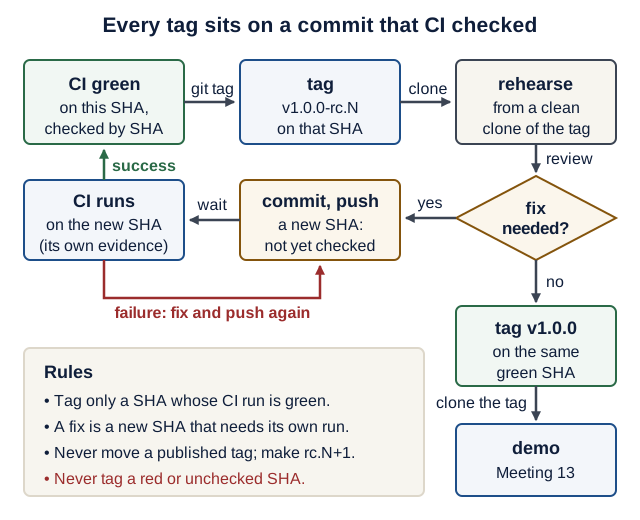
Text version of the diagram
- CI green on SHA A (
gh run list --commit Ashowscompletedandsuccess) → tag →v1.0.0-rc.1points at A. - Rehearse (Meeting 12): clean clone of the tag, follow the README, demo, break one thing on purpose.
- Did the rehearsal need a fix?
- Yes → commit and push the fix → a new SHA B, untested so far → wait for CI → green on B → tag
v1.0.0-rc.2on B → rehearse again. - No → tag
v1.0.0on the same green SHA.
- Yes → commit and push the fix → a new SHA B, untested so far → wait for CI → green on B → tag
- Demo (Meeting 13) from a clean clone of
v1.0.0. - Red CI on a new SHA: fix, push, and wait again. Never tag a red or unchecked SHA.
The course’s factory lab draws the same rule in general form: evidence belongs to the revision that was checked.
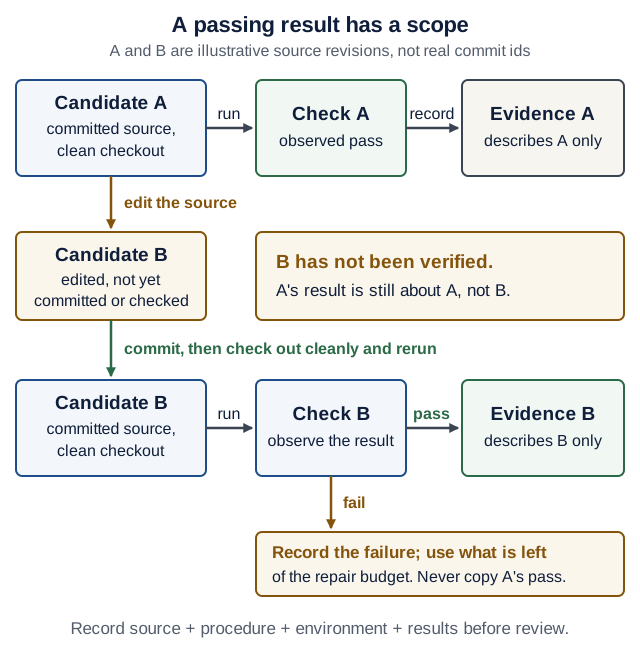
rc.1 and B is the fix you made after rehearsal. On a narrow screen, scroll the diagram sideways. Open the diagram at full size.Text version of the diagram
- Candidate A (committed, clean checkout) → run → Check A passes → record → Evidence A, about A only.
- Edit the source → Candidate B, not yet verified: A’s result says nothing about B.
- Commit, check out cleanly and rerun → Check B. Pass → Evidence B. Fail → record the failure; never copy A’s pass.
Rollback is not restore. Rolling back means running an older version of the code: you deploy or check out the previous tag. It does not bring back data: the database in the backend-data volume keeps whatever the newer version wrote, including schema changes the old code may not understand. Restoring means putting back a copy of the data taken before the change, which works only if you made that copy. A release plan therefore names both: the previous tag for the code, and a backup (or a change the old code tolerates) for the data.
Live demo
1. The workflow. State the contract.
# .github/workflows/ci.yml
name: CI

on:
  push:
    branches: [main]
  pull_request:

# Least privilege: this workflow only reads the repository.
permissions:
  contents: read

jobs:
  test:
    name: test (${{ matrix.service }})
    runs-on: ubuntu-latest
    timeout-minutes: 15
    strategy:
      fail-fast: false # show every failing service, not just the first
      matrix:
        service: [backend, ai-service, frontend]
    defaults:
      run:
        working-directory: ${{ matrix.service }}
    steps:
      # Actions are pinned by full commit SHA (a tag can be moved; a SHA cannot).
      - uses: actions/checkout@3d3c42e5aac5ba805825da76410c181273ba90b1 # v7.0.1
        with:
          persist-credentials: false
      - uses: astral-sh/setup-uv@1c37ad07a6a961277cf70c0d37d6f313000f5884 # v10.3.0
        with:
          version: "0.13.1" # pin the tool too, not just the libraries
          enable-cache: true
          working-directory: ${{ matrix.service }}
      - run: uv sync --locked # fails if uv.lock is out of date
      - run: uv run ruff check .
      - run: uv run ruff format --check .
      - run: uv run pytest
        env:
          AI_MODEL: test # never call a paid model in CI

  compose:
    needs: test
    runs-on: ubuntu-latest
    timeout-minutes: 15
    steps:
      - uses: actions/checkout@3d3c42e5aac5ba805825da76410c181273ba90b1 # v7.0.1
        with:
          persist-credentials: false
      # A clean checkout must start with zero secrets (no .env present).
      - run: docker compose config --quiet
      - run: docker compose up --build --wait --wait-timeout 180
      - name: Smoke test
        run: |
          curl --fail --silent --show-error http://localhost:8000/health
          curl --fail --silent --show-error http://localhost:8501/_stcore/health
          curl --fail --silent --show-error -X POST \
            -H "Content-Type: application/json" \
            -d '{"text": "Hummus: chickpeas, tahini. 15 min."}' \
            http://localhost:8000/recipes/from-text
      - if: failure()
        run: docker compose logs
      - if: always()
        run: docker compose down -v

  audit:
    # Advisory: a new advisory can turn this red with no code change.
    continue-on-error: true
    runs-on: ubuntu-latest
    timeout-minutes: 10
    steps:
      - uses: actions/checkout@3d3c42e5aac5ba805825da76410c181273ba90b1 # v7.0.1
        with:
          persist-credentials: false
      - uses: astral-sh/setup-uv@1c37ad07a6a961277cf70c0d37d6f313000f5884 # v10.3.0
        with:
          version: "0.13.1"
      - name: Known vulnerabilities in locked dependencies (OSV)
        run: |
          status=0
          for service in backend ai-service frontend; do
            (cd "$service" && uv audit --locked --preview-features audit-command) || status=1
          done
          exit "$status"
The audit loop records a failure and keeps going, so one run reports all three services.
2. Lint the workflow before pushing it. Observe the real result. From the repository root:
actionlint .github/workflows/ci.yml
uvx zizmor --offline .github/workflows/ci.yml
Install actionlint once: brew install actionlint on macOS, or a release binary from actionlint’s releases on Linux and WSL; zizmor needs nothing beyond uvx.
Predict: both commands succeed. What does each one print?
Check your prediction
actionlint checks syntax and expressions and prints nothing when all is well. zizmor checks security and ends with No findings to report. Good job! (3 suppressed) (zizmor 1.31.1 and actionlint 1.7.12, checked 17 October 2026). “Suppressed” means lower-signal findings that the default persona hides; uvx zizmor --offline --persona=pedantic .github/workflows/ci.yml shows them (here: two jobs without a name: and no concurrency: limit). Drill 2 shows a workflow that passes the first tool and fails the second.
3. Harden the containers. Make the smallest change. Add two lines to each service in compose.yaml:
# compose.yaml: under each of ai-service, backend and frontend
    security_opt: ["no-new-privileges:true"]
    cap_drop: [ALL]
After docker compose up --build --wait, compare a hardened container with the same image started without the flags. Predict all three values for each container before you run it: CapEff (capabilities in use now), CapBnd (the ceiling) and NoNewPrivs.
docker compose exec backend grep -E "CapEff|CapBnd|NoNewPrivs" /proc/self/status
docker run --rm recipe-box-backend grep -E "CapEff|CapBnd|NoNewPrivs" /proc/self/status
Show the expected output
CapEff:	0000000000000000
CapBnd:	0000000000000000
NoNewPrivs:	1
CapEff:	0000000000000000
CapBnd:	00000000a80425fb
NoNewPrivs:	0
CapEff is 0 in both: uid 10001 uses no capability either way. The difference is the ceiling: Docker’s default bounding set a80425fb holds 14 capabilities (python3 -c "print(bin(0xa80425fb).count('1'))" prints 14), and the hardened one holds none. Verified with python:3.14-slim as uid 10001 on Docker 29.1 (checked 17 October 2026). The stack stays healthy and “Paste a recipe” still works: nothing needed those privileges.
4. Play the grader. Observe the real result. scripts/clean-checkout.sh checks that your work is committed, clones exactly that commit into a temporary folder, follows the README, and removes everything it created:
#!/usr/bin/env bash
# scripts/clean-checkout.sh: do what a grader does, on a fresh clone of one commit.
set -euo pipefail

if [ -n "$(git status --porcelain)" ]; then
  echo "FAIL: uncommitted changes. The grader cannot see them; commit first."
  git status --short
  exit 1
fi
sha="$(git rev-parse HEAD)"
echo "Testing commit $sha"
if [ "$sha" != "$(git rev-parse '@{u}' 2>/dev/null || true)" ]; then
  echo "WARNING: HEAD is not on GitHub yet (unpushed, or no upstream). Push it."
fi

source="$(git rev-parse --show-toplevel)"
if [ "${CLONE_FROM:-}" = "origin" ]; then
  source="$(git remote get-url origin)" # what the grader clones
fi
work="$(mktemp -d)"
project="clean-checkout-$$" # own project name: own containers, own volume
export BACKEND_PORT="${BACKEND_PORT:-8000}" FRONTEND_PORT="${FRONTEND_PORT:-8501}"

trap 'rm -rf "$work"' EXIT

git clone --quiet "$source" "$work" # committed files only: no .env, no .venv
cd "$work"
git checkout --quiet --detach "$sha" || {
  echo "FAIL: $sha is not in $source. Push it first."
  exit 1
}
if [ -e .env ]; then
  echo "FAIL: .env is committed. Rotate every key in it, then remove it."
  exit 1
fi
cp .env.example .env

cleanup() {
  status=$? # the exit status of the script, saved before anything else runs
  if [ "$status" -ne 0 ]; then
    echo "FAILED (exit $status). Last log lines from each service:"
    docker compose -p "$project" --project-directory "$work" logs --tail 80 || true
  fi
  docker compose -p "$project" --project-directory "$work" down -v --rmi local
  rm -rf "$work"
}
trap cleanup EXIT # from here on, also remove containers, volume and images

docker compose -p "$project" up --build --wait --wait-timeout 180
check() { curl --fail --silent --show-error --output /dev/null "$@"; }
check "http://localhost:$BACKEND_PORT/health"
check "http://localhost:$FRONTEND_PORT/_stcore/health"
check -X POST "http://localhost:$BACKEND_PORT/recipes/from-text" \
  -H "Content-Type: application/json" -d '{"text": "Hummus: chickpeas. 15 min."}'

for service in backend ai-service frontend; do
  (cd "$service" && uv sync --locked --quiet && uv run pytest --quiet)
done
echo "Clean checkout OK: $sha"
Make it executable with chmod +x scripts/clean-checkout.sh, then run scripts/clean-checkout.sh from the repo root. It prints Testing commit <sha>, the build output, Clean checkout OK: <sha>, then the cleanup’s output (about 40 s for Recipe Box with a warm build cache). Ports taken? Prefix it with BACKEND_PORT=18000 FRONTEND_PORT=18501. To test exactly what the grader clones, run CLONE_FROM=origin scripts/clean-checkout.sh: it clones GitHub instead of your local folder and fails if your commit was never pushed.
Read the script line by line
set -euo pipefail: stop at the first failing command (-e), treat an unset variable as an error (-u), and let a failure anywhere in a pipe fail the pipe (pipefail). Without it, the script would print “OK” after a failed step.git status --porcelain: a stable, machine-readable list of uncommitted changes; empty means clean. The grader clones Git, so uncommitted work does not exist for them.git rev-parse HEADand@{u}: the SHA you are testing, and the commit your branch’s upstream (usuallyorigin/main) points at. Different means unpushed work.mktemp -d: creates a new, empty, uniquely named folder, so nothing from your working copy leaks in.$$: the script’s process ID. Two runs at once get different Compose project names, so different containers and volumes.trap '…' EXIT: run this command whenever the script exits, success or failure. A secondtrap … EXITreplaces the first: before the clone, only the folder needs removing; after it, the containers, volume and images do too.status=$?insidecleanup: inside an exit trap,$?is the script’s exit status; save it before any other command overwrites it. On failure, the logs are printed beforedown -vdeletes the containers that hold them.check() { … "$@"; }: a small function;"$@"forwards all its arguments tocurlunchanged, quotes included.( cd "$service" && … ): parentheses run a subshell, so thecddoes not change the folder for the next loop iteration.down -v --rmi local: remove the containers, the named volumes and the images this project built (not images pulled from a registry).
Predict: docker compose up --wait fails because one healthcheck never passes. Which lines run next, what does the trap delete, and what evidence would you have lost without the logs line?
Check your prediction
set -e stops the script at the failed up, so the smoke checks and tests never run. The exit trap (cleanup) runs: status is non-zero, so it prints the last 80 log lines per service, then down -v --rmi local deletes the containers, the volume and the built images, and rm -rf deletes the clone. The container logs are the evidence: once the containers are gone, so are their logs. That is why the logs call comes first.
Break it and watch the check fail. In your copy of the script, change /_stcore/health to /healthz, commit it on a scratch branch, and run the script again. Predict the last lines before you look.
Show the expected output
curl: (22) The requested URL returned error: 404
FAILED (exit 22). Last log lines from each service:
…followed by the logs and the cleanup. --fail turns an HTTP error into curl’s exit code 22, and set -e passes it on as the script’s exit code. Restore /_stcore/health. (Script logic verified on 17 October 2026 with stub docker, curl and uv commands in a scratch repository: committed, dirty, unpushed, CLONE_FROM=origin, failed up, wrong URL and committed .env cases.)
Investigate: answer from the script, then check.
- You edited
backend/app/main.pybut did not commit. What does the script print, and why is that the right behaviour for a grader simulation? - Your commit is local only. Which line warns you, and which run mode turns the warning into a failure?
Show model answers
FAIL: uncommitted changes…and the changed file. The grader clones Git; a test of files they will never see proves nothing about their run.- The
@{u}comparison prints theWARNING. WithCLONE_FROM=origin, the clone comes from GitHub, where the SHA does not exist, sogit checkout --detachfails and the script printsFAIL: <sha> is not in <url>. Push it first.
5. Audit. In backend/, uv audit --locked --preview-features audit-command prints Found no known vulnerabilities and no adverse project statuses in 69 packages.
6. Tag the release candidate (lab step 7). Restore, verify, commit.
Hands-on lab
Apply each step to your own product. Plan your time:
- Core today: steps 1, 4 and 7
- Before Meeting 11: steps 2, 3 and 6
- May finish in Meeting 11: step 5
- Extension (optional): the Stretch goals, after EX3’s minimum works
- CI. Copy the workflow to
.github/workflows/ci.yml; adapt the matrix to your service folders and the smoke step to your endpoints. Open a pull request in your own repository. Checkpoint: the threetestchecks andcomposeare green;auditis advisory and may show findings. - Lint it from the repository root with actionlint and zizmor until both are clean.
- Harden every service; check
idand the three capability lines in each container, then rerun your Lecture 9 drills. - Clean-checkout script: save it as
scripts/clean-checkout.sh, adapt the smoke URLs, commit, push, and run it from the repository root. Checkpoint:Clean checkout OK: <sha>, with the SHA thatgit rev-parse origin/mainprints. -
Security review in pairs. List what you protect, every entry point, and the control for each, with the file and line that implements it. A control is something that blocks or limits the harm, not a wish:
Asset (what you protect) Entry point (how harm gets in) Control, and the evidence (file:line) API keys a commit, a Docker image, a CI log .envgit-ignored and in.dockerignore; CI usesAI_MODEL=testand has no secrets (.gitignore:1,ci.ymlenv:)Model spend the “Paste a recipe” box UsageLimitsplus a request timeout; the backend never retries a 429 (ai-service/app/agent.py,backend/app/ai_client.py)(your row) Add the optional shared token only if something besides your backend can reach your third service.
-
Runbook. Give your README these sections (Recipe Box’s adds one for releases):
Setup requirements and configuration Run docker compose up --build, URLs; down keeps data, down -v deletes it; the data lives in the backend-data volume at /app/data; optional backup: docker compose cp backend:/app/data/app.db backup.db Test the command per service, scripts/clean-checkout.sh Failure drills your Lecture 9 table: what to stop, what the user sees Real-model run optional: variables, cost limits, eval results table Troubleshooting symptom, cause, fix for problems you actually hit AI-use note tools, what they helped with, what you checked Open-source evidence the evidence table -
Release candidate, from your repository root, once CI on
mainis green:git switch main && git pull --ff-only git status --short gh run list --workflow ci.yml --commit "$(git rev-parse HEAD)" --json status,conclusion,headShaCheckpoint:
git status --shortprints nothing, and every run listed shows"status": "completed"and"conclusion": "success"with aheadShaequal togit rev-parse HEAD. An empty list[]means CI never ran on this exact commit: push it, or wait. Then tag and publish, with a one-line note of what this candidate contains:git tag -a v1.0.0-rc.1 -m "Release candidate 1: three services, CI, runbook" git push origin v1.0.0-rc.1 gh release create v1.0.0-rc.1 --verify-tag --prerelease --generate-notes--verify-tagrefuses to create the release if the tag is not on GitHub yet. (gh run listflags verified withgh2.83.1’s--help, checked 17 October 2026.)
EX3 progress: after this lab you have basic CI and the start of the runbook. EX3 (due Mon 11 Jan 2027, 23:59) also needs the AI evaluation results from Lecture 9 and a demo; see the assignment table.
Break it on purpose
Each drill: predict, run, then explain. Undo every change afterwards.
Drill 1: a stale lockfile. In backend/pyproject.toml, add "rich>=14.0", to dependencies by hand, not with uv add. Predict: which CI step fails, and does any test run?
Show the expected output
uv sync --locked stops before any test runs:
error: The lockfile at `uv.lock` needs to be updated, but `--locked` was provided.

hint: To update the lockfile, run `uv lock`.
Why: CI refuses to build something you never tested. Revert, or run uv add rich and commit uv.lock.
Drill 2: unpin an action. In a copy of the workflow, make every checkout step a plain - uses: actions/checkout@v7 with no with: block. Predict: which tool catches it, actionlint, zizmor or both? Then also delete the permissions: block and predict again.
Show the expected output
actionlint still passes: the YAML is valid. zizmor exits non-zero, once per checkout step, with error[unpinned-uses]: unpinned action reference and help[artipacked]: credential persistence through GitHub Actions artifacts. Without permissions: it adds warning[excessive-permissions]: overly broad permissions (zizmor 1.31.1, checked 17 October 2026).
Why can’t actionlint see this? It checks that the workflow is well-formed; a moving tag and a persisted token are well-formed, just unsafe. Restore the original.
Drill 3: commit the key. In a throwaway clone, put a fake key in .env. Predict: what does git add .env do? Then force it with git add -f .env, commit, and run the script. Finally git rm --cached .env, commit, and run git log --oneline --all -- .env.
Show the expected output
git add .env refuses (“The following paths are ignored by one of your .gitignore files”). After the forced commit, the script prints FAIL: .env is committed. Rotate every key in it, then remove it. After untracking, git log --oneline --all -- .env still lists the commit that added it.
Why rotation comes first: the old commit, and every clone of it, still contains the key. Only rotation makes those copies useless.
Debug log: for Drill 1 or Drill 3, fill in the debug log card: symptom (the exact line), reproduce, a one-sentence hypothesis written before you check, experiment, result, fix and check, cause.
Drill 4: a vulnerable pin (optional). In a scratch uv project, uv add "jinja2==3.1.2", then run uv audit --locked --preview-features audit-command. Predict: how many problems will it report, and does each count mean a different bug?
Show the expected output
Found 10 known vulnerabilities and no adverse project statuses in 2 packages, each with a “Fixed in:” version, and exit code 1. That is about 10 advisory records for 5 CVEs: each CVE is published once as a GHSA advisory and once as a PYSEC advisory. “2 packages” means two were audited (jinja2 and its dependency markupsafe), not that both are vulnerable. Counts change as advisories are published (checked 17 October 2026). --ignore matches any alias: ignoring one GHSA ID removes both of its records (10 → 8). uv add "jinja2>=3.1.6" clears it: Found no known vulnerabilities and no adverse project statuses in 2 packages.
Drill 5: injection, two ways (optional). Inspired by web-security weeks in Stanford’s CS142 and CS155 and the agent-safety lecture in CS329Z; the exercise is original. EASS is not affiliated with Stanford.
(a) SQL. Save this in a scratch folder (never in your product) and predict how many rows each DELETE removes before you run python3 sql_injection.py:
# sql_injection.py (scratch file: never in your product)
import sqlite3

db = sqlite3.connect(":memory:")
db.execute("CREATE TABLE recipe (id INTEGER PRIMARY KEY, title TEXT)")
db.executemany("INSERT INTO recipe (title) VALUES (?)", [("Soup",), ("Hummus",)])

title = "x' OR '1'='1"  # what an attacker types into a search box

pasted = db.execute(f"DELETE FROM recipe WHERE title = '{title}'")
print("formatted string deleted", pasted.rowcount, "rows")

db.executemany("INSERT INTO recipe (title) VALUES (?)", [("Soup",), ("Hummus",)])
bound = db.execute("DELETE FROM recipe WHERE title = ?", (title,))
print("bound parameter deleted", bound.rowcount, "rows")
Show the expected output
formatted string deleted 2 rows
bound parameter deleted 0 rows
Why: the f-string pastes the text into the SQL, so the quote ends the string and OR '1'='1' becomes part of the query: true for every row. A ? parameter sends the text separately as a value, so it can only ever be compared with titles. SQLModel always does the second. (Run on Python 3.14, 17 October 2026.)
(b) Model output is untrusted too. Lecture 4’s plain() escapes titles before Streamlit renders them. A prompt-injected paste could make the model return a title such as Soup . In a terminal, run python3 -m http.server 9999; then save a recipe with that title through the UI. Predict: with plain() in place, does the server log a request for /x.png when the list renders? And with plain() removed?
Check your prediction
With plain(), no request: the title is shown as typed, brackets and all. Without it, Streamlit renders the label as Markdown and the browser fetches the image, so the server log shows "GET /x.png HTTP/1.1" 404. Every visitor’s browser would make that request. (Lecture 4’s editors verified the fetch on Streamlit 1.66.0, 17 October 2026.) This is why the backend validates model output and the frontend escapes it: two independent controls for one untrusted value.
Open-source track
Evidence week. Fill the evidence table in your product README with every field the course README lists, one row per PR.
- Merge evidence for each merged PR:
gh pr view URL --json state,mergedAt,mergeCommit,baseRefName.baseRefNamemust be the project’s main development branch (FastAPI’s ismaster). - Star evidence, dated: the snapshot you saved the day you opened each PR (Lectures 3, 6 and 8). If one is missing, record today’s
gh repo view OWNER/REPO --json stargazerCount,licenseInfooutput with today’s date. A later snapshot does not prove the opening-day count: record it, mark it “taken later”, and ask the instructor before relying on it, especially if the count is near 10,000. Opening a new PR this week? Re-check the star count on the day you open it. - Answer open reviews with Lecture 9’s routine.
- A PR silent for two weeks? Start another viable contribution now; the requirement stays three merged PRs (what counts as merged).
Optional: 10 minutes. Open
.github/workflows/in a project you contributed to. Find its triggers (on:), itspermissions:, how it pins actions (tag or SHA), and which job ran on your PR. Write two lines comparing it with yourci.yml. Done when: you can name one practice they use that you don’t, or the reverse.
Working with AI assistants
Try the software factory lab: identify which revision each check covers, inspect a review finding after green tests, and explain why publishing a PR and releasing a product are separate outcomes.
A work order for today, in the course’s work-order format:
Outcome:      CI runs ruff and pytest for ai-service with AI_MODEL=test on every PR
Files:        .github/workflows/ci.yml
Non-goals:    no change to tests/ or to any service code; no secrets; no write permissions
Verify with:  actionlint .github/workflows/ci.yml; uvx zizmor --offline .github/workflows/ci.yml; green checks on the PR
Review focus: permissions, every uses: line (full SHA plus version comment), anything that skips a check
Acceptance:   breaking one ai-service test on purpose turns the PR's test (ai-service) check red
Stop:         if the change seems to need a secret or a write permission, stop and report
- You run tag and release commands; the agent may only propose them. Do not give a coding agent a token that can push tags or run
gh release create, and never let it read.env. - Review any diff to
.github/workflows/ortests/line by line. An agent can turn CI green by deleting an assertion, addingcontinue-on-error, or narrowing the matrix. A weakened check is a failure, not a fix (review and release). - Name your verification commands in your repository instructions (
AGENTS.mdorCLAUDE.md):scripts/clean-checkout.sh,actionlintanduvx zizmor --offline, so the agent runs the checks the grader’s path depends on. - Workflow review against a checklist. “Review my ci.yml: SHA-pinned actions with version comments,
contents: read,persist-credentials: false,uv sync --locked,AI_MODEL=test, no secrets, logs on failure,down -valways.” Verify: actionlint, zizmor, then a real run. - Threat model. Paste your architecture diagram (never
.env) and ask for the five likeliest risks, each with a control. Verify: each control exists in your code (add it to your security-review table with file:line), or goes on your list. - Spot the outdated suggestion:
actions/checkout@v4or another floating tag (setup-uv v10 has nov10tag at all);pip install -r requirements.txtin CI;uv sync --frozen, which skips the lock check;permissions: write-all.
AI-use note line: in your README’s AI-use note, record which tool drafted ci.yml or the script, and which commands you ran to check it.
Completion check
From the repository root:
scripts/clean-checkout.sh
gh run list --workflow ci.yml --commit "$(git rev-parse 'v1.0.0-rc.1^{commit}')" --json status,conclusion,headSha
git tag --list "v1.0.0*"
Expect Clean checkout OK: <sha>, "status": "completed" with "conclusion": "success" for the tagged commit, and v1.0.0-rc.1.
EX3 minimum (from the README):
| Must work | Evidence you keep | If it fails, repair here |
|---|---|---|
| CI runs each service’s tests and the Compose smoke test, green on the commit you tag | the gh run list --commit … output | Common pitfalls · lab step 1 |
| A short runbook in the README: setup, run, test, troubleshooting | the README sections | lab step 6 |
A fresh clone starts with no real keys: .env never committed, .env.example lists every setting | Clean checkout OK: <sha> | lab step 4 · Secrets |
Not yet? Repair and re-run before Meeting 11; the rehearsal assumes this works.
Course-recommended hardening (formative, not separately graded):
- Actions pinned by full SHA;
contents: read;persist-credentials: false. - actionlint and zizmor clean.
uv auditread; each ignored ID has a README row.- Containers non-root, with
cap_drop: [ALL]andno-new-privileges; ai-service not published. - The full eight-section runbook and a filled evidence table.
v1.0.0-rc.1published as a GitHub pre-release.
Quick quiz
Q1. Why pin actions/checkout to a 40-character SHA instead of @v7?
A tag is a movable pointer: whoever controls the action’s repository can point v7 at new code that then runs with your token. A SHA names exactly one commit; the comment keeps it readable.
Q2. (Lecture 8) Why must a clean checkout start with zero real keys?
Graders and CI have none. env_file with required: false and AI_MODEL=${AI_MODEL:-test} make TestModel the default, so the flow runs offline and free; a real model is a documented opt-in.
Q3. You pushed a commit with a real API key an hour ago. What do you do first, and why?
Rotate it at the provider. Rewriting history first leaves a valid key in every clone, fork and cache made in that hour. Then check usage at the provider and stop tracking the file; rewriting history is optional and needs a force push, so ask first.
Q4. (Lecture 9) CI runs on every push. What stops it from spending money on models?
AI_MODEL=test everywhere, and models.ALLOW_MODEL_REQUESTS = False in the ai-service conftest, which makes any real model request fail the test. UsageLimits is a different, weaker control: it stops a run after the counted usage crosses the threshold, so some work can already have happened. It is not a bill ceiling.
Q5. CI fails at uv sync --locked, but everything passes on your laptop. What happened, and why is that useful?
pyproject.toml changed without uv lock, or uv.lock was not committed. CI refuses to build what you never tested: run uv lock and commit it.
Q6. Your ai-service publishes no port. Name a process that can still call it. What does the optional shared token add, and what does it not add?
Check your answer
Answer: any container on the same Compose network, not only your backend (another service you add, or a compromised one). The token adds service authentication: a caller without the secret gets 401. It does not add authorization (which records a caller may touch), user identity, or encryption; anyone who holds the secret, including a leaked .env, passes.
Q7. Name two things that uv.lock does not freeze.
Check your answer
Answer: any two of: the base image behind a tag such as python:3.14-slim; the behaviour of a remote model or external API; the actions your workflow uses (pinned separately by SHA); uv itself (pinned separately); new advisories about the locked versions.
Explain it: in one sentence, what is scripts/clean-checkout.sh for? (Not what each line does.)
Show a model answer
Weak: “It clones the repo, copies .env.example, runs docker compose up and curls three URLs.” Strong: “It proves that one committed SHA, with no secrets and nothing from my laptop, starts and passes its tests the way a grader will run it, so uncommitted files and hidden local state can’t fool me.” Purpose plus the failure it prevents.
Defend it: a teammate wants CI to run on tags too, “to be safe”. Defend the current design with one reason and name one cost.
What a strong answer mentions
Reason: the tag points at a commit CI already checked on main; a tag run adds no new evidence about that SHA, and release-style workflows that reuse caches are a known attack path. Cost: nothing automatically stops someone from tagging an unchecked commit, which is why the release steps check gh run list --commit before tagging.
Stretch goals
Each is optional; do them after EX3’s minimum works.
- Wire the shared secret through Compose:
AI_SHARED_SECRET: ${AI_SHARED_SECRET:-}underenvironment:of both backend and ai-service, and a value in.envfrompython -c "import secrets; print(secrets.token_hex(32))". Simpler is enough: if only your backend can reach the ai-service, leave it out. - Pin the base image by digest:
docker buildx imagetools inspect python:3.14-slimprints it; writeFROM python:3.14-slim@sha256:<digest>. Sensible once your Dockerfile is stable; you then own updating the digest for security fixes. - Dependabot with
package-ecosystem: github-actions, so SHA pins get update PRs. - CHANGELOG.md in Keep a Changelog format. Simpler is enough:
gh release create --generate-notesalready lists merged PRs.
Common pitfalls
The lockfile at uv.lock needs to be updated→pyproject.tomlchanged without relocking →uv lockin that service; commituv.lock.- The compose job fails at
up --wait→ a healthcheck never passes → read the output of the “logs if failed” step. curl: (7) Failed to connectin the smoke step → that port is not published → smoke-test only the frontend and backend.- Passes for you, fails for the grader → a file you never committed, or a commit you never pushed → commit and push, then run
CLONE_FROM=origin scripts/clean-checkout.sh. gh run list --commit …prints[]→ CI never ran on that exact SHA (unpushed, or you amended after pushing) → push and wait for the run.- Pushing the tag starts no workflow → no tag trigger, by design → tag a commit already green on
main. - The
auditjob failed, but the workflow run succeeded → a new advisory, not your code → read it; upgrade, or--ignoreit with a README row.
Instructor notes
Suggested flow, with minute budgets:
- Ask “what exactly will the grader type?” and write it down: it becomes the clean-checkout script (5 min).
- The nine-key table and the “how many check runs?” prediction; run a peer-instruction vote on it (10 min).
- Walk through
ci.ymltop to bottom; run actionlint and zizmor, then Drill 2 live (15 min). - Harden compose and run the capability prediction (10 min).
- Start the clean-checkout script; while it builds, the leaked-key order and “rollback is not restore” (15 min).
- Lab core: CI, script, release candidate (the rest of the meeting).
- Release-candidate round: each student shows a green run for their SHA and a tag, or names the blocker.
If time runs short: keep steps 1, 3, 5 and the lab core. The security review and the runbook move to Meeting 11. Exit ticket: “Write the SHA your v1.0.0-rc.1 points at, and the command that proves CI passed on it.”
Emphasize: distinguish exact pins from moving version lines, apply least privilege at every layer, rotate leaked keys first, and treat the hardening list as recommended, not as extra EX3 requirements. Students get stuck on stale uv.lock files, wrong smoke-test ports, uncommitted or unpushed commits, and gh auth.
Read more
Before the lab (≤15 min): Understanding GitHub Actions. Guiding questions: (1) What is the difference between a job and a step? (2) Which events can start a workflow, and which one does Recipe Box leave out on purpose?
Go deeper (optional):
- GitHub Actions: secure use reference
- uv: using uv in GitHub Actions
- zizmor documentation
- Compose file reference: services
- GitHub CLI: gh release create and gh run list
- Agent sandboxes: review and release: disposable candidate execution, trusted verification, and release credentials. Container resource limits and agent budgets do not replace authorization.
- Manifests, skills and evals: engineering contracts: configuration consumers, reusable procedures, evidence, and current agent-engineering guidance.
- Visual system walkthrough: one request, end to end: service ownership, validation, the commit boundary, and failure evidence.
- Count the user outcome: a release-decision exercise using reliability and critical-failure evidence.
- Visual inference engineering: model choice, attention, quantization, caching, speculation, batching, parallelism, modalities and production, with worked visual exercises.
- Rehearse schema evolution, recovery and the complete change cycle in the industry studio. This optional activity deepens the current checkpoint without changing the assignment.
← Course home · ← Previous: Lecture 9 · Next: Meetings 11–13 →